Table of Contents
"AI lets you build apps without any coding!" — you've probably seen claims like this on social media or YouTube. But how much truth is there to it?
The short answer: you can build simple apps, yes. But the idea that "AI handles everything" comes with some serious caveats.
In this article, we take an honest look at what someone with zero programming experience can realistically achieve using AI tools in 2026. If you've been wondering "Can I actually do this?" — we'll answer that question with concrete examples.
1. The Reality of AI App Development in 2026
As of 2026, AI coding tools have evolved at a remarkable pace. Claude Code now generates roughly 4% of all public commits on GitHub, and GitHub Copilot is used by millions of developers worldwide.
But here's the crucial point: the people getting the most out of these tools are experienced programmers.
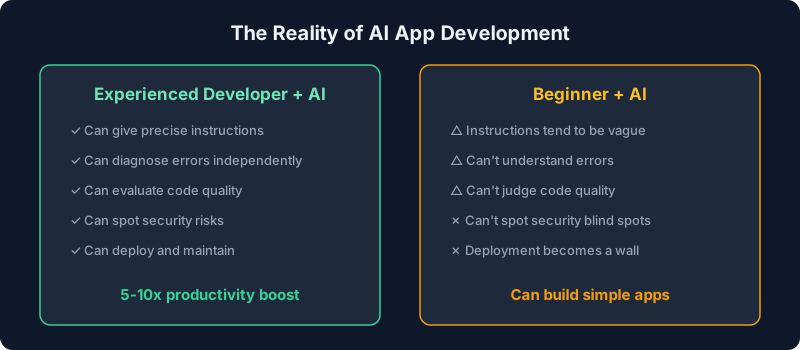
AI tools aren't a magic wand — they're more like a brilliant assistant. The clearer your instructions, the better the results. But that assumes you already know what you want to build and how to communicate it effectively.
That said, the tools available in 2026 are vastly more capable than they were just two years ago, and the barrier to entry for beginners has never been lower. If you're new to AI, start with our overview of what generative AI actually is.
2. Apps Beginners Can Build with AI
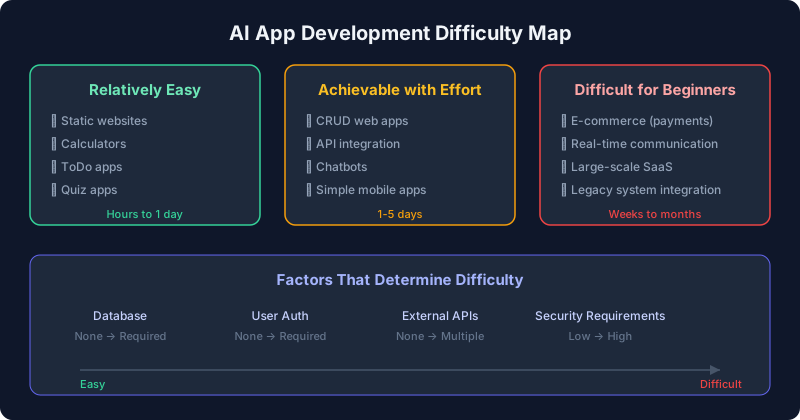
Here's a breakdown of what beginners can realistically build using AI tools, organized by difficulty level.
Relatively Easy
| App Type | Examples | Estimated Time |
|---|---|---|
| Static Websites | Portfolios, landing pages, personal blogs | A few hours to 1 day |
| Calculator Tools | BMI calculator, loan repayment simulator, unit converter | 1–2 hours |
| ToDo Apps | Simple task manager (local storage) | 2–4 hours |
| Quiz/Diagnostic Apps | Personality quizzes, knowledge tests | 3–6 hours |
What these all have in common: no database required (or everything runs in the browser) and no user authentication. Tell an AI "build me a ToDo app" and it will produce working code.
Achievable with Effort
| App Type | Examples | Estimated Time |
|---|---|---|
| CRUD Web Apps | Budget tracker, reading log, recipe manager | 1–3 days |
| API Integration Apps | Weather display, news aggregator | 1–2 days |
| Chatbots | FAQ responder, customer support bot | 1–3 days |
| Simple Mobile Apps | Note-taking app, counter (React Native, etc.) | 2–5 days |
At this level, you'll start running into errors and debugging challenges. AI can often fix issues if you tell it "I got this error," but expect to go back and forth multiple times. Your choice of framework also matters — check out our comparison of AI-friendly frameworks for guidance.
Difficult for Beginners
- E-commerce with payments: Strict security requirements, complex integrations with services like Stripe
- Real-time multiplayer games: Requires advanced tech like WebSockets and state synchronization
- Large-scale SaaS: User management, role-based access control, billing, and infrastructure design
- Legacy system integration: Requires deep understanding of existing business systems and databases
These are projects that take even experienced engineers weeks or months. No matter how advanced AI tools become, design decisions, security knowledge, and operational expertise still require a human.
3. What Beginners Can't Do with AI Alone
There's a big difference between "being able to build something" and "shipping something people can actually use." Here's where AI alone falls short.
① Deployment
AI can generate code, but getting that code live on the internet is a separate skill entirely. Domain registration, server configuration, SSL certificates — none of this is about writing code. Free hosting platforms like Vercel or Netlify simplify the process, but you still need to understand the steps involved.
② Debugging
AI-generated code doesn't work perfectly 100% of the time. When errors appear, you need the ability to understand what's happening and communicate it clearly to the AI. Saying "it doesn't work" isn't enough — you need to share the exact error message, take screenshots, and provide context.
③ Security
There's no guarantee that AI-generated code is secure. Hardcoded passwords, SQL injection vulnerabilities, exposed API keys — without security knowledge, you won't even notice these problems lurking in your code.
④ Ongoing Maintenance
Building an app is just the beginning. Library updates, bug fixes, feature additions — long-term maintenance is unavoidable. If you don't understand the structure of the code AI generated, making changes later becomes extremely difficult.
Understanding what AI is good at — and what it isn't — is essential. For more on this, read our guide on what AI can and cannot do.
4. 5 Common Pitfalls for Beginners
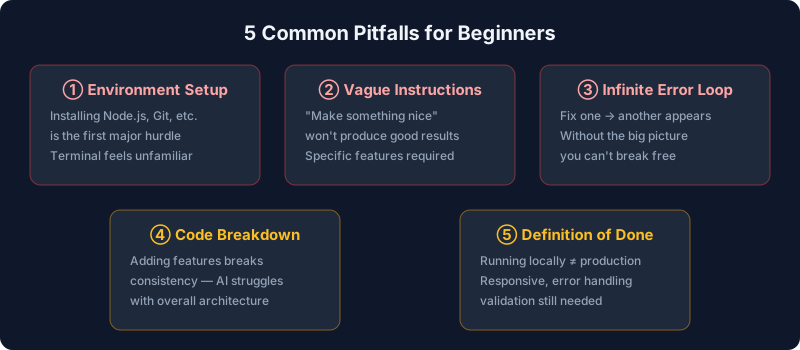
Based on real experiences of beginners who've tried building apps with AI, here are the most common stumbling blocks.
① Getting Stuck on Environment Setup
Before you can even ask AI to "build me an app," you need to install development tools like Node.js, Python, or Git on your computer. This is the very first wall. If you're thinking "What's a terminal?" — this is where many people give up.
② Giving Vague Instructions
"Make something nice" won't get you what you want. You need to be specific about screen layouts, feature lists, and data flow. The quality of your prompts directly determines the quality of your results.
③ The Infinite Error Loop
You tell AI about an error, it fixes it, but a different error appears. Fix that one, and yet another shows up — welcome to the infinite error loop. Without a grasp of the overall codebase, breaking out of this cycle is incredibly difficult.
④ Code Breaking as Features Grow
Small apps work fine, but as you keep adding features, the code's consistency starts falling apart. AI optimizes for the immediate context of your conversation, but it struggles to maintain architectural consistency across an entire project.
⑤ Not Knowing When It's "Done"
Running locally and being production-ready are worlds apart. Responsive design, error handling, loading states, input validation — the work required to reach professional quality is substantial.
5. Minimum Skills You Need to Know
We get it — you want AI to handle everything. But having even a basic foundation makes the difference between success and failure.
| Skill | Why You Need It | Time to Learn |
|---|---|---|
| Terminal Basics | Required to run AI tools and install packages | 2–3 hours |
| HTML/CSS Basics | Needed to tweak appearance and understand layouts | 1–2 days |
| Git Basics | Lets you track code history and undo mistakes | Half a day |
| File Structure Understanding | Helps you know which file does what | 1 day |
| Reading Error Messages | Essential for communicating problems to AI accurately | Learn by doing |
Investing roughly 3–5 days of foundational learning beforehand dramatically increases your chances of success with AI app development. If you want to build a broader understanding of AI, our AI beginner's course is a great starting point.
6. Recommended AI Development Tools
Here are the most beginner-friendly AI development tools available in 2026.
Code Generation (No Coding Required)
| Tool | Features | Best For | Pricing |
|---|---|---|---|
| Bolt.new | Generate apps from natural language in the browser. End-to-end from code to deployment | People who want results fast | Free tier available |
| Lovable | Full-stack app generation from natural language. Supabase integration for auth and database | People who need apps with a database | Free tier available |
| Replit Agent | Chat-based app development. No environment setup needed | People who struggle with setup | From $25/month |
Coding Assistants (Some Programming Knowledge Needed)
| Tool | Features | Best For | Pricing |
|---|---|---|---|
| Claude Code | Autonomous dev agent that runs in the terminal. Handles complex projects | People ready for serious development | From $20/month |
| GitHub Copilot | Real-time code completion inside your editor. Most widely adopted | People who prefer editor-based workflows | From $10/month |
| Cursor | AI-powered editor with GUI-based code generation and editing | People who like a VS Code-style environment | From $20/month |
Complete beginners should start with code generation tools like Bolt.new or Lovable. No environment setup — you can start building right in the browser. Once you're comfortable, moving to an agent-based tool like Claude Code unlocks more serious development capabilities.
For a detailed tool comparison, see our Claude Code vs Codex comparison. Understanding how AI agents work will also help you get more out of these tools.
7. Your First AI App: A Step-by-Step Guide
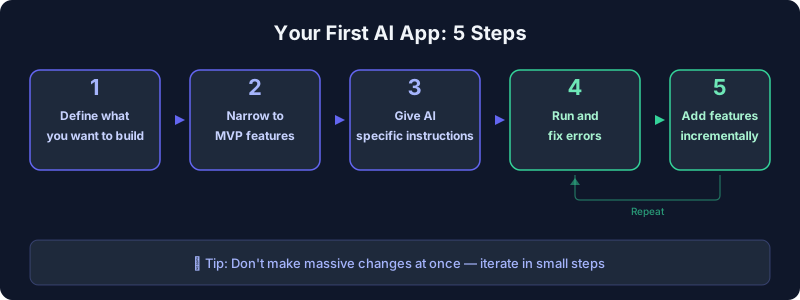
Here's a practical, step-by-step process for building your first app with AI.
Step 1: Define What You Want to Build — Specifically
Don't just say "I want to build an app." Instead, get specific: "An app that logs the books I've read and shows how many I finished each month in a chart." Even sketching screens on paper helps enormously.
Step 2: Narrow Down to MVP
Don't try to build every feature at once. Start with the Minimum Viable Product (MVP) — the bare essentials. Using the reading log example, "register a book title and date finished, and display them in a list" is enough. Charts can come later.
Step 3: Give AI Specific Instructions
Here's an example of a good prompt:
Prompt example:
"Build a reading log app using React.
Features: ① A form to input book title, author, and date finished ② Display list of registered books ③ Save to local storage
Design: Simple, modern UI with responsive layout
Tech: React + Tailwind CSS, TypeScript"
The key is to spell out features, design, and tech stack. Vague instructions lead to vague results.
Step 4: Run It and Fix Errors
When you run the generated code, errors are almost guaranteed. Don't panic — just copy the full error message and send it to the AI for a fix. Agent-based tools like Claude Code can even detect and fix errors on their own.
Step 5: Add Features Incrementally
Once your MVP is working, add one feature at a time. Making too many changes at once makes it impossible to tell what caused a new error. "Add chart display" and "Add search functionality" — give instructions in small, focused chunks.
8. Summary
| Topic | Conclusion |
|---|---|
| Can beginners build apps with AI alone? | Simple apps, yes. But "AI does everything" is overselling it |
| What you can build | Static sites, calculators, ToDo apps, quiz apps, and more |
| What's difficult | E-commerce, large SaaS, real-time communication apps |
| Biggest hurdles | Environment setup, debugging, deployment — everything beyond code generation |
| Keys to success | Basic knowledge (3–5 days) + specific instructions + starting small |
| Recommended tools | Complete beginners: Bolt.new/Lovable. With some experience: Claude Code |
The claim "AI lets you build apps by itself" is half true and half misleading. A more accurate statement: "With AI's help, anyone with a basic foundation can build apps — and that era is here."
The most important thing is to not aim for perfection from the start. Start small, and learn as you build. AI can be your most powerful learning partner, too. Start by building one simple app with Bolt.new or Lovable and see for yourself.
If you're interested in earning money with AI, check out our guide to AI side hustles. Want to know where you stand? Try our AI skills assessment.
FAQ
Can I really build apps with zero programming knowledge?
Using code generation tools like Bolt.new or Lovable, you can build simple apps (ToDo lists, calculators, etc.) with no prior knowledge. However, handling errors and publishing your app to the internet requires at least some basic IT skills. If you're starting from absolute zero, we recommend spending 3–5 days learning terminal basics and HTML/CSS fundamentals first.
Can I use AI-built apps for work or side income?
For personal use or small-scale projects, absolutely. However, apps that handle personal data or process payments require security expertise to build safely. You can take on freelance work like landing page creation or simple web app development, but remember that quality assurance is your responsibility as the developer.
Can I start for free?
Yes. Both Bolt.new and Lovable offer free tiers, so you can start experimenting without spending anything. Free tiers do have generation limits, though. For more serious development, paid tools like Claude Code (from $20/month) or GitHub Copilot (from $10/month) are worth the investment.
Do I own the code AI generates?
Generally, the copyright for AI-generated code belongs to the user (subject to each tool's terms of service). Commercial use is typically allowed. However, be aware that AI may reference existing open-source code during generation, so pay attention to licensing. For important projects, always review the terms of service.
![15 Jobs Most Likely to Be Replaced by Generative AI — And How to Future-Proof Your Career [2026]](https://az-arte.com/images/articles/ai-job-loss-featured-en.svg)
![20 Best Generative AI Tools for Game Development: Art, Music, Coding & More [2026]](https://az-arte.com/images/articles/ai-gamedev-tools-featured-en.svg)