![Claude Code vs Codex: Which Should You Choose? A Complete Comparison of Pricing, Performance & Use Cases [2026]](https://az-arte.com/images/articles/claude-code-vs-codex-en.svg)
"I want AI to write my code, but should I use Claude Code or Codex?"
In 2026, the AI coding tool landscape is fiercely competitive. Two tools stand out above the rest: Anthropic's Claude Code and OpenAI's Codex. Both are AI agents that run in your terminal, autonomously reading and writing files, running tests, and handling git operations.
In this article, we answer the question "So which one is actually better?" by comparing them across three dimensions: pricing, performance, and best use cases. By the end, you should have a clear picture of which tool fits your development style and budget.
Table of Contents
1. Claude Code vs Codex: What's the Difference?
First, for those wondering "What even is an AI coding tool?" — both are AI assistants that run in your terminal, writing code, fixing bugs, and running tests on your behalf. Think of them as AI pair programmers.
| Category | Claude Code | Codex |
|---|---|---|
| Developer | Anthropic | OpenAI |
| How to Use | Terminal / IDE / Desktop App | Terminal / IDE / ChatGPT Interface |
| AI Model | Claude Sonnet 4.6 / Opus 4.6 | GPT-5.4 / GPT-5.3-Codex |
| Open Source | ❌ (Proprietary) | ✅ (CLI is Apache 2.0) |
| Starting Price | $20/mo (Pro plan) | $20/mo (Plus plan) |
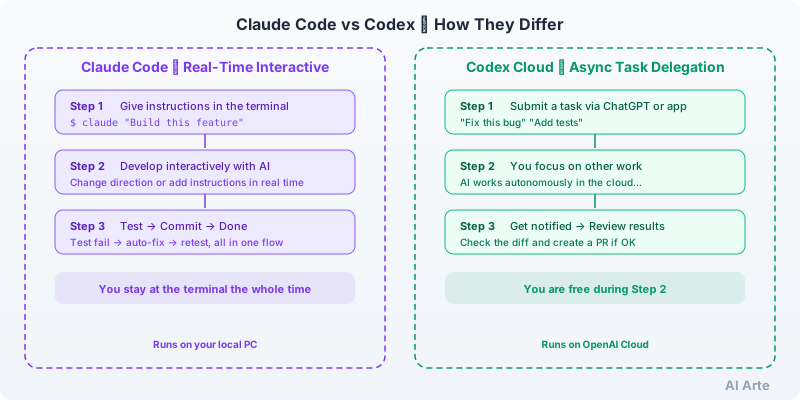
One important distinction: Codex has two modes — a terminal-based CLI and a cloud-based mode. The CLI works locally and interactively, just like Claude Code. The cloud mode lets you submit tasks through the ChatGPT interface and wait for results asynchronously. Claude Code is local-only. This article primarily compares the CLI versions, while also highlighting the unique advantages of Codex's cloud mode.
2. Pricing Comparison
Let's start with what everyone wants to know — the cost. Both tools are available starting at $20/month (per the Claude pricing page and ChatGPT pricing page, as of March 2026).
| Plan | Claude Code | Codex |
|---|---|---|
| Free | ❌ Not available | ❌ Not available |
| $20/mo | Pro (base usage included) | Plus (base usage included) |
| $100/mo | Max 5x (5x usage) | — |
| $200/mo | Max 20x (20x usage) | Pro (~6-7x usage) |
Note that they measure "usage" differently. Claude Code tracks token consumption — the amount scales with how much text you send to and receive from the AI. Codex uses a credit system where the cost per task varies based on the model and complexity. Both $20/month plans handle typical day-to-day development work, but heavy usage will require upgrading to Max or Pro tiers.
What are tokens? Tokens are the smallest unit of text that AI models process. In English, roughly 1 token equals about 4 characters or 0.75 words. The more code you feed the AI or the longer the responses, the more tokens you consume.
You can also use both tools via API with pay-as-you-go pricing. Here's a comparison per million tokens (from the Anthropic API pricing and Codex pricing page).
| Model | Input | Output |
|---|---|---|
| Claude Sonnet 4.6 | $3.00 | $15.00 |
| Claude Opus 4.6 | $5.00 | $25.00 |
| codex-mini (for Codex CLI) | $1.50 | $6.00 |
On a per-token basis, Codex's codex-mini costs less than half of Claude Sonnet. However, model capability also differs, so price alone doesn't tell the full story. Let's look at performance next.
For a comprehensive pricing breakdown, see our Claude vs ChatGPT pricing comparison article.
3. Performance (Benchmarks)
The industry-standard benchmark for AI coding tools is SWE-bench (data from the SWE-bench official leaderboard and official blog posts from each company).
What is SWE-bench? It's a benchmark that gives AI a set of real bug-fix tasks from open-source projects and measures the percentage it resolves correctly. Higher scores indicate stronger practical coding ability.
| Model | SWE-bench Verified |
|---|---|
| Claude Opus 4.6 | 80.8% |
| Claude Sonnet 4.6 | 79.6% |
| GPT-5.4 (Codex latest) | 78.2% |
| GPT-5.3-Codex | 78.0% |
As of March 2026, Claude Opus 4.6 leads at 80.8%. That said, the gap is only a few percentage points, and in real-world development you may not notice the difference.
Worth noting: OpenAI has questioned the reliability of SWE-bench Verified (citing test data contamination concerns) and recommends the more challenging SWE-bench Pro instead. On SWE-bench Pro, GPT-5.4 scored 57.7%, but comparable scores from Claude under the same conditions are limited in public data, making a direct comparison difficult.
Benchmarks are useful reference points, but the best way to know which tool works better for your projects is to try them yourself.
4. Feature Comparison
Let's compare the key features of both tools.
| Feature | Claude Code | Codex |
|---|---|---|
| File Read/Write | ✅ | ✅ |
| Command Execution | ✅ | ✅ |
| Git Operations & PR Creation | ✅ | ✅ |
| Image Recognition | ✅ | ✅ |
| Parallel Agents | ✅ Sub-agents | ✅ Sub-agents |
| External Tool Integration (MCP) | ✅ | ✅ |
| IDE Integration | VS Code & JetBrains | VS Code & Cursor |
| Cloud Async Execution | ❌ | ✅ (Codex Cloud) |
| Desktop Screen Control | ✅ (Computer Use) | ❌ |
The core features are nearly identical. The real differences come down to two areas.
Codex-Only Feature: Cloud Async Execution
Codex offers a "Codex Cloud" mode that lets you submit tasks through the ChatGPT interface and have them processed asynchronously in the cloud. You can hand off a task and move on to other work without waiting. It supports running multiple tasks in parallel and can handle long-running tasks that take over 7 hours.
Claude Code doesn't have this mode. It's designed for real-time, interactive use in the terminal. The upside is that you can change direction mid-task or give detailed feedback on the fly.
Claude Code-Only Feature: Computer Use
Claude Code has a unique feature called Computer Use that lets the AI directly control your browser and desktop applications. This enables workflows like "edit the code, check the result in the browser, and fix any issues" — all handled by the AI without manual intervention. Codex doesn't offer this capability.
Project Configuration Files: CLAUDE.md vs AGENTS.md
Both tools support placing a configuration file at the root of your project to give the AI project-specific rules and context.
- Claude Code uses
CLAUDE.md: Define coding conventions, build commands, and architectural guidelines. It acts as a persistent "handoff memo" for the AI across sessions - Codex uses
AGENTS.md: Same concept, but developed as an open standard by the Agentic AI Foundation under the Linux Foundation. It's supported by tools beyond just Codex, including Google Jules and Cursor
5. Strengths and Weaknesses
Where Claude Code Excels
- Large-scale refactoring: You can watch changes unfold in real time across dozens of files. Need to pivot mid-way? Just tell it to change course
- Testing with your local environment: It has direct access to your local databases and Docker containers, so it can run tests in conditions close to production
- End-to-end UI verification: With Computer Use, the AI can operate your browser to verify results — write code, check the browser, and fix issues, all in one seamless loop
- Windows support: Works natively on macOS, Linux, and Windows (Codex CLI's Windows support is experimental)
Where Claude Code Falls Short
- You can't fire-and-forget — it requires real-time interaction
- Occupies your terminal while running
- Source code is proprietary (not open source)
Where Codex Excels
- Parallel task processing: With Codex Cloud, you can submit multiple bug fixes at once and review them all together. Great for "I need to knock out 10 bugs at once" scenarios
- Asynchronous workflows: Submit a task and focus on something else. Results come back as pull requests
- Use via ChatGPT: No need to touch the terminal — just give coding instructions through the ChatGPT interface. Ideal for those who aren't comfortable with the command line
- Open-source CLI: The CLI is released under the Apache 2.0 license, so you can inspect the source code and customize it
Where Codex Falls Short
- The cloud version doesn't allow mid-task course corrections (feedback comes after completion)
- The cloud version can't directly access local databases or API keys
- CLI Windows support is experimental (WSL recommended)
- No desktop screen control capability
6. Which One Should You Pick? A Decision Guide
Based on our comparison, here are recommendations for different scenarios.
"I want to have a conversation with the AI while I code"
Go with Claude Code. You can interact in real time — "change this part," "actually, try a different approach" — as you build. It's ideal for large refactoring jobs and tasks that involve complex design decisions.
"I want to hand off tasks and focus on something else"
Go with Codex (Cloud). Submit tasks like "implement this feature" or "fix this bug," then get back to your own work. It can process multiple tasks simultaneously, making efficient use of your time.
"I'm not comfortable with the terminal"
Go with Codex (Cloud). Just type instructions like "fix this bug in this repo" in the ChatGPT interface — no command-line knowledge required.
"I need to use it on Windows"
Go with Claude Code. It has native support for Windows as well as macOS and Linux. Codex CLI's Windows support is still experimental and recommends WSL.
"I want to minimize costs with pay-as-you-go API pricing"
Go with Codex. The codex-mini model costs less than half of Claude Sonnet per token ($1.50 vs $3.00 per million input tokens). That said, there is a performance trade-off, so it's worth testing both to find the right balance of cost and quality.
"If budget allows, use both"
Claude Pro ($20/mo) + ChatGPT Plus ($20/mo) = $40/month for access to both tools. Use Claude Code for interactive development sessions, and Codex Cloud for batching independent small tasks. Since the underlying AI models have different strengths, having both at your disposal gives you maximum flexibility.
7. Frequently Asked Questions
Q. How is this different from GitHub Copilot?
Copilot primarily works inside your editor, predicting and autocompleting the next line of code. Claude Code and Codex are agent-based tools — you give them a task like "build this feature" and they autonomously create files, run tests, and open pull requests. The scope of work is completely different. Copilot is "typing assistance"; Claude Code and Codex are "task delegation."
Q. Is it safe to use with sensitive code?
Both offer business/enterprise plans that prevent conversation data from being used for AI training. Claude Code runs locally, sending only API communications (your prompts and the AI's responses) to the cloud. Codex CLI also runs locally. Codex Cloud executes in cloud containers but is isolated from the internet by default. For highly sensitive projects, consider their enterprise-tier plans.
Q. Is there a free way to try them?
As of March 2026, neither Claude Code nor Codex is available on a free plan. You'll need at least a $20/month subscription or an API key. With the API approach, you only pay for what you use, so you can get started with a small amount.
Q. Which has a brighter future?
This is the author's perspective: both tools are under active development, and the feature gap is shrinking fast. Claude Code's strength lies in its deep integration with the broader Claude ecosystem. Codex's advantages are its open-source strategy and ChatGPT's massive user base. It's unlikely that one will disappear — healthy competition will drive both to keep improving. *This is the author's opinion, not an official statement.
Conclusion
Claude Code and Codex are both powerful AI coding tools. Their core features overlap significantly, but they differ in their philosophy of how you work with AI.
- Claude Code = Real-time, interactive development with AI. Best for large-scale changes, complex decision-making, and automated UI verification
- Codex = A fire-and-forget option alongside interactive mode. Best for parallel processing of small tasks and easy access via ChatGPT
If you're unsure, start with the $20/month plan for either one. You won't know which AI coding tool fits your workflow until you try it. Test both, then make the one that suits your development style your go-to tool.
Reference Links
- Claude Pricing Plans (Official)
- Claude Code Documentation (Official)
- ChatGPT Pricing Plans (Official)
- Codex CLI Documentation (Official)
- SWE-bench Leaderboard
* The information in this article is current as of March 2026. Pricing and benchmark scores are subject to change. Please refer to the official websites for the latest information.
![20 Best Generative AI Tools for Game Development: Art, Music, Coding & More [2026]](https://az-arte.com/images/articles/ai-gamedev-tools-featured-en.svg)
![Generative AI Knowledge Cutoff Dates Compared: ChatGPT, Claude, Gemini & More [2026]](https://az-arte.com/images/articles/ai-cutoff-featured-en.svg)