Table of Contents
"Wouldn't it be great if you could just give AI an instruction and it would think and work on its own?" That's exactly what AI agents make possible. Anthropic's Claude Agent SDK is a framework that lets you build AI agents powered by Claude using Python or TypeScript. It's the same technology that runs under the hood of Claude Code, Anthropic's official CLI.
This article provides a comprehensive walkthrough of Claude Agent SDK, from core concepts to implementation and practical use cases.
What Is an AI Agent?
AI agents are fundamentally different from traditional "question and answer" AI. Their defining characteristic is the ability to autonomously break down tasks, use tools, evaluate results, and decide what to do next.
For example, if you ask an agent to "fix the bug in auth.py," it will work through these steps:
- Read the file to understand the code
- Search related files to grasp the bigger picture
- Identify the root cause of the bug
- Apply the fix
- Run tests to verify the solution
- Report the results
The agent handles this entire workflow on its own, without human intervention at each step. That's the power of agents.
Claude Agent SDK Overview
Claude Agent SDK is an official agent development framework from Anthropic. It gives you programmatic access to the same engine that powers Claude Code.
Here are its key features:
| Feature | Description |
|---|---|
| Automatic agent loop | The SDK manages the tool call → result processing → next decision cycle automatically |
| Built-in tools | Ready-to-use tools for file operations, command execution, web search, and more |
| Custom tools | Easily add your own tools for API calls, database operations, etc. |
| MCP integration | Connect to external tool servers via MCP to extend capabilities |
| Cost controls | Set budget caps and turn limits |
| Sub-agents | Split tasks and run them in parallel |
| Supported languages | Python / TypeScript |
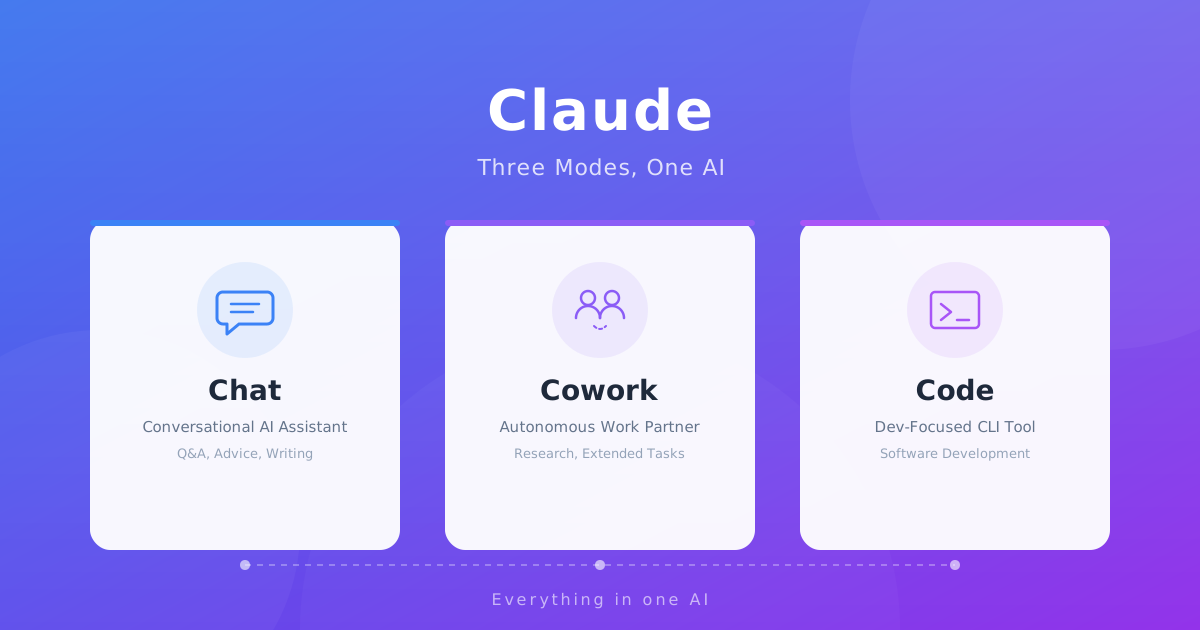
Among Claude's three modes — Chat, Cowork, and Code, the Agent SDK is the technology behind Claude Code (the Code mode).
How the Agent Loop Works
At the heart of the Agent SDK is the agent loop — an automated cycle where Claude thinks, uses tools, checks results, and thinks again.
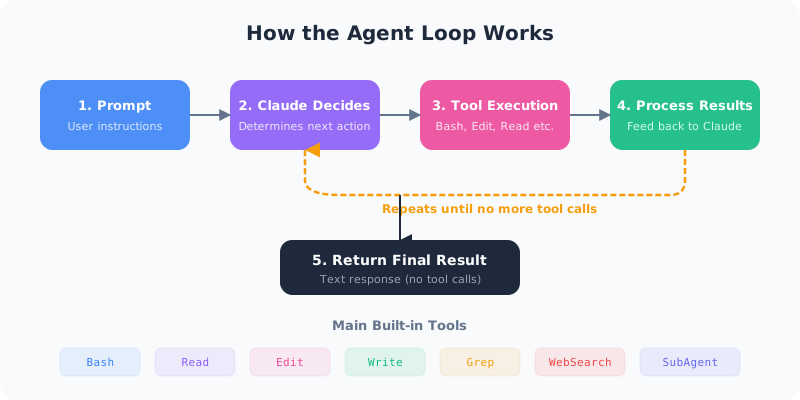
Here's how it flows step by step:
- Receive prompt: The user's instruction is passed to Claude
- Claude reasons: It analyzes the instruction and determines what actions are needed
- Execute tools: Tools like Bash, Edit, and Read are called to perform the work
- Process results: Tool output is fed back to Claude
- Continue or finish: If more work is needed, go back to step 2. Otherwise, return a text response
The key point is that the loop ends when there are no more tool calls. Once Claude determines that no further tools are needed, it returns a final text response.
Getting Started: Installation & Basic Code
Installation
The SDK is available for both Python and TypeScript.
# Python
pip install claude-agent-sdk

# TypeScript
npm install @anthropic-ai/claude-agent-sdk
Minimal Agent (Python)
import asyncio
from claude_agent_sdk import query, ClaudeAgentOptions, ResultMessage

async def main():
    async for message in query(
        prompt="Find and fix the bug in src/auth.py",
        options=ClaudeAgentOptions(
            allowed_tools=["Read", "Edit", "Bash", "Grep"],
            max_turns=30,
        ),
    ):
        if isinstance(message, ResultMessage):
            if message.subtype == "success":
                print(message.result)
            print(f"Cost: ${message.total_cost_usd:.4f}")

asyncio.run(main())
Minimal Agent (TypeScript)
import { query } from "@anthropic-ai/claude-agent-sdk";

for await (const message of query({
  prompt: "Find and fix the bug in src/auth.py",
  options: {
    allowedTools: ["Read", "Edit", "Bash", "Grep"],
    maxTurns: 30,
  }
})) {
  if (message.type === "result" && message.subtype === "success") {
    console.log(message.result);
  }
}
With just this code, you have an agent that reads files, hunts for bugs, applies fixes, and reports results — all on its own.
Built-in Tools
The Agent SDK comes with a rich set of tools you can use right away, without writing any extra code.
| Tool | Function | Example Use |
|---|---|---|
| Bash | Execute shell commands | Run tests, build projects, git operations |
| Read | Read files | Inspect source code and config files |
| Edit | Partially modify files | Bug fixes, refactoring |
| Write | Create new files | Generate new modules |
| Glob | Search files by pattern | List all TypeScript files with **/*.ts |
| Grep | Search file contents | Find function definitions or error messages |
| WebSearch | Search the web | Look up the latest docs or API specs |
| WebFetch | Fetch web pages | Retrieve information from a URL |
| Agent | Launch sub-agents | Split tasks for parallel processing |
You just specify which tools to enable via allowed_tools, and they're ready to go. No need to write tool-handling code yourself.
Creating Custom Tools
When built-in tools aren't enough, you can create your own. Let's build a custom tool that connects to a weather API.
Python
from claude_agent_sdk import tool, create_sdk_mcp_server

@tool(
    "get_weather",
    "Get the current weather for a given city",
    {"city": str}
)
async def get_weather(args: dict) -> dict:
    city = args["city"]
    # In practice, call an actual API
    weather_data = await fetch_weather_api(city)
    return {
        "content": [
            {"type": "text", "text": f"Weather in {city}: {weather_data}"}
        ]
    }

weather_server = create_sdk_mcp_server(
    name="weather",
    version="1.0.0",
    tools=[get_weather]
)
TypeScript
import { tool, createSdkMcpServer } from "@anthropic-ai/claude-agent-sdk";
import { z } from "zod";

const getWeather = tool(
  "get_weather",
  "Get the current weather for a given city",
  { city: z.string().describe("City name") },
  async (args) => {
    const data = await fetchWeatherApi(args.city);
    return {
      content: [{ type: "text", text: `Weather in ${args.city}: ${data}` }]
    };
  }
);
Custom tools are built as MCP servers and connected to your agent. When errors occur, return isError: true instead of throwing an exception. This keeps the agent loop running, allowing Claude to retry or try an alternative approach.
Parallel Processing with Sub-Agents
For large tasks, splitting the work across sub-agents and running them in parallel is much more efficient. Sub-agents handle specialized tasks without polluting the main agent's context (memory).
When Sub-Agents Are Useful
- Running extensive test suites: Even if test logs are enormous, they don't affect the main agent's context
- Parallel research: Investigate multiple modules simultaneously and collect the results
- Separating specialized work: Assign "code review" and "test execution" to different agents
Custom Sub-Agents in Claude Code
In Claude Code (CLI), you can define custom sub-agents simply by placing Markdown files in the .claude/agents/ directory.
# .claude/agents/reviewer.md
---
name: code-reviewer
description: A sub-agent specialized in code review
tools: Read, Glob, Grep
model: sonnet
---

You are a senior code reviewer.
Review code for quality, security,
and best practices.
By limiting tool access (in this example, read-only tools), you prevent the reviewer from accidentally modifying code.
Agent SDK vs Client SDK vs Claude Code
Claude offers three developer-facing interfaces. Each has different strengths, so choose based on your needs.
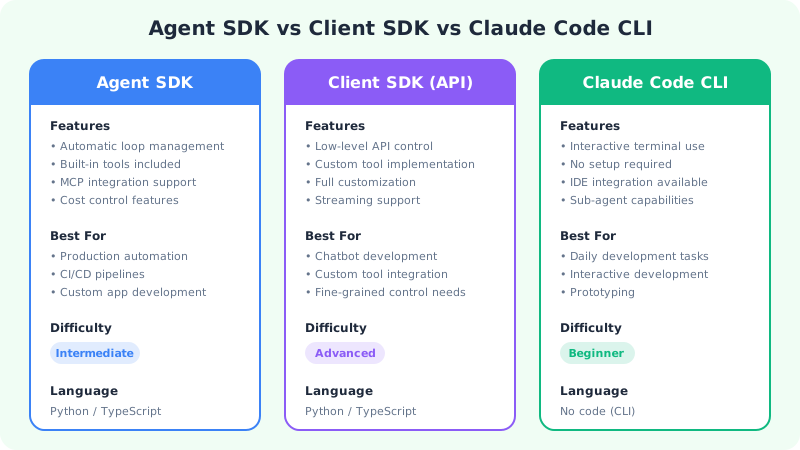
| Aspect | Agent SDK | Client SDK (API) | Claude Code CLI |
|---|---|---|---|
| Loop management | Automatic | Manual implementation | Automatic |
| Tools | Built-in + custom | All self-implemented | Built-in |
| Best for | Automation & production | Full custom control | Interactive development |
| Difficulty | Intermediate | Advanced | Beginner |
| Coding required | Yes | Yes | No |
Quick decision guide:
- Day-to-day development work → Claude Code CLI
- Building automated systems → Agent SDK
- Creating your own AI-powered app → Client SDK
Real-World Use Cases
Automated Code Development
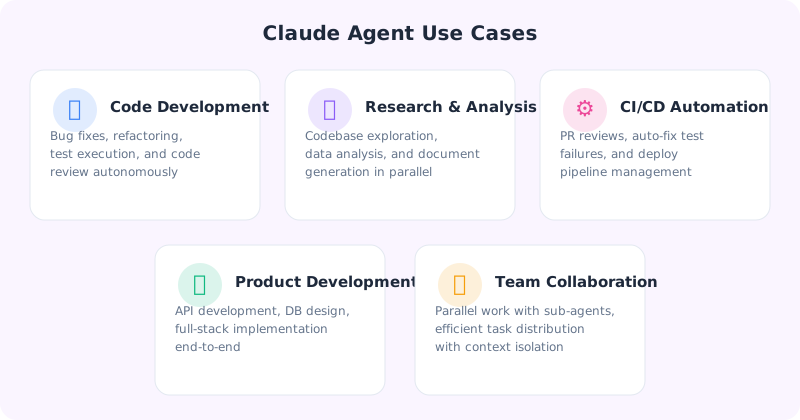
This is the most common use case. Tell the agent "implement this feature," and it will explore the file structure, write the code, and run the tests.
# Automated bug fixing
async for msg in query(
    prompt="The auth module tests are failing. Investigate and fix the issue",
    options=ClaudeAgentOptions(
        allowed_tools=["Read", "Edit", "Bash", "Grep"],
        max_turns=20,
        max_budget_usd=2.00,  # Cost cap: $2
    ),
):
    pass
CI/CD Pipeline Integration
Integrate with GitHub Actions or similar tools to build workflows that automatically review code on every PR or attempt auto-fixes when tests fail.
Data Analysis & Research
Multi-step research tasks like "analyze the error patterns from last month's logs" can be delegated to an agent. Combine with the WebSearch tool to pull in the latest information as well.
Best Practices
1. Always Set Cost Controls
Because agents loop, they can consume more tokens than expected. Always set max_budget_usd and max_turns.
options=ClaudeAgentOptions(
    max_budget_usd=5.00,   # Stop at $5
    max_turns=30,           # Stop after 30 turns
    effort="medium",        # Reasoning depth (low/medium/high/max)
)
2. Keep Tools to a Minimum
Enabling unnecessary tools wastes context window space. Only grant the tools the task actually needs via allowed_tools.
3. Use isError for Error Handling
If a custom tool throws an exception, the entire agent loop stops. Return isError: true instead, and Claude will attempt recovery.
4. Offload Heavy Work to Sub-Agents
Delegate tasks with large outputs, like test execution or log analysis, to sub-agents. This prevents the main agent's context from getting overloaded.
5. Be Specific in Your Prompts
Instead of "improve the code," say "add rate limiting to the login function in auth.py and write tests for it." Specific instructions lead to much more efficient results.
Summary
Claude Agent SDK dramatically lowers the barrier to building AI agents. Powered by the same engine as Claude Code, it lets you create autonomous task-executing agents in Python or TypeScript.
A great approach is to start by using Claude Code interactively to experience how agents work, and then move to the Agent SDK when you need automation — a smooth, step-by-step transition.
For more on the basics of using Claude, check out Comparing Claude's Three Tabs: Chat, Cowork, and Code.
Frequently Asked Questions
Is Claude Agent SDK free to use?
The SDK itself is free, but you'll pay for Claude API usage. You can set a spending cap with max_budget_usd to avoid unexpected costs. During development and testing, set effort to "low" to keep costs down.
What's the difference between Agent SDK and Claude Code?
Claude Code is an interactive tool for the terminal and IDE, while the Agent SDK is a framework you embed in your programs for automation. They share the same engine under the hood, but serve different purposes. Use Claude Code for everyday development, and Agent SDK for CI/CD or production automation.
Which programming languages are supported?
Python and TypeScript are supported. However, the targets the agent operates on (file editing, command execution, etc.) have no language restrictions, so you can use it with projects in Go, Rust, PHP, or any other language.
What is MCP?
MCP (Model Context Protocol) is a standard protocol for connecting AI models with external tools. You can implement databases, browser automation, APIs, and other tools as MCP servers and connect them to your agent. Since the Agent SDK supports MCP, third-party MCP servers are also compatible.
![15 Jobs Most Likely to Be Replaced by Generative AI — And How to Future-Proof Your Career [2026]](https://az-arte.com/images/articles/ai-job-loss-featured-en.svg)
![20 Best Generative AI Tools for Game Development: Art, Music, Coding & More [2026]](https://az-arte.com/images/articles/ai-gamedev-tools-featured-en.svg)
![Generative AI Knowledge Cutoff Dates Compared: ChatGPT, Claude, Gemini & More [2026]](https://az-arte.com/images/articles/ai-cutoff-featured-en.svg)