![20 Best Generative AI Tools for Game Development: Art, Music, Coding & More [2026]](https://az-arte.com/images/articles/ai-gamedev-tools-featured-en.svg)
The era of solo game development has truly arrived.
Tasks that once required entire teams — concept art, music composition, programming, and QA testing — are now within reach for individual developers, thanks to AI tools. According to the GDC 2026 "State of the Game Industry" report, 52% of the game industry has already adopted AI in their workflows, and that number is only accelerating.
In this guide, we break down the best AI tools for each stage of game development. Whether you're an indie developer working solo or part of a larger team, every tool listed here is practical and production-ready.
AI Art & Graphics Tools
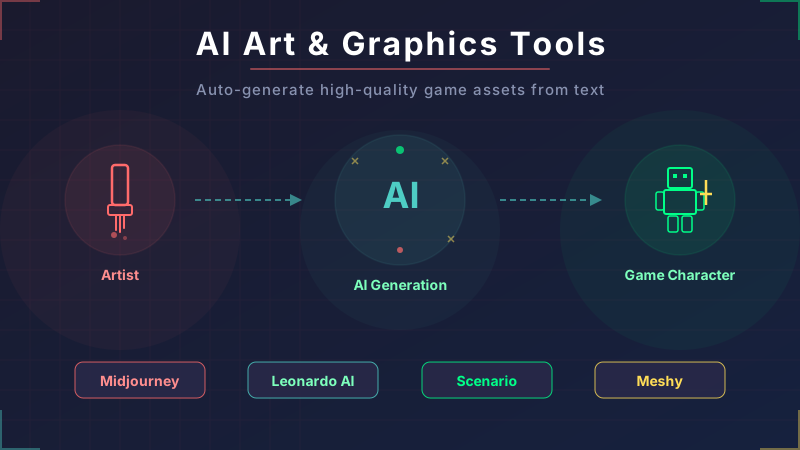
Visual art is the area where AI has made the biggest impact on game development. From concept art and character design to UI textures, AI tools are being used at every step of the art pipeline.
Midjourney — The Go-To for Concept Art
Midjourney is the gold standard for generating high-quality images from text prompts. The V7 model introduced a draft mode that enables rapid iteration on ideas. In game development, it's primarily used for concept art and promotional materials. Plans start at $10/month.
Leonardo AI — Built for Game Assets
Leonardo AI is packed with features tailored for game asset creation: custom model training, real-time canvas editing, 3D texture generation, and consistent character generation. The free plan offers 150 tokens per day, making it easy to try before committing.
Scenario AI — Pro-Grade Style Consistency
Scenario's biggest strength is the ability to train custom models on your own art style, letting you mass-produce assets with a consistent look. Major studios like Scopely, Ubisoft, and Unity have adopted it. Your training data is never used for other models, which is a major plus for IP security.
Blockade Labs (Skybox AI) — Instant Environment Generation
Generate 360-degree panoramic environments from text prompts in seconds. Supports 8K/16K resolution with over 48 art styles. Plugins are available for Unity and Unreal Engine. It can dramatically cut background art costs. Over 1 million users and counting.
3D Model & Environment Generation
3D modeling traditionally takes hours or even days, but AI is bringing that down to minutes.
Meshy — Text-to-3D in Seconds
Meshy generates 3D models from text or images automatically. It offers plugins for Blender, Unity, and Unreal Engine. Using batch generation workflows, one team reported completing 50 assets in 2 hours — a process that previously took 2 weeks. Perfect for props and environmental objects.
Tripo AI — Game-Ready Topology
At GDC 2026, Tripo unveiled "Tripo P1.0," which generates 3D models with clean quad-based topology, making them ideal for direct import into game engines. It also features one-click auto-rigging and is actively researching "World Models" that generate interconnected 3D environments.
Promethean AI — Automated Level Design
Describe a scene in plain English — "interior of a wrecked spaceship with exposed wiring" — and Promethean AI generates it as a 3D environment. It handles prop placement, object arrangement, and layout generation automatically. Used by PlayStation Studios, with support for Blender, Unreal, and Unity.
AI Music & Sound Tools
BGM and sound effect production can also be dramatically streamlined with AI.
Suno — Full-Track BGM Generation
Suno generates complete songs — including vocals — from text prompts. The V4.5 model delivers professional-quality output, making it ideal for prototyping game soundtracks and background music. A free plan is available.
AIVA — Orchestral & Cinematic Specialist
AIVA specializes in orchestral and cinematic compositions. When your RPG or adventure game needs an epic score, AIVA's output quality rivals human composers.
Stable Audio — Great for SFX & Ambient Sound
Built by Stability AI, Stable Audio excels at generating short audio clips, sound effects, ambient audio, and drum loops. It's better suited for in-game sound effects and texture sounds than full tracks.
ElevenLabs — AI Voice Acting
Generate NPC dialogue, narration, and character voices with AI. Features include voice cloning, multilingual support, and 44.1kHz high-quality output. It makes large-scale NPC voiceover achievable at a fraction of traditional costs. Plans start at $5/month.
AI Coding Assistants
AI coding tools are quickly becoming essential in game programming. According to the GDC 2026 survey, 47% of developers now use AI for coding assistance.
Claude Code — Unmatched Codebase Comprehension
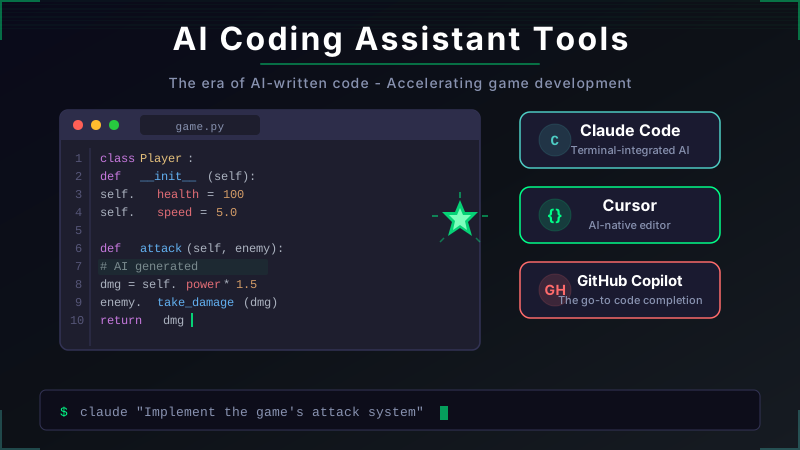
As of 2026, Claude Code is the #1 AI coding tool (46% of developers call it their favorite in recent surveys). With a 1-million-token context window, it can understand codebases exceeding 30,000 lines in their entirety. It's perfect for workflows that involve feeding in game engine API docs and coding against them. Knowing the differences between Claude's three modes will help you use it even more effectively.
Cursor — AI Seamlessly Integrated into Your IDE
Cursor is an AI-native IDE that understands your entire project context. It supports multi-file editing, visual diffs, and blazing-fast autocomplete. At $20/month, it offers the tightest integration with everyday coding workflows.
GitHub Copilot — Ecosystem Integration
Copilot integrates with VS Code, JetBrains, and other major IDEs. Its seamless GitHub integration is a key advantage. The free plan includes 2,000 completions and 50 chat messages per month — a great starting point. Especially recommended for teams already using GitHub Enterprise.
Narrative & NPC Dialogue Tools
AI is also opening up new possibilities for storytelling and NPC dialogue generation.
Inworld AI — The Leader in AI-Driven NPCs
Inworld is middleware that powers real-time conversational NPCs. Characters can perceive their environment, have autonomous motivations, and retain memories using multimodal AI. The no-code "Character Engine" handles everything from prototyping to production. Free plan available for prototype development.
Claude / ChatGPT — Your Brainstorming Partner for Story Design
These tools are excellent for writing game scenarios, building worlds, and fleshing out character backstories. Claude Opus 4.6 particularly excels at capturing character voice and personality, and can help verify consistency in complex branching storylines. ChatGPT is the most widely used AI tool in the gaming industry (74% adoption rate) and is perfect for brainstorming sessions.
QA & Test Automation Tools
QA is one of the most expensive stages of game development. AI-driven automated testing can lead to significant cost savings.
Razer QA Companion-AI — The GDC 2026 Standout
Announced at GDC 2026, this tool uses AI agents that autonomously play your game to run tests. Its video-based bug detection identifies rendering, physics, animation, and collision issues automatically.
nunu.ai — AI That Plays Like a Human Tester
AI agents play your game and execute test cases just like human testers would. One case study reported a 50% reduction in manual QA costs. Supports both lightweight SDK integration and black-box testing.
Modl.ai — No-Integration AI QA
Modl.ai offers black-box AI QA that requires no integration with your game. It detects visual glitches, missing assets, performance issues, and gameplay logic bugs, generating detailed reports with screenshots.
Practical Workflow: Combining AI Tools in Your Pipeline
Here's how to integrate the tools covered above into a real game development pipeline.
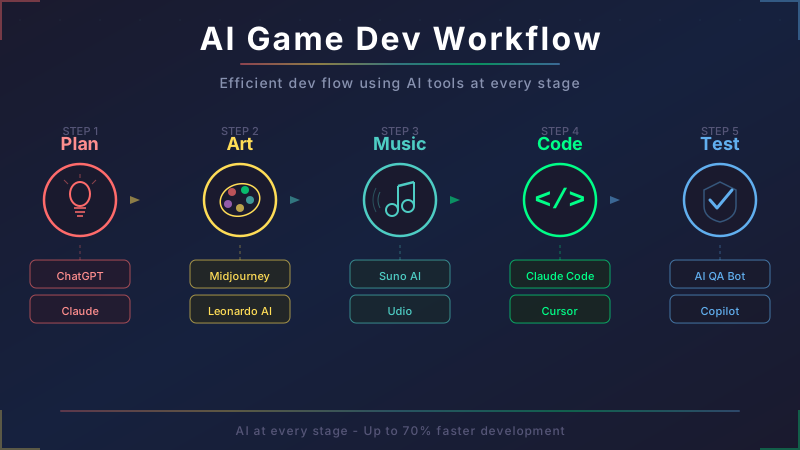
| Development Phase | Recommended AI Tools | Specific Use Cases |
|---|---|---|
| Planning & Ideation | Claude / ChatGPT | World-building, game mechanics brainstorming |
| Concept Art | Midjourney / Leonardo AI | Visual direction, character design exploration |
| 3D Modeling | Meshy / Tripo AI | Props, environment objects, character models |
| Backgrounds & Environments | Blockade Labs / Promethean AI | Skyboxes, auto-generated level layouts |
| Music & SFX | Suno / AIVA / Stable Audio | BGM prototyping, sound effects, ambient audio |
| Voice Acting | ElevenLabs | NPC voices, narration |
| Programming | Claude Code / Cursor | Game logic, shaders, UI implementation |
| QA & Testing | nunu.ai / Modl.ai | Automated playtesting, bug detection |
The key is not to hand everything off to AI, but to adopt an approach of "let AI handle 80% quickly, then have humans polish the remaining 20%." For indie developers in particular, the ability to cover every stage of development solo is nothing short of revolutionary.
Risks & Industry Considerations
There are important risks and challenges to keep in mind when using AI tools.
Copyright & Legal Risks
Copyright for AI-generated content remains a contentious topic worldwide. In the U.S., "human authorship" is generally required for copyright protection, making it difficult to protect purely AI-generated assets. The EU AI Act also imposes compliance requirements on businesses. Caution is advised when using AI-generated content in commercial games.
Industry Pushback
According to the GDC 2026 survey, 52% of the game industry views AI's impact as negative (up sharply from 30% in 2025). Visual artists (64%) and narrative designers (63%) are the most opposed. There's a significant gap between corporate AI adoption and the sentiment on the ground. The risk of job displacement from AI is a real and growing concern.
Platform Disclosure Requirements
Steam now requires disclosure of AI-generated content, and over 15,000 games have already been tagged with AI labels. Player criticism of AI usage is increasing, making transparency about AI use more important than ever.
Quality Control Is Still Essential
Using AI-generated assets without refinement can result in an obvious "AI look." In commercial games, final quality adjustments and style consistency must be handled by humans.
Conclusion
AI tools are transforming every stage of game development.
- Art: Midjourney, Leonardo AI, and Scenario cover everything from concepts to production assets
- 3D: Meshy and Tripo AI generate 3D models in minutes
- Music: Suno, AIVA, and ElevenLabs handle BGM through voice acting
- Code: Claude Code and Cursor dramatically accelerate development speed
- QA: nunu.ai and Modl.ai significantly reduce testing workloads
A Google Cloud study (August 2025, surveying 615 developers) found that 90% of game developers have already integrated AI into their workflows. The AI-in-gaming market is projected to reach $3.4 billion in 2026 and grow to $6.7 billion by 2030.
While copyright concerns and industry pushback are real issues to navigate, choosing not to use AI at all may soon be a competitive disadvantage. Start by identifying the most time-consuming stage of your development pipeline and try just one AI tool there. You might be surprised at the difference it makes.
FAQ
Are there free AI tools for game development?
Many tools offer free plans. Leonardo AI (150 tokens/day), Suno (free plan), GitHub Copilot (2,000 completions + 50 chats/month), Blockade Labs (limited access), and Inworld AI (for prototyping) are all free to get started with. For indie developers, free plans alone can take you surprisingly far.
Can AI-generated game assets be used commercially?
Most AI tools permit commercial use on paid plans. However, copyright protection for AI-generated content is still being debated globally, so it's not entirely risk-free. For commercial releases, always check each tool's terms of service and consider adding human refinement to establish originality.
Can one person build an entire game using AI tools?
Absolutely. By combining AI tools, a solo developer can cover art, music, programming, and testing. That said, relying entirely on AI can lead to inconsistent quality and style. The most effective approach is to "prototype quickly with AI, then polish by hand."
Which AI tools work with Unity and Unreal Engine?
Meshy, Blockade Labs (Skybox AI), Promethean AI, and Scenario AI all offer Unity/Unreal plugins. Claude Code and Cursor provide engine-agnostic coding support. GDevelop has a built-in AI assistant and is a great option for beginners.
![Which Frameworks Are Most Generative AI-Friendly? A Complete Compatibility Guide [2026]](https://az-arte.com/images/articles/ai-friendly-frameworks-en.svg)
![Claude Code vs Codex: Which Should You Choose? A Complete Comparison of Pricing, Performance & Use Cases [2026]](https://az-arte.com/images/articles/claude-code-vs-codex-en.svg)