Table of Contents
- 1. What Is Next.js — A React-Based Full-Stack Framework
- 2. Next.js vs Plain React — What Gets Added
- 3. Four Rendering Strategies — SSR, SSG, ISR, and CSR
- 4. App Router vs Pages Router
- 5. The Evolution of Next.js — From v13 to v16.2
- 6. Why AI Keeps Recommending Next.js — 5 Reasons
- 7. Comparing Alternatives — Nuxt, Remix, SvelteKit, Astro
- 8. Next.js and Vercel — Why They're Always Mentioned Together
- 9. When to Use Next.js — and When to Skip It
- 10. Learning Roadmap — Where to Start
- FAQ
Tell Claude Code or ChatGPT to build you a web app, and you'll almost certainly hear——"Let's use Next.js."
But hold on. What actually is Next.js? Is plain React not good enough? Why does every AI default to it?——These questions dissolve once you understand what problem Next.js is designed to solve.
This article covers everything based on Next.js 16.2, released in March 2026: what Next.js is, how it differs from React, its rendering strategies, why AI keeps recommending it, and how it stacks up against alternatives. By the end, you'll be able to decide for yourself whether Next.js is actually the right fit for your project — rather than just going along with what the AI says.
1. What Is Next.js — A React-Based Full-Stack Framework
Next.js is an open-source React-based full-stack framework developed by Vercel. Its first version shipped in 2016, and the current release as of April 2026 is 16.2 (released March 18, 2026). It's the most widely used React framework in the world.
The One-Sentence Version
If you had to describe Next.js in one sentence: it's "the foundation that takes React and makes it production-ready."
Plain React is just a UI library. URL routing, server-side rendering, image optimization, SEO, API endpoints, build optimization — everything you need for a real website has to be wired up yourself. Next.js ships all of that built in.
What Next.js Provides
- File-based routing — drop a file in the right place and a URL is created automatically
- Multiple rendering strategies — mix SSR, SSG, ISR, and CSR within the same project
- React Server Components — run React on the server side
- API routes — write frontend and backend in the same project
- Image optimization — responsive images and lazy loading via
next/image - Font optimization — self-hosted Google Fonts with no extra config
- Server Actions — call server functions directly from forms
- Turbopack — a Rust-powered bundler that's extremely fast (standard in v16)
- TypeScript out of the box — type safety with zero configuration
Who Builds It
Next.js is primarily developed by Vercel, but it's open source (MIT license) with contributions from over 3,000 developers worldwide. React core team members (Andrew Clark, Sebastian Markbåge, and others) are deeply involved, meaning Next.js evolves in lockstep with React itself.
2. Next.js vs Plain React — What Gets Added
The first question for anyone who only knows React is "what exactly does Next.js add?" Here's a side-by-side comparison.
| Feature | Plain React | Next.js |
|---|---|---|
| UI components | ✅ Core feature | ✅ Includes React |
| Routing | ❌ Needs React Router or similar | ✅ File-based routing built in |
| Server-side rendering | ❌ DIY | ✅ SSR/SSG/ISR built in |
| Code splitting | △ Manual setup | ✅ Automatic |
| Image optimization | ❌ Third-party library | ✅ next/image built in |
| API backend | ❌ Separate server required | ✅ API routes / Route Handlers |
| SEO | △ SPA needs extra work | ✅ Naturally SEO-friendly via SSR/SSG |
| Build tooling | Vite, Create React App, etc. | ✅ Turbopack built in |
| Learning curve | Low (UI only) | Medium–High (full-stack concepts) |
The Short Version
Think of plain React as an engine alone. Next.js is a complete car — engine, chassis, tires, nav, and climate control all included. React on its own is fine for personal learning projects, but when you're building something real, assembling all the missing pieces yourself takes far longer than just reaching for Next.js.
3. Four Rendering Strategies — SSR, SSG, ISR, and CSR
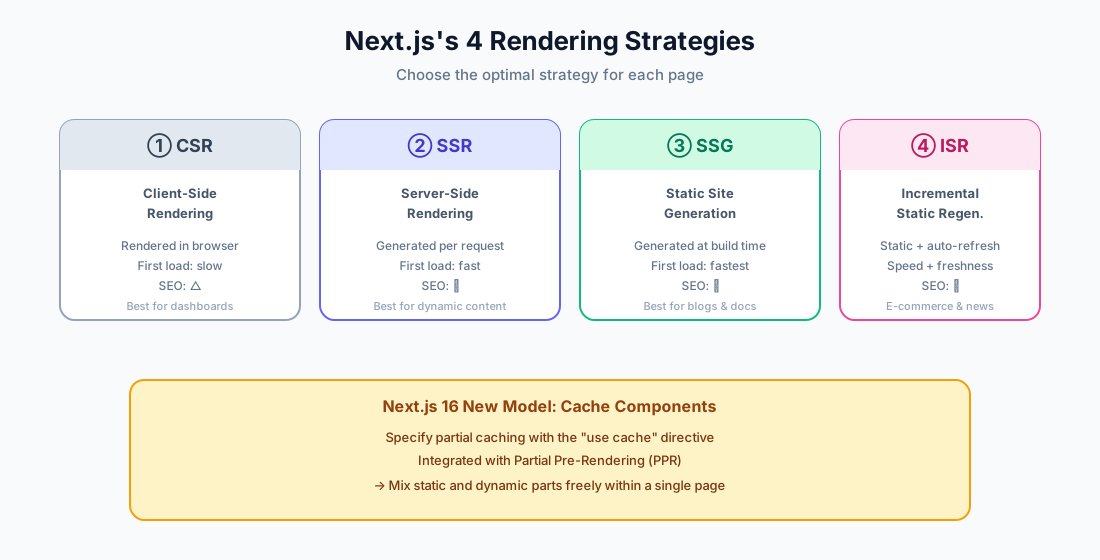
Next.js's biggest strength is the ability to mix different rendering strategies on a per-page basis within a single project. Once you get this, the "why Next.js" question answers itself.
① CSR (Client-Side Rendering)
JavaScript runs in the browser to generate HTML. This is the default behavior of classic React apps (Create React App). Initial load is slower and SEO suffers, but it's well suited for personal, post-login views like dashboards.
② SSR (Server-Side Rendering)
The server generates HTML on every request before sending it to the browser. Ideal for pages where content varies per user — social feeds, e-commerce carts. Strong SEO, fast first paint. The tradeoff is higher server load.
③ SSG (Static Site Generation)
All HTML is pre-generated at build time. Best for content that doesn't change often — blog posts, product pages, documentation. Pages are served from a CDN, making this the fastest and cheapest approach. This site (AI Arte) uses SSG for most pages.
④ ISR (Incremental Static Regeneration)
An extension of SSG: pages are pre-rendered at build time, then regenerated in the background after a set interval. This is a Next.js original invention — it gives you the speed of static sites and the freshness of dynamic content at the same time. Perfect for news sites or e-commerce with changing inventory.
Cache Components in Next.js 16
Next.js 16 introduced Cache Components, a new model that unifies these strategies. You can selectively cache parts of a page with the "use cache" directive, and combine it with Partial Pre-Rendering (PPR) to mix static and dynamic sections within a single page.
// Next.js 16: partial caching with "use cache"
async function BlogHeader() {
  "use cache"
  const posts = await fetchPosts()  // cached at build time
  return <nav>{posts.map(...)}</nav>
}

async function UserGreeting() {
  // no cache — runs on every request
  const user = await getCurrentUser()
  return <p>Hello, {user.name}</p>
}
4. App Router vs Pages Router — Two Routing Systems
Any time you look up Next.js you'll run into "App Router" and "Pages Router." This is one of the most common sources of confusion.
Pages Router (Legacy — 2016+)
Files placed inside a pages/ directory map directly to URLs. Simple and easy to follow, but it doesn't support shared layouts or Server Components.
pages/
├── index.tsx          → /
├── about.tsx          → /about
└── blog/
    └── [slug].tsx     → /blog/:slug
App Router (New — Next.js 13+)
Routes are managed via folders inside an app/ directory. Supports nested layouts, React Server Components, Streaming, and all modern Next.js features. This has been the standard for new projects since 2024.
app/
├── layout.tsx         ← shared layout for all pages
├── page.tsx           → /
├── about/
│   └── page.tsx       → /about
└── blog/
    └── [slug]/
        └── page.tsx   → /blog/:slug
Which Should You Learn
For any new project, go with App Router — no question. It's what the official docs recommend. It's what AI-generated code uses nearly 100% of the time. Pages Router is for maintaining existing projects and nothing more.
5. The Evolution of Next.js — From v13 to v16.2
Next.js has moved fast in recent years, and AI-generated code can sometimes reflect an older version. Here are the key releases to know.
| Version | Released | Key Changes |
|---|---|---|
| Next.js 13 | Oct 2022 | App Router (beta), React Server Components, Streaming, Turbopack (alpha) |
| Next.js 14 | Oct 2023 | Server Actions stabilized, Partial Prerendering preview |
| Next.js 15 | Oct 2024 | async params / cookies / headers (breaking change), React 19 support, Turbopack Dev stable |
| Next.js 16 | Oct 2025 | Cache Components, Turbopack as default, React Compiler stable, proxy.ts (middleware renamed), DevTools MCP |
| Next.js 16.2 | Mar 2026 | ~4x faster next dev startup, ~50% faster rendering, Agent-ready create-next-app, Browser Log Forwarding |
Breaking Changes in Next.js 16 (Watch Out)
Next.js 16 shipped several breaking changes. Older code won't always run as-is:
- Node.js 20.9+ required (Node 18 support dropped)
- AMP fully removed
middleware.ts→proxy.ts(middleware is now deprecated)params,searchParams,cookies(),headers()must be awaited — async is now requiredexperimental.pprremoved — evolved into Cache Componentsnext lintremoved — use Biome or ESLint directly
AI-Generated Code Can Be Outdated
Depending on when Claude, ChatGPT, or Copilot last ingested training data, they might generate code in the Pages Router style or pre-Next.js 14 patterns. If generated code uses a pages/ directory or doesn't await params, it's the old way — rewrite it to target App Router / Next.js 16, or just tell the AI "rewrite this for Next.js 16 App Router."
6. Why AI Keeps Recommending Next.js — 5 Reasons
Ask an AI to help you build a web app and Next.js shows up every single time. There are clear reasons for this.
Reason 1: Dominant Training Data
Next.js has around 130,000 GitHub stars (as of April 2026) and over 9 million npm weekly downloads. Its exposure in AI training data is unmatched, so models have learned a very strong "web app = Next.js" association.
Reason 2: One Project Does Everything
Frontend, API, SSR, SEO, and image optimization all live in a single project. That makes the AI's job straightforward. There's no need to juggle "React for the frontend, Express for the backend, AWS for deployment" — it's one coherent stack.
Reason 3: Vercel Integration Makes Deployment Instant
Deploy to Vercel — the PaaS built by the same company that makes Next.js — and a git push publishes to production. AI likes to propose a straight-line path from "built" to "shipped," and Next.js + Vercel is that path (see the PaaS article for a deep dive).
Reason 4: TypeScript by Default Plays Well With AI Code
TypeScript works with zero configuration, so AI can generate type-safe code from the start. Type errors surface problems early, which also helps catch bugs in AI-generated code faster.
Reason 5: Next.js 16 Made AI Tooling a First-Class Feature
Next.js 16 introduced DevTools MCP (Model Context Protocol), letting AI agents like Claude Code directly inspect a Next.js app's internals — routing, cache state, logs, and errors. Version 16.2 added Agent-ready create-next-app and Browser Log Forwarding. Collaborating with AI is now a core design goal of the framework.
7. Comparing Alternatives — Nuxt, Remix, SvelteKit, Astro
Next.js isn't the only option. Knowing the alternatives helps you make smarter choices.
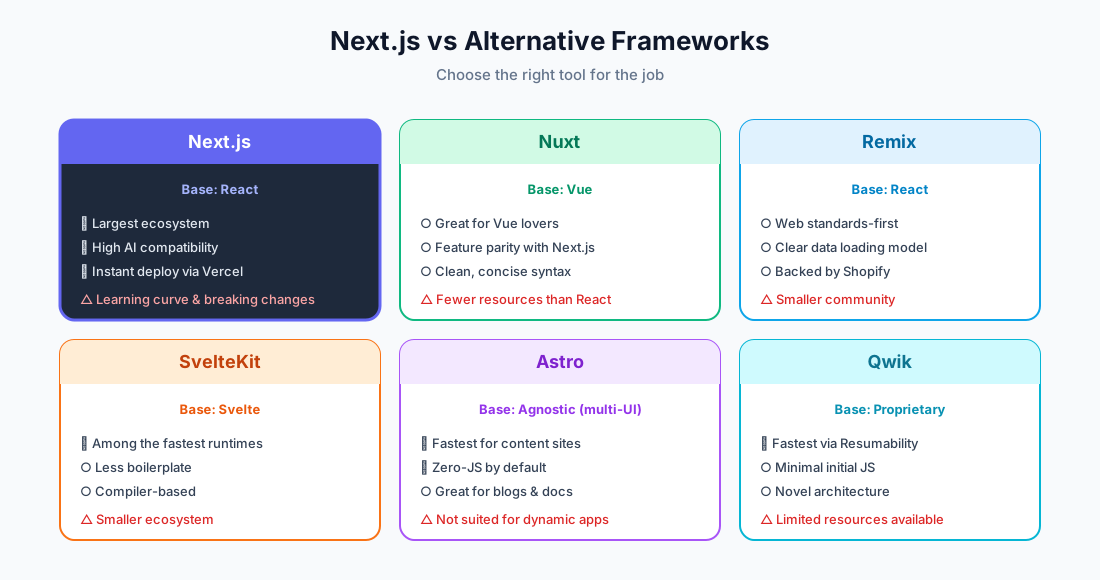
| Framework | Based On | Strengths | Weaknesses |
|---|---|---|---|
| Next.js | React | Largest ecosystem, AI-friendly, Vercel integration | App Router learning curve, frequent breaking changes |
| Nuxt | Vue | Full Next.js feature parity, great for Vue fans | Fewer learning resources than React |
| Remix | React | Web standards-first, clean data loading model | Smaller community; merged with React Router v7 after Shopify acquisition |
| SvelteKit | Svelte | Among the fastest runtimes, concise syntax | Smaller ecosystem |
| Astro | Own (multi-UI) | Fastest for content sites, ships zero JS by default | Not suited for interactive apps |
| Qwik | Own | Resumability for the fastest possible initial load | Still young, limited resources |
Quick Decision Guide
- Best overall + AI collaboration → Next.js
- Vue fan → Nuxt
- Content site / docs / blog, performance-first → Astro
- Minimal syntax, top-tier speed → SvelteKit
8. Next.js and Vercel — Why They're Always Mentioned Together
Whenever you read about Next.js, "Vercel" is never far behind. Here's how to keep them straight.
| Next.js | Vercel | |
|---|---|---|
| What it is | Open-source framework | Commercial hosting PaaS |
| Cost | Free (MIT license) | Free tier + pay-as-you-go |
| Relationship | Vercel builds and maintains it | PaaS optimized for Next.js |
| Alternatives | — | Netlify, Cloudflare, AWS Amplify, etc. |
Next.js Isn't Locked to Vercel
A common misconception: Next.js is not Vercel-exclusive. You can deploy it anywhere:
- Other PaaS platforms: Netlify, Cloudflare Pages, Render, Railway
- Raw IaaS via Docker: AWS, GCP, Azure
- A VPS running Node.js with
next start - A static host (SSG-only) via
next export
That said, features like Image Optimization, ISR, and Server Actions work most smoothly on Vercel. Other platforms may need extra configuration or have partial support.
9. When to Use Next.js — and When to Skip It
✅ Next.js Is a Great Fit When
- SEO matters — corporate sites, media, e-commerce, blogs
- You have dynamic content-heavy web apps — SaaS, admin dashboards
- You need both logged-in and public pages — mix SSR and SSG as needed
- You're building with TypeScript
- You want to co-develop with AI — take advantage of DevTools MCP
- You want effortless deployment to Vercel
❌ Next.js Is Overkill When
- A simple one-page marketing site — Astro or plain HTML is enough
- A minimal personal blog — Astro, Hugo, or Jekyll will be faster
- You already have a Laravel, Rails, or Django backend — no need to migrate
- An admin-only SPA — plain React + Vite is sufficient
- Your team isn't comfortable with React yet — start with Vite + React for a gentler on-ramp
10. Learning Roadmap — Where to Start
Step 0: Prerequisites
- HTML / CSS / JavaScript fundamentals
- React basics (components, props, state, hooks)
- TypeScript basics (strongly recommended)
Step 1: Scaffold With create-next-app
npx create-next-app@latest my-app
cd my-app
npm run dev
Visit http://localhost:3000. The default setup includes App Router + TypeScript + Tailwind CSS.
Step 2: Work Through the Official Tutorial
The best starting point is the official learning course at nextjs.org/learn. The App Router tutorial walks you through database connections, authentication, and deployment in one complete flow.
Step 3: Build a Small Project
- A personal blog (SSG)
- A TODO app (Server Actions)
- A simple e-commerce page (ISR + Stripe)
Step 4: Deploy to Vercel
Connect your GitHub repo to Vercel and your site is live. The deployment experience alone is worth doing at least once.
Tips for Learning With AI
Ask Claude Code or Cursor to "build a TODO app with Next.js 16 App Router," then have the AI explain each line of the code it generates. That tight loop speeds up learning considerably. Just remember — as mentioned above — that AI can generate outdated patterns, so always cross-check against the official docs.
FAQ
Q1. Is Next.js free?
Yes, the framework itself is completely free under the MIT license. Costs only arise if you deploy to Vercel, and for personal projects the free tier is usually enough.
Q2. Should I learn React or Next.js first?
Spend 2–3 days on React fundamentals (components, props, state, hooks), then move straight to Next.js. There's no need to master plain React before making the jump.
Q3. App Router or Pages Router?
For anything new, App Router — no hesitation. It's what the official docs, AI tools, and all modern features target. Only learn Pages Router if you're maintaining an existing codebase that uses it.
Q4. What's the one-line difference between React and Next.js?
React is a UI library. Next.js is a complete web application framework that includes React plus routing, SSR, image optimization, and APIs — everything you need to ship a real product.
Q5. Can I run Next.js without Vercel?
Absolutely. Any environment that runs Node.js — VPS, Docker, AWS, GCP, Azure — works fine. Some features like ISR and Image Optimization require extra setup or have limitations on non-Vercel platforms.
Q6. Do I have to migrate to Next.js 16?
It's recommended but not mandatory. The official codemod handles most changes automatically (npx @next/codemod@canary upgrade latest), though some things like async params still need manual fixes.
Q7. Is Next.js suitable for small sites?
It works, but for a simple one-page site, Astro or plain HTML is lighter. Next.js really shines when you need dynamic features and room to scale.
Q8. Can I use AI-generated Next.js code as-is?
Usually yes, but always check the version. If you see a pages/ directory or non-async params, it's old code. Update it to Next.js 16 App Router conventions, or just tell the AI "rewrite this for Next.js 16 App Router."
Wrapping Up: Make the Call Yourself, Don't Just Follow the AI
When AI says "let's use Next.js," there's often a passive reason behind it: "it's the safest, most common, most AI-writable choice." That's usually the right call — but not always. For small sites, Astro is enough. For an existing Laravel or Rails app, there's no reason to migrate. Keep that in mind.
Having read this, you should no longer be stuck at "what even is Next.js?" — you should be able to judge whether your project actually needs it. Respect the AI's recommendations, but don't blindly follow them. That's the smart way to develop in the age of AI.
Related Articles
- What Is PaaS (Like Vercel)? How It Compares to Shared Hosting, VPS, and Cloud — A deep dive into deploying Next.js on PaaS
- What Makes a Framework AI-Friendly? — The full picture, beyond just Next.js
- Beginner's Guide to AI Service Development — From IT fundamentals to building your first service

![15 Jobs Most Likely to Be Replaced by Generative AI — And How to Future-Proof Your Career [2026]](https://az-arte.com/images/articles/ai-job-loss-featured-en.svg)
![20 Best Generative AI Tools for Game Development: Art, Music, Coding & More [2026]](https://az-arte.com/images/articles/ai-gamedev-tools-featured-en.svg)