![What Is PaaS (Vercel, etc.)? Shared Hosting vs VPS vs Cloud vs PaaS Compared [2026]](https://az-arte.com/images/articles/paas-vercel-comparison-featured-en.svg)
Table of Contents
- 1. What Is PaaS --- and Why Does AI Keep Recommending It?
- 2. The Four Hosting Tiers --- Understanding the Shared Responsibility Model
- 3. Shared Hosting --- The Traditional Workhorse
- 4. VPS --- "Your Own Virtual Machine"
- 5. Cloud (IaaS) --- AWS, GCP, and Azure
- 6. PaaS --- Vercel, Netlify, Render, and Friends
- 7. Comparing the Four --- Cost, Flexibility, and Ops Burden
- 8. Major PaaS Services Head-to-Head
- 9. Why Does AI Keep Pushing PaaS?
- 10. Recommendations by Use Case --- Which One Should You Pick?
- FAQ
If you've been using Claude Code or ChatGPT to help you build an app, you've probably heard this advice more than once --- "Let's deploy to Vercel," "Just ship it on Render," "Railway makes this easy."
But hold on. What is Vercel? Is it different from AWS? Why can't I just use the shared hosting I already pay for? --- These questions all dissolve once you understand the different types of hosting services.
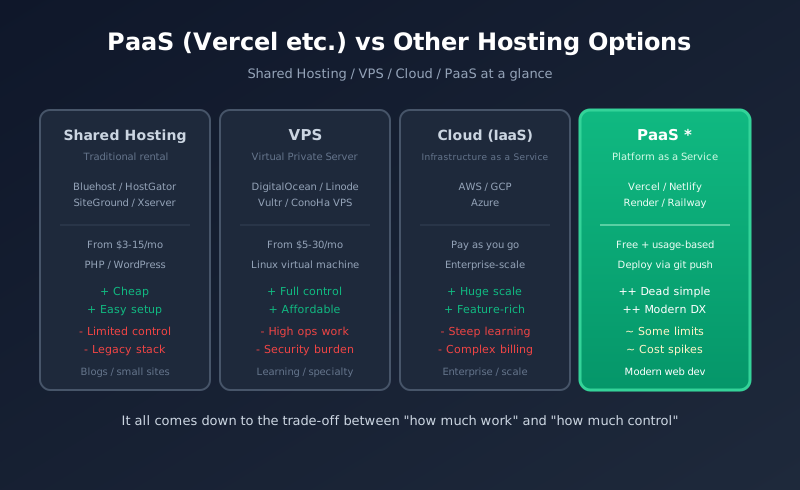
This article takes the PaaS (Platform as a Service) that AI loves to recommend and puts it head-to-head with traditional shared hosting, VPS, and cloud (IaaS) --- comparing them across three axes: cost, flexibility, and operational burden. By the end, you'll know exactly which one fits your project.
1. What Is PaaS --- and Why Does AI Keep Recommending It?
PaaS (Platform as a Service) is a hosting model where the provider handles everything you need to run an app --- servers, OS, middleware, runtimes, the lot. All you bring is your application code. You push to git, and your app goes live. That's the whole flow.
Examples of PaaS
| Service | Sweet Spot | Notes |
|---|---|---|
| Vercel | Next.js / frontend | Built by the Next.js team. World-class CDN |
| Netlify | Static sites / JAMstack | Vercel's main rival. Built-in form handling |
| Render | Fullstack (API + DB) | The de facto Heroku successor. Rapidly gaining mindshare |
| Railway | Backend / databases | Clean UI and usage-based pricing |
| Fly.io | Global distribution | Deploys your app across regions worldwide |
| Cloudflare Pages | Static / edge functions | By far the most generous free tier |
| Heroku | The classic (fullstack) | Lost momentum after killing the free tier in 2022 |
The Real Point of PaaS: "Do Less"
On shared hosting or a VPS, you end up doing a pile of work that has nothing to do with your actual app --- getting SSL certificates, configuring Nginx or Apache, installing Node.js, writing deploy scripts, monitoring logs, setting up backups. All of that sits between you and the product you're trying to build.
PaaS automates it all. Specifically:
- Deploy with a single git push (build, deploy, and publish all run automatically)
- Automatic SSL certificates (HTTPS out of the box, auto-renewed)
- CDN and caching built in (fast delivery from anywhere in the world)
- Environment variables and secrets managed via GUI
- Preview environments generated automatically (every PR gets its own URL)
- Automatic scaling (traffic spikes handled without intervention)
- One-click rollback (revert to any previous deploy instantly)
So when AI says "deploy to Vercel," there's a clear rationale behind it: it frees you up to focus on actually building, instead of wrangling infrastructure.
2. The Four Hosting Tiers --- Understanding the Shared Responsibility Model
The easiest way to wrap your head around the different hosting options is to ask: "how much do I manage myself, and how much does the provider handle?" This is called the shared responsibility model.
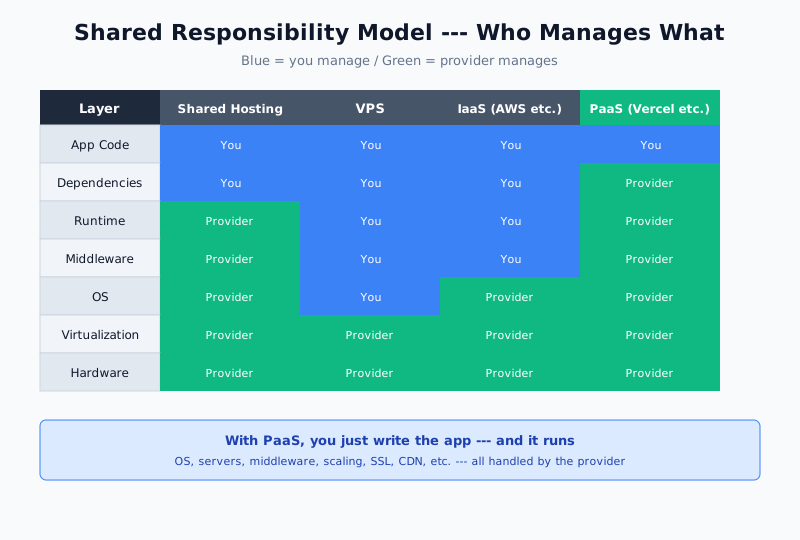
Any web service is a stack of layers, from hardware up to your application code. Bottom to top:
- Hardware --- physical servers, storage, network equipment
- Virtualization --- the technology that splits one physical machine into many virtual ones
- OS --- Linux, Windows Server, etc.
- Middleware --- web servers (Nginx / Apache), databases (MySQL / PostgreSQL), etc.
- Runtime --- Node.js, Python, PHP, Ruby, and other execution environments
- Dependencies --- packages managed via npm, composer, and the like
- Application code --- the source code you write
Each hosting type is defined by where the provider's responsibility starts and yours ends.
| Type | Provider manages | You manage |
|---|---|---|
| Shared Hosting | Hardware through middleware | Parts of runtime config and your app |
| VPS | Hardware and virtualization only | Everything from OS upward |
| Cloud (IaaS) | Hardware through OS | Middleware through your app |
| PaaS | Hardware through runtime | Just your app code |
| SaaS | Everything | Configuration only (no code) |
The further down you go, the less you're on the hook for; the further up, the more control you have. Choosing the right one comes down to the trade-off between control and operational overhead.
3. Shared Hosting --- The Traditional Workhorse
Shared hosting packs many users onto a single physical server. A huge chunk of the web still runs this way, and it's especially common for small business sites and personal blogs.
Popular Services
- Bluehost (one of the largest, from ~$3/mo)
- SiteGround (well-regarded for WordPress, from ~$4/mo)
- HostGator (long-running budget option, from ~$3/mo)
- DreamHost (independent, from ~$3/mo)
- Xserver (dominant in Japan, from ~$6/mo)
Pros
- Extremely cheap (a few dollars a month)
- One-click WordPress install (right from the control panel)
- Barely any technical knowledge required (upload files over FTP and you're done)
- Custom domains and email included (plenty for a small business)
Cons
- Tech stack is restricted (PHP works great; Node.js and Python are hit-or-miss)
- You share a box with strangers (if their site melts down, yours slows too)
- SSH is often unavailable (no command line access)
- Poor fit for modern dev workflows (automated git-push deploys take some hacking)
Good For
WordPress sites, corporate homepages, personal blogs, small e-commerce stores. If your use case is "run an off-the-shelf PHP CMS," shared hosting is unbeatable on price-performance.
This site (AI Arte) actually runs on Xserver shared hosting. Running Laravel on shared hosting is a slightly unconventional setup, but yes --- it's entirely possible to run a modern framework on shared hosting if you're willing to work with the constraints.
4. VPS --- "Your Own Virtual Machine"
A VPS (Virtual Private Server) gives you exclusive access to a single virtual machine running inside a physical server. Everything from the OS up is yours to manage.
Popular Services
- DigitalOcean (from $4/mo, extremely popular with devs)
- Linode (Akamai-owned, from $5/mo)
- Vultr (from $2.50/mo, excellent value)
- Hetzner (European, from ~$4/mo, fantastic specs per dollar)
- ConoHa VPS (Japan-focused, from ~$4/mo)
Pros
- Complete freedom above the OS (Node.js, Python, Docker --- install anything)
- Root access (SSH in and run whatever you want)
- Noisy neighbors are less of a problem (dedicated CPU and memory allocations)
- Cheap (a few to tens of dollars per month)
Cons
- Server admin skills required (Linux, Nginx, SSL certs, firewalls, the whole stack)
- Security updates are on you (fall behind and you get compromised)
- You're the on-call rotation (if the box goes down at 3am, you're up)
- Scaling is manual (traffic grew? time to resize the plan yourself)
Good For
Engineers who want to learn server operations, developers who want control without breaking the bank, and anyone running specialty middleware. Common uses include self-hosted game servers, personal mail servers, and dev/staging environments.
5. Cloud (IaaS) --- AWS, GCP, and Azure
IaaS (Infrastructure as a Service) offers hardware and virtualization as a service. Think of it as a VPS on steroids --- massively more powerful, with far more services bolted on.
Major Providers
- Amazon Web Services (AWS) --- market leader, 200+ services
- Google Cloud Platform (GCP) --- strongest in AI/ML and data analytics
- Microsoft Azure --- enterprise-focused, tight Office integration
- Oracle Cloud --- notable for its permanent free tier
- Alibaba Cloud --- strong in China and across Asia
Pros
- Scales effectively without limit (a handful of servers to thousands, automatically)
- Rich managed services (databases, caches, queues, AI, CDNs --- hundreds of them)
- Pay-as-you-go flexibility (only pay for what you use)
- Regions worldwide (US, Europe, Asia-Pacific, and everywhere in between)
- Rock-solid reliability and security (trusted by banks and governments)
Cons
- Enormous learning curve (AWS alone has 10+ different certifications)
- Pricing is bewildering (many people only learn their bill is $10k when they get it)
- You really need dedicated cloud engineers (running this solo at serious scale is brutal)
- Overkill for small sites (a tiny blog does not need AWS)
Good For
Large web services, enterprise backend systems, data analytics platforms, ML infrastructure, globally-distributed apps. Netflix, Airbnb, Spotify --- most of the big names run on AWS.
Behind the Scenes: PaaS Runs on the Cloud
Here's a fun fact: most PaaS providers, including Vercel and Netlify, run on top of AWS themselves (CloudFront, Lambda, and friends). You can think of PaaS as "IaaS with the complexity hidden behind a nice UI."
6. PaaS --- Vercel, Netlify, Render, and Friends
We covered the basics in section 1, but let's dig into how PaaS actually works.
The Typical PaaS Workflow
- Connect your GitHub (pick a repo, that's it)
- Build settings auto-detected (Next.js, Astro, Vite --- all recognized automatically)
- git push triggers a deploy (pushing to main ships to production)
- Custom domain setup (just point a CNAME)
- Automatic SSL (issued and renewed via Let's Encrypt)
- Preview URLs per PR (every pull request gets its own live preview)
Total time to get running? Under 10 minutes, even the first time. Setting the same thing up on a VPS --- Nginx config, Let's Encrypt, systemd units, a CI/CD pipeline --- takes days.
How PaaS Pricing Works
PaaS services typically use a "generous free tier + usage-based overage" pricing model.
| Service | Free tier | Paid plan |
|---|---|---|
| Vercel | Personal / hobby only (commercial use prohibited) | Pro from $20/mo |
| Netlify | 100GB bandwidth, 300 build minutes/mo | Pro from $19/mo |
| Render | Free static sites, free Web Service tier (with sleep) | From $7/mo |
| Railway | $5/mo in free credit | Hobby from $5/mo |
| Cloudflare Pages | Unlimited bandwidth, 500 builds/mo | From $20/mo |
Things to Watch Out For
PaaS is incredibly convenient, but it has its pitfalls.
- Costs can spike hard once you blow past the free tier (there are plenty of horror stories of $1,000+ Vercel bills)
- You can't install your own middleware (Redis, PostgreSQL, etc. require separate services)
- Long-running functions hit limits (Vercel functions cap out at 10-60 seconds)
- Commercial use requires a paid plan (personal blogs are usually fine on free)
- Vendor lock-in is real (leaning on proprietary APIs makes migration painful)
7. Comparing the Four --- Cost, Flexibility, and Ops Burden
Here's everything in a single table.
| Factor | Shared Hosting | VPS | Cloud (IaaS) | PaaS |
|---|---|---|---|---|
| Monthly cost | $3-15 | $5-30 | Usage-based (cents to thousands) | Free to $20/mo |
| Setup time | 30 min | Several hours to a day | A day to a week | 5-10 min |
| Skills required | Basic FTP | Linux admin | Cloud architecture | git only |
| Flexibility | Low (mostly PHP) | High (OS on up) | Maximum (no limits) | Medium (language/FW-restricted) |
| Scalability | Low | Medium (manual) | Maximum (automatic) | High (automatic) |
| Ops burden | Low | High | Maximum | Minimum |
| SSL certs | Automatic (free) | Configure yourself | Configure yourself | Automatic (free) |
| CDN | None | Configure separately | Build your own | Included |
| CI/CD | None | Build your own | Build your own | Included |
| Database | MySQL bundled | Configure yourself | Managed DB (separate bill) | Integrate with external service |
| Best for | WordPress | Learning / specialty | Enterprise / scale | Modern web apps |
This isn't about which one is "best." The right question is "which one fits what I'm trying to do?"
8. Major PaaS Services Head-to-Head
Within the PaaS world, each service has its own strengths. Here's a breakdown of the top five.
Vercel --- King of the Frontend
- Strengths: Built by the Next.js team, world-class edge network, exceptional developer experience
- Weaknesses: No commercial use on free tier, strict function execution limits, cost can spike
- Best for: Next.js / React / Vue / Svelte frontends, JAMstack sites
- Pricing: Free for personal use, Pro $20/mo, overages billed by bandwidth and function time
Netlify --- The JAMstack Pioneer
- Strengths: Simple pricing, built-in form handling, Functions (serverless) support
- Weaknesses: Next.js optimizations are weaker than Vercel's
- Best for: Static site generators like Astro, Hugo, and Jekyll
- Pricing: Free (100GB/mo), Pro $19/mo
Render --- The Heroku Successor
- Strengths: Full-stack support (Web Service + DB), managed PostgreSQL and Redis
- Weaknesses: Free Web Services sleep after 15 minutes (cold starts apply)
- Best for: Node.js / Python / Ruby / Go backends and monolithic apps
- Pricing: Web Service from $7/mo, PostgreSQL from $7/mo
Railway --- Simplicity First
- Strengths: Intuitive UI, rich templates (spin up DB + API with one click)
- Weaknesses: Usage-based pricing means you need to watch your budget
- Best for: Prototypes, small-to-mid fullstack apps, Discord bots, that kind of thing
- Pricing: Hobby $5/mo ($5 credit included), Pro $20/mo
Cloudflare Pages --- Best-in-Class Free Tier
- Strengths: Unlimited bandwidth for free, global CDN, Workers (edge functions) integration
- Weaknesses: Not well-suited to complex backends
- Best for: High-traffic static sites, Astro / Hugo / Next.js (SSG)
- Pricing: Free (unlimited bandwidth), Pro $20/mo
9. Why Does AI Keep Pushing PaaS?
Ask Claude Code or ChatGPT to help you build and deploy an app, and it will almost always recommend Vercel or Render. This isn't random --- it's a rational choice from the AI's perspective.
Reason 1: The Success Rate Is Dramatically Higher
Deploying to a VPS or AWS has dozens of potential failure points --- network config, SSL, systemd, nginx tuning. The odds that an AI's instructions actually work end-to-end are much higher with PaaS, where it's just "git push."
Reason 2: Environments Are Standardized
On a VPS, the answer to "how do I do X?" changes depending on whether you're running Ubuntu 22.04 or CentOS 7. PaaS environments are standardized, so AI advice tends to work verbatim.
Reason 3: PaaS Matches the Apps AI Likes to Build
The apps AI helps people build tend to be Next.js sites, Python APIs, Discord bots --- exactly the territory PaaS providers specialize in. If you were building a WordPress site, AI would steer you toward shared hosting instead.
Reason 4: Troubleshooting Is Much Easier
PaaS dashboards give you logs, metrics, and deploy history in one place. When AI asks you to "share the logs," you can grab them in two clicks. On a VPS, it's "SSH in, run journalctl, filter, paste..." --- a lot more friction.
10. Recommendations by Use Case --- Which One Should You Pick?
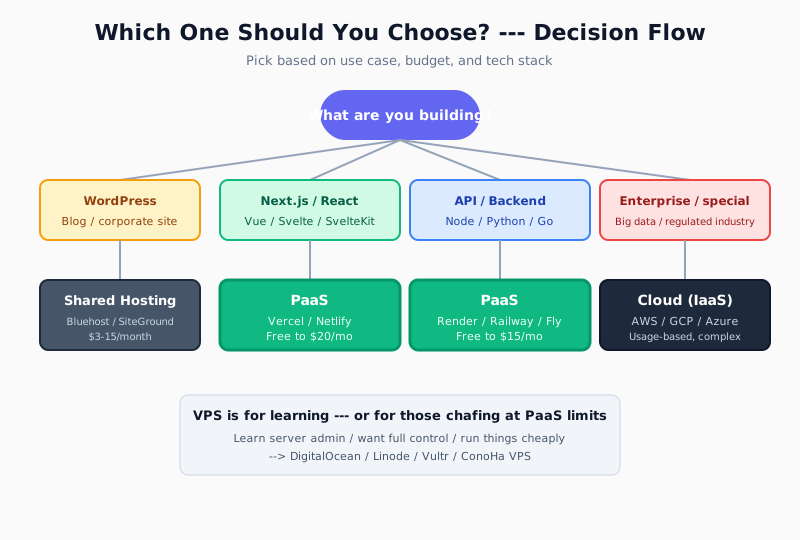
WordPress Blog or Corporate Site
-> Shared hosting (Bluehost, SiteGround, Xserver). A few dollars a month is plenty. Running a WordPress site on PaaS or AWS is massively over-engineered.
Modern Frontend with Next.js / React
-> Vercel (the obvious choice for Next.js) or Netlify (for other frameworks). Start on the free tier, move to Pro ($20/mo) when you go commercial.
Static Sites / High-Traffic Content
-> Cloudflare Pages. Unlimited bandwidth on the free tier is unmatched. Perfect for technical blogs and documentation sites.
APIs, Backends, Fullstack Apps
-> Render or Railway. You get your database on the same platform, and total costs land around $10-30/mo.
Discord Bots, Always-On Small Apps
-> Railway or Fly.io. Both have pricing models that favor small always-on workloads.
Learn Server Ops / Maximum Control
-> VPS (DigitalOcean, Linode, Vultr). A few dollars a month gets you a whole Linux box to play with.
Large-Scale Web Services / Enterprise Systems
-> Cloud (AWS, GCP, Azure). Assumes you have dedicated cloud engineers on staff.
Hosting ML / AI Models
-> Hugging Face Spaces (has a free tier) or Modal (GPU PaaS). AWS SageMaker is the choice at serious scale.
Just Starting Out?
-> Start with Vercel + Cloudflare Pages. You get a free deploy experience that shows you just how nice git-push-to-production can be. Once you're comfortable, branch out to Render, Railway, and eventually AWS.
For more on the forces at play here, check out Can AI Replace Infrastructure and Network Engineers? --- it gives additional context on why AI gravitates toward PaaS.
FAQ
Q. What's the difference between PaaS, SaaS, IaaS, and FaaS?
IaaS rents you infrastructure (servers, storage --- AWS EC2, etc.), PaaS rents you an app runtime environment (Vercel, etc.), and SaaS rents you finished software (Gmail, Slack, etc.). FaaS (Function as a Service) is a subset of PaaS, where you deploy individual functions (AWS Lambda, Cloudflare Workers). The amount of code you write decreases in the order IaaS > PaaS > FaaS > SaaS.
Q. Can I run a commercial blog on Vercel's free tier?
No. Vercel's free (Hobby) plan prohibits commercial use. That includes affiliate links, ad-supported sites, corporate homepages, and any paid services --- all considered commercial. Hobby portfolios and open-source project docs are fine. For commercial use, consider Pro ($20/mo) or Cloudflare Pages (where commercial use is free).
Q. Is PaaS really that easy? What do I do when something breaks?
The first deploy really is easy (under 10 minutes), but you'll still run into the usual suspects --- "the build fails," "env vars aren't getting applied," "I can't connect to my database" --- just like anywhere else. The difference is that PaaS gives you logs right in the dashboard, which makes diagnosing problems dramatically easier than on shared hosting or a VPS. Ask AI to "solve this Vercel build log error" and it usually sorts things out fast.
Q. Is it true people have gotten huge surprise bills on PaaS?
Yes. There are multiple reports of Vercel users getting hit with thousands of dollars in a single month after their personal site got hammered with traffic (viral content, hotlinked images, etc.). The mitigation: Vercel has a "Spend Management" feature that lets you set a hard cap. For sites where high traffic is likely, Cloudflare Pages --- with its unlimited free bandwidth --- is the safer bet.
Q. Can I run WordPress on Vercel?
No. WordPress core runs on PHP, and Vercel doesn't support that. PaaS like Vercel is built for modern runtimes --- Node.js, Python, Go. If you want WordPress, shared hosting or a VPS is the right answer. That said, running WordPress as a Headless CMS (admin + API) with a Next.js frontend on Vercel is a pattern many teams use.
Q. I'm worried about vendor lock-in. Is it hard to migrate away from PaaS?
The core "git push to deploy" workflow is standard across PaaS providers, so moving your code between them is pretty painless. The catch is proprietary APIs --- Vercel KV, Netlify Functions, Cloudflare Workers bindings --- which make migration much harder if you rely on them heavily. The rule of thumb: if you want to avoid lock-in, minimize use of proprietary APIs and stick to standard technologies (standard Next.js APIs, PostgreSQL, etc.) wherever you can.
Q. Can I run a real app entirely on AWS's free tier?
AWS offers both "12-month free" and "always free" tiers, but they're too restrictive for serious personal-project hosting. You get 750 hours/mo of EC2 t2.micro (roughly one instance), a db.t2.micro RDS, etc. --- and one misconfiguration and you're paying. If your goal is "learn AWS," go for it. If your goal is "just ship something," PaaS is safer and easier.
Q. So what should I actually pick?
"When in doubt, use PaaS (Vercel, Render, or Cloudflare Pages)" is the modern answer. The reasons: (1) hard to mess up, (2) free to start, (3) gets the most out of AI assistance, (4) migration later is relatively painless. For WordPress, shared hosting is the only sensible pick. Consider AWS only when you have dedicated cloud engineers and are building something genuinely large-scale.
This article reflects information as of April 2026. Pricing and free tiers for each service can change --- check the official pages before you sign up.
![15 Jobs Most Likely to Be Replaced by Generative AI — And How to Future-Proof Your Career [2026]](https://az-arte.com/images/articles/ai-job-loss-featured-en.svg)
![20 Best Generative AI Tools for Game Development: Art, Music, Coding & More [2026]](https://az-arte.com/images/articles/ai-gamedev-tools-featured-en.svg)