Table of Contents
- 1. What's Happening Right Now — The Rise of AI Coding Tools
- 2. Infrastructure Work AI Can Do
- 3. Infrastructure Work AI Cannot Do
- 4. The Impact on Network Engineers
- 5. How Real-World Teams Are Changing
- 6. How to Thrive as an Infra Engineer in the AI Era
- 7. Conclusion — Not Replacement, but Evolution
- FAQ
"I asked Claude Code to write Terraform for spinning up an EC2 instance, and thirty seconds later the IaC was done. Doesn't that mean infrastructure engineers are out of a job?"
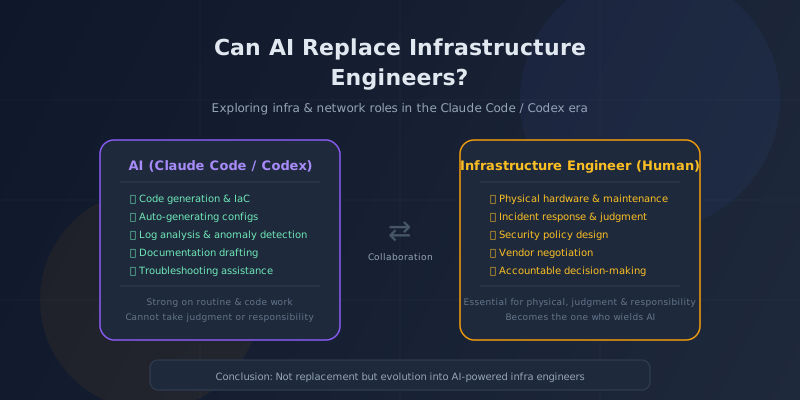
Plenty of people are feeling this way right now. AI coding tools have evolved at breathtaking speed, and in the infrastructure world they're accelerating code generation, configuration authoring, and log analysis. OpenAI's Codex coding agent, announced in 2025, is also particularly strong at generating infrastructure code.
So, are infrastructure and network engineers actually about to become obsolete?
The short answer: the realistic view is that we're seeing "a shift in roles," not "replacement." In this article, we'll zoom into the infrastructure domain specifically, sort out what AI is good at versus where it struggles, and lay out concrete strategies engineers should adopt.
1. What's Happening Right Now — The Rise of AI Coding Tools
First, let's take stock of what AI coding tools can actually do in infrastructure today.
Major AI Tools and How They Handle Infrastructure
| Tool | Provider | Strengths in Infrastructure |
|---|---|---|
| Claude Code | Anthropic | Generates Terraform, Docker, Ansible, K8s manifests, and more. Excels at modifying code while understanding the whole project |
| Codex (CLI) | OpenAI | Executes and validates code in a sandbox. Pairs IaC generation with verification in a single flow |
| GitHub Copilot | GitHub / MS | In-editor completion. Predicts the next lines of your existing Terraform or YAML |
| Amazon Q Developer | AWS | AWS-focused. Strong at CloudFormation, CDK, and IAM policy generation |
| Google Cloud Assist | Helps configure GCP environments. Integrates with Vertex AI |
What's notable is that these tools are moving beyond simple code completion and starting to behave like "agents." Claude Code can read and write files and run commands, while Codex executes code in a sandbox to verify results.
The Scope of "What AI Can Do" Is Expanding Fast
In 2024, AI could barely scaffold a Terraform template. By 2025–2026, it can do things like this:
- Read existing infrastructure code and flag security issues
- "I want to deploy this app on AWS" → propose a complete VPC, subnet, SG, ALB, and ECS/EKS layout
- Analyze production error logs and surface candidate root causes and fixes
- Build a CI/CD pipeline from scratch
- Generate and refactor Kubernetes manifests and Helm charts
Seeing this pace of progress, it's easy to conclude "we don't need infra engineers anymore." But that's only half the picture.
2. Infrastructure Work AI Can Do
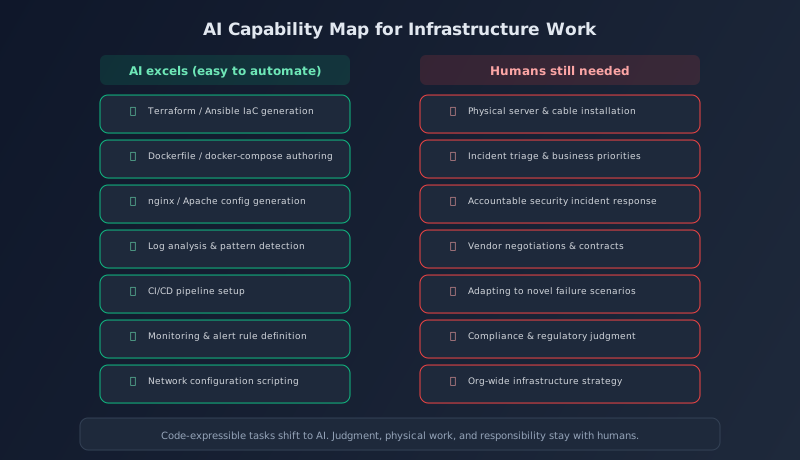
AI is especially strong where the work is expressible as code, pattern-based, and text-driven.
1. Infrastructure as Code (IaC) Generation
Terraform, CloudFormation, Pulumi, Ansible, Chef — generating code for IaC tools is arguably AI's sweet spot.
| Task | AI Accuracy | Notes |
|---|---|---|
| Terraform resource definitions | Excellent | Near-accurate for major AWS / GCP / Azure resources |
| Ansible playbooks | Excellent | Great at common package installs and config changes |
| Docker / docker-compose | Excellent | Handles multi-stage builds and network configuration |
| K8s manifests / Helm | Good | Accurate on basics. Review complex custom resources |
| CI/CD pipelines | Good | Generates GitHub Actions, GitLab CI, and similar workflows |
2. Configuration File Generation and Tuning
nginx.conf, apache.conf, iptables/nftables rules, systemd unit files — AI is great at producing these too. Ask it to "write an nginx reverse proxy config for this web app with SSL," and you'll get a configuration that follows best practices.
3. Log Analysis and Anomaly Detection
Finding patterns in large volumes of logs is where AI really shines.
- Summarizing text logs from syslog, journald, CloudWatch Logs, and more
- Classifying error patterns and analyzing frequencies
- Instantly answering "Which errors have spiked in the last hour?"
- Suggesting likely causes and remediations based on the logs
4. Auto-Generating Documentation and Runbooks
AI can read your existing infrastructure code and draft diagrams' accompanying explanations, operational runbooks, and incident response manuals — exactly the tasks infra engineers love to avoid (but desperately need).
5. Security Checks
Routine security reviews — scanning for over-permissive IAM policies, validating security group rules, checking Terraform against the CIS Benchmark — are areas where AI can assist effectively.
3. Infrastructure Work AI Cannot Do
This is the crucial part. If you don't understand AI's limits, you end up in the worst-case scenario: "Let AI handle everything" → catastrophic outage.
1. Physical-Layer Work
This should be obvious: AI can't do anything physical.
- Racking hardware and running cables
- Swapping out failed HDDs and SSDs
- Physically configuring or replacing network gear (routers, switches, firewalls)
- Data center access control and physical security
"But if everything moves to the cloud, won't physical work disappear?" Not quite. Surveys show that roughly 60% of Japanese enterprises still run at least some on-premises infrastructure alongside cloud (per IDC Japan), and physical infrastructure isn't going away anytime soon.
2. Business Judgment During Incidents
When a production incident hits, the most important question is "what takes priority?" — and that's a business decision.
- "The database is corrupted. Restoring from backup means we lose the last two hours of data. Do we restore or try to repair?"
- "Both Service A and Service B are down. With limited resources, which do we bring back first?"
- "We suspect a security breach. Do we take the service offline to investigate, or investigate while it runs?"
These calls require more than technical knowledge. They demand weighing business impact, customer commitments (SLAs), legal risk, and alignment with leadership — and they can't be handed off to AI. AI can present options, but it can't own the decision.
3. Handling Novel Failure Modes
AI is strong on patterns it has seen in its training data, but it's weaker on failures that nobody has ever encountered before.
- Unpublished bugs on the cloud provider's side
- Compound failures across multiple systems (network + DNS + application all misbehaving at once)
- Intermittent hardware issues caused by aging components
Situations like these call for experienced engineers' "gut feel" — the ability to draw analogies from past incidents. That remains decisive.
4. Ultimate Responsibility for Security
When AI says "this configuration is secure," that's not a guarantee. The legal and ethical responsibility when a security incident occurs falls on humans, not AI.
- Reporting to and coordinating with regulators after a data breach
- Running forensic investigations and preserving evidence
- Defining preventive measures and reporting to leadership
- Customer notification and communication
5. Vendor Management and Negotiation
Cloud vendors, data center operators, ISPs, security vendors — an infra engineer's job involves a lot of external negotiation. Contract terms, SLA agreements, coordinating incident response with partners — these are purely human territory, and AI can't touch them.
4. The Impact on Network Engineers
Network engineering sits in a somewhat unique spot within infrastructure. Let's look at how AI affects it specifically.
Network Tasks AI Can Automate
| Task | AI Capability | Concrete Example |
|---|---|---|
| ACL / firewall rule generation | Excellent | Describe the requirement → AI produces iptables / nftables / SG rules |
| VLAN / subnet design proposals | Good | Drafts IP plans from requirements |
| Network device configuration | Good | Generates Cisco IOS, Junos, and similar configs (verification required) |
| Traffic analysis | Excellent | Anomaly detection and pattern analysis on NetFlow / sFlow data |
| BGP / OSPF configuration | Limited | Handles basics, but complex routing policies need human review |
Network Tasks That Are Hard for AI
- Physical cabling design and installation: floor layout, cable routing, patch panel organization
- RF surveys and Wi-Fi design: on-site measurements are essential. Identifying wall materials and interference sources
- Layer-1 troubleshooting: cable breaks, port failures, drops in optical signal levels — all of which require physical inspection
- Carrier coordination: provisioning new circuits, bandwidth changes, tuning redundant configurations
- Large-scale network migrations: planning and executing migrations across hundreds of devices, with phased cutover to minimize downtime
Because network engineering depends so heavily on the physical layer, full replacement by AI is even harder than on the server side. That said, AI contributes a lot to efficiency in configuration generation and troubleshooting.
5. How Real-World Teams Are Changing
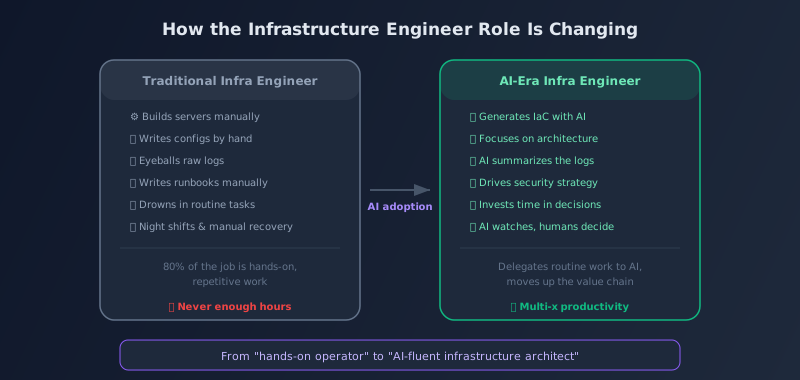
Forget the theory for a moment — here are a few concrete patterns showing how AI is actually being used in the field.
Pattern 1: Accelerated IaC Development
At one startup, infra engineers are using Claude Code to generate Terraform code. What used to take 30 minutes to an hour per AWS resource definition now gets done in 5–10 minutes — the engineer describes the requirement, AI drafts it, and the human reviews and refines.
Importantly, they never apply AI-generated code straight to production. A human always reviews it, adjusting for security and cost optimization.
Pattern 2: First-Response Support During Incidents
When a production incident occurs, they first have AI analyze the logs and narrow down candidate root causes. A human then makes the final call and runs the recovery. A clean division of labor.
- Before: 30 minutes to an hour reading logs manually to identify the cause
- After: AI narrows it down to three candidate causes in five minutes → human confirms and acts
MTTR (mean time to recovery) drops, but this introduces a new risk: "We trusted AI's analysis and did the wrong recovery." That's why the final judgment still needs to sit with an experienced engineer.
Pattern 3: Accelerated Junior Engineer Development
Infrastructure has long had the reputation of "you can't do anything without experience," but AI is dramatically flattening the learning curve.
- "What does this Terraform code mean?" → AI walks through it line by line
- "Why should this security group block port 22?" → AI explains the context and reasoning
- "I don't know how to read this incident log" → AI explains its structure and highlights the key lines
This isn't "engineers become unnecessary" — it's "engineers grow faster."
Pattern 4: The One-Person Infrastructure Team
Infrastructure operations that used to require three to five people can now, with AI's help, be handled by one or two. Headcount drops, but the remaining engineers need deeper skills and sharper judgment.
6. How to Thrive as an Infra Engineer in the AI Era
Now for the concrete strategies. Here are the skills that AI won't replace — and in fact, become more valuable because of AI.
1. Learn to Use AI Fluently
This is the single most important and immediately actionable strategy. Engineers who treat AI as a tool rather than a threat can multiply their productivity several times over.
- Integrate Claude Code, Codex, Copilot, and similar tools into your daily workflow
- Learn to write effective prompts (instructions) for AI
- Maintain the technical chops to correctly verify and refine AI output
For how to try these tools for free, see "How to Use AI for Free [2026 Edition]."
2. Shift Toward Design and Architecture
AI is great at writing code. It's not great at deciding what to design and how.
- Cloud architecture design: balancing availability, scalability, and cost optimization
- Multi-cloud strategy: understanding the differences between AWS, GCP, and Azure and using each appropriately
- Disaster recovery (DR) design: from defining RPO/RTO to drafting recovery procedures
3. Deepen Your Security Expertise
Security is the area where "AI getting it wrong" has the biggest consequences. As a result, engineers with deep security expertise are likely to see growing demand as AI adoption increases.
- Designing and implementing zero-trust architectures
- Security incident response skills
- Compliance work (ISMS, PCI DSS, GDPR, and the like)
4. Adopt an SRE Mindset
Google's SRE philosophy — "treat operations as a software engineering problem" — matters even more in the AI era.
- Defining and operating SLIs/SLOs/SLAs
- Making decisions based on error budgets
- Driving automation (AI is one form of automation)
- Building a strong postmortem culture
5. Strengthen the Bridge to Business
The skill that's hardest to replace with AI is connecting technology to business.
- Proposing infrastructure cost optimizations and reporting to leadership
- Defining and estimating infrastructure requirements for new product lines
- Translating technical risks into business risks for non-technical stakeholders
7. Conclusion — Not Replacement, but Evolution
Let's bring it all together.
| Question | Answer |
|---|---|
| Will AI replace infra engineers? | Full replacement: no. But demand for "engineers who only turn screws" will definitely shrink |
| Where AI is strong | IaC generation, config files, log analysis, documentation — routine work that can be expressed as code |
| Where humans are needed | Physical work, incident judgment, security accountability, vendor negotiation, architecture design |
| Impact on headcount | Teams will likely shrink, but the engineers who remain will need sharper skills |
| Impact on network engineers | Harder to replace than server infra because of physical-layer dependencies. Configuration generation still gets more efficient |
The most important message here is this: "infrastructure engineers who can wield AI" will become the most valuable on the market. With AI taking on routine work, engineers can focus on higher-level design, judgment, and strategy.
This isn't a threat — it's an opportunity to evolve. Don't fear AI; arm yourself with it. That's the survival strategy for the AI era.
For foundational IT knowledge and how to get started with AI-powered development, see also "AI Development for Complete Beginners."
FAQ
Q. Should I give up on becoming an infrastructure engineer now?
No — if anything, it's a great opportunity. AI tools are lowering the learning barrier for infrastructure. That said, "install Linux and set up nginx" skills alone aren't enough anymore. You'll need cloud architecture design skills, security knowledge, and the ability to use AI tools effectively. Put differently, demand for engineers who have those skills is likely to stay high.
Q. Will networking certifications like CCNA lose their value?
The certifications themselves won't "disappear," but parts of the skills they certify (memorizing configuration commands, for example) can now be handled by AI. What matters is the understanding of networking fundamentals you pick up while studying for them — the OSI model, how TCP/IP works, routing protocol concepts. That knowledge still matters in the AI era, because you need fundamentals to judge whether AI output is correct.
Q. If AI causes a production incident, who's responsible?
Today, the human (and the organization) who decided to apply AI-generated code to production bears the responsibility. AI is a tool; it can't be a legal subject. It's like a knife — if your cooking fails, you can't blame the knife maker. That's exactly why a workflow where humans review and verify AI-generated infrastructure code before applying it is non-negotiable.
Q. Does AI have less impact on on-premises environments?
In on-prem environments, where physical tasks (installing, swapping, and cabling hardware) are common, AI's impact is smaller than in the cloud. That said, text-based work — configuration management with tools like Ansible, monitoring setup, documentation — benefits just as much on-prem. Expect to see a natural division emerge: "humans handle the physical, AI assists with the logical (configuration and code)."
Q. How should I choose between Claude Code and Codex?
Claude Code runs in your local terminal and excels at understanding an entire existing project and generating or modifying code within it. Codex, on the other hand, can execute and verify code in a sandbox, which makes it strong for generating new IaC with verification built in. In practice, using Claude Code for modifying and extending existing infrastructure, and Codex for prototyping brand-new builds, works well. That said, these tools evolve fast — the best approach is to try both and pick whichever fits your workflow.
Q. Should small businesses adopt AI-powered infrastructure management too?
Yes — the benefits are actually biggest for small businesses. Even if you can't afford a dedicated infrastructure engineer, AI tools make it much more feasible for a developer to handle infrastructure on the side. That said, for critical work like security configuration and backups, don't take AI output at face value. Have someone with trustworthy expertise review it.
![20 Best Generative AI Tools for Game Development: Art, Music, Coding & More [2026]](https://az-arte.com/images/articles/ai-gamedev-tools-featured-en.svg)
![Generative AI Knowledge Cutoff Dates Compared: ChatGPT, Claude, Gemini & More [2026]](https://az-arte.com/images/articles/ai-cutoff-featured-en.svg)
![Which Frameworks Are Most Generative AI-Friendly? A Complete Compatibility Guide [2026]](https://az-arte.com/images/articles/ai-friendly-frameworks-en.svg)