![AI Development for Complete Beginners — From Apps, Databases & Servers to Launching Your Service [Full Guide]](https://az-arte.com/images/articles/ai-service-dev-guide-featured-en.svg)
Table of Contents
- 1. Why Complete Beginners Can Build Services Now
- 2. The IT Big Picture — Apps, Databases & Servers in 5 Minutes
- 3. Frontend & Backend — The UI and the Engine
- 4. Databases — Where Your Data Lives
- 5. Local vs. Production — Development and Deployment
- 6. Shared Hosting, VPS & Cloud — Comparing Three Server Types
- 7. What Is Claude Code? — Coding with an AI Partner
- 8. Languages & Frameworks — How to Choose
- 9. Step-by-Step: Launching Your Service
- 10. Tips to Avoid Giving Up
- FAQ
"I'd love to build a web service, but programming is way beyond me..."
Many people feel this way. And until recently, they were right — building even a simple service required mastering HTML, CSS, JavaScript, server administration, database design, and more. Learning all of that on your own was genuinely daunting.
But in 2026, everything has changed. With AI coding tools, you can describe what you want in plain language and the AI writes the code for you. What you actually need isn't memorized syntax — it's an understanding of how IT works and the ability to give AI clear instructions.
This guide starts from the very basics — "What is an app?" "What is a server?" — and walks you through every step to launching your own service.
1. Why Complete Beginners Can Build Services Now
Let's get straight to the point. The reason complete beginners can now build services is that AI handles the hands-on coding work for you.
Traditional Development vs. the AI Era
| Phase | Traditional | AI Era (2026+) |
|---|---|---|
| Learning a language | Months to years | Just understand the basics |
| Writing code | All by hand | Instruct AI → generate → refine |
| Debugging | Decipher errors yourself | Paste the error to AI — it explains the cause and fix |
| Architecture | Requires experience | Brainstorm designs with AI |
| Learning cost | Enormous | "IT big picture" + "ability to instruct AI" |
The key takeaway is not that "you don't need to write code" — it's that you need to understand the IT big picture so you can give AI the right instructions. Think of it like cooking: you don't have to do every step yourself, but if you can't tell the difference between grilling a steak and simmering a curry, you won't know what to order from the chef (AI).
Let's build that big picture from scratch.
2. The IT Big Picture — Apps, Databases & Servers in 5 Minutes
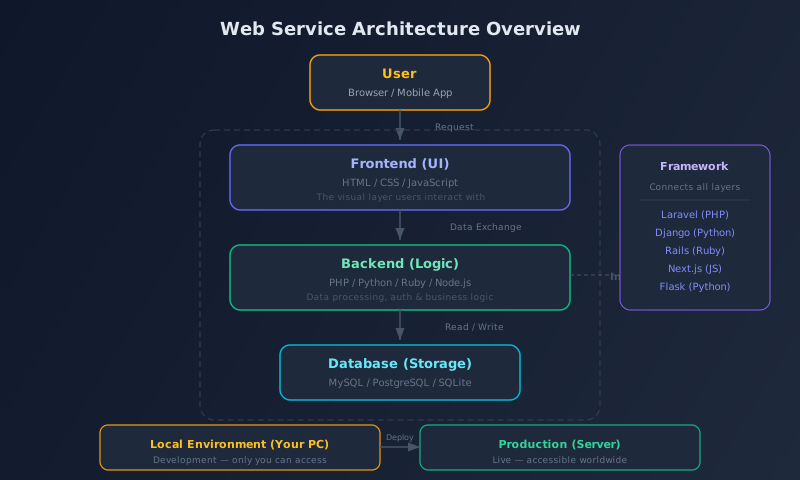
A web service is made up of four main components.
1. Frontend (What Users See)
This is the "screen" you're looking at right now. Button colors, font sizes, layout — everything the user directly interacts with is the frontend.
- HTML: Defines the structure (headings, paragraphs, image placement, etc.)
- CSS: Handles the styling (colors, fonts, layout)
- JavaScript: Adds interactivity (something happens when you click a button)
Think of HTML as the frame of a house, CSS as the interior design, and JavaScript as the electrical and plumbing systems.
2. Backend (Behind the Scenes)
The "backstage" processing that users never see. Login authentication, saving and retrieving data, payment processing — all handled by the backend.
- PHP: Strong in web development. WordPress and this site (Laravel) run on PHP
- Python: Excels at AI/data analysis too. Django and Flask are popular
- Ruby: Famous for Ruby on Rails. Popular with startups
- Node.js: JavaScript on the server side. Unify your frontend and backend language
If the frontend is the "dining room" of a restaurant, the backend is the "kitchen." Diners never see inside the kitchen, but that's where the food (data) is prepared.
3. Database (Data Storage)
User profiles, article content, product information — every piece of data is stored in a database. We'll cover this in more detail later.
4. Server (The Machine Behind It All)
The frontend, backend, and database all run on a "computer" called a server. It's essentially the same as your PC, except it runs 24/7 and accepts connections from around the world.
5. Framework (The Development Skeleton)
A framework ties components 1–4 together efficiently. Instead of writing everything from scratch, commonly needed features (login, database connection, routing, etc.) come pre-built. Examples include Laravel (PHP), Django (Python), Rails (Ruby), and Next.js (JavaScript).
Once you understand how these five pieces relate, you've grasped the IT big picture.
3. Frontend & Backend — The UI and the Engine
Let's dig a little deeper. Here's how the frontend and backend divide their roles, illustrated with a real-world example.
Example: Posting on Twitter
| Action | Frontend | Backend |
|---|---|---|
| Tap the Post button | Displays the button & detects the click | Saves the post to the DB |
| View your timeline | Lays out the list of posts | Fetches the latest posts from the DB |
| Log in | Shows the ID/password form | Authenticates & manages sessions |
| Upload an image | Shows the file picker UI | Stores & resizes the image |
Every web service works through this collaboration between the frontend (what you see) and the backend (the processing).
"Full-Stack" vs. Specialization
A developer who handles both frontend and backend is called a "full-stack engineer." At companies, teams usually specialize, but solo developers often do both.
This is where AI comes in. With tools like Claude Code, you can instruct the AI to write both frontend and backend code, making full-stack solo development possible.
4. Databases — Where Your Data Lives
A database (DB) is a system that organizes and stores information. Think of it like an Excel spreadsheet.
Database Basics
| Term | Excel Equivalent | Example |
|---|---|---|
| Table | Sheet | "Users" table, "Articles" table |
| Column | Column header | Name, Email, Password |
| Row (Record) | A single row of data | John Smith, john@example.com, *** |
| Query | Search / Filter | "Show all users aged 20+" |
Popular Databases
- MySQL: The most popular. Used by WordPress and countless web services. Included with most shared hosting
- PostgreSQL: Feature-rich. Excels at complex data processing
- SQLite: Ultra-lightweight DB that runs from a single file. Great for personal projects and prototypes
You interact with databases using a language called SQL, but frameworks like Laravel and Django let you work with data using your programming language instead of writing raw SQL. And AI can auto-generate those queries for you, too.
5. Local vs. Production — Development and Deployment
This is where many beginners stumble. "It worked on my computer, but it breaks when I deploy!" is a rite of passage every developer goes through.
Local Environment (Development)
Your service running on your own PC. Only you can access it.
- The URL is
localhost:8000or127.0.0.1(addresses that point to your own machine) - Changes take effect immediately
- Mistakes don't affect anyone else
- The database also lives on your PC
Production Environment
Your service running on a server on the internet. Anyone in the world can access it.
- The URL is a custom domain like
https://example.com - Must run 24/7
- Security measures are essential
- Every change requires "deployment" (transferring and applying files)
What Is "Deployment"?
Sending your service from the local environment to the production environment is called deployment.
| Method | Concept | Example |
|---|---|---|
| FTP / SFTP | Manually upload files | Transfer files with tools like FileZilla |
| Git + SSH | Automatically send only changes | git push → git pull on server |
| CI/CD | Auto-deploy on push | GitHub Actions, GitLab CI |
| PaaS | Platform handles everything | Vercel, Heroku, Railway |
For beginners, we recommend starting with FTP/SFTP to understand the process, then moving to Git + SSH once you're comfortable. You can always automate later once you understand the fundamentals.
6. Shared Hosting, VPS & Cloud — Comparing Three Server Types
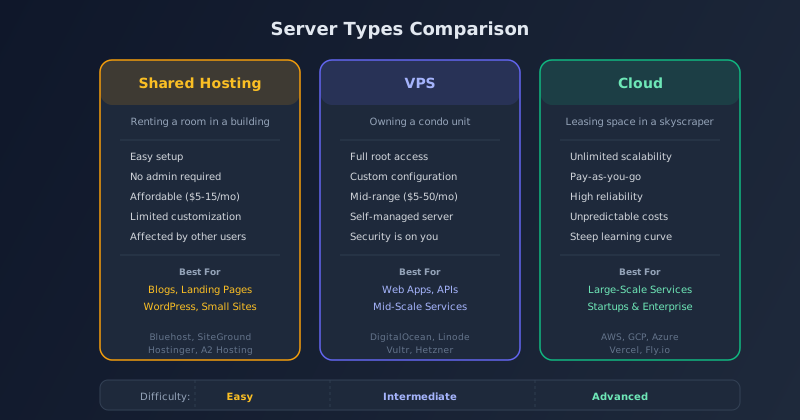
To make your service public, you need a server. "Which server should I choose?" is one of the most common beginner questions. Here are the three types, explained through an apartment analogy.
Shared Hosting
Analogy: Renting a room in an apartment building
Multiple users (tenants) share a single server (building). The hosting company manages everything — you just take care of your "room."
- Pros: Easy setup. No administration. Affordable ($5–$15/month)
- Cons: Limited customization. Other users' traffic can affect performance
- Best for: Blogs, landing pages, WordPress, small websites
- Examples: Bluehost, SiteGround, Hostinger, A2 Hosting
For a personal blog or WordPress site, shared hosting is more than enough. This site (AI Arte) also runs on shared hosting.
VPS (Virtual Private Server)
Analogy: Owning a condo unit
A single server is virtually divided, giving each user an isolated environment. It's like having "your own server."
- Pros: Full root access. OS-level customization
- Cons: Server management is your responsibility. Security is on you
- Best for: Web apps, API servers, mid-scale services
- Examples: DigitalOcean, Linode, Vultr, Hetzner
When you hit the limits of shared hosting, moving to a VPS is the natural next step. However, it requires some knowledge of Linux command-line basics.
Cloud (IaaS / PaaS)
Analogy: Leasing space in a skyscraper
You use a portion of massive infrastructure from companies like Amazon (AWS), Google (GCP), or Microsoft (Azure), paying only for what you need.
- Pros: Unlimited scalability. Pay-as-you-go pricing. High reliability
- Cons: Costs can be unpredictable. Steep learning curve. Complex configuration
- Best for: Large-scale services, startups, enterprise systems
- Examples: AWS, GCP, Azure, Vercel, Fly.io, Railway
So Which One Should You Pick?
| Your Situation | Recommendation | Reason |
|---|---|---|
| Complete beginner, just want to launch | Shared hosting | Easy setup and affordable |
| Building a web app with PHP/Laravel | Shared hosting or VPS | Laravel runs fine on shared hosting |
| Deploying a Python or Node.js app | VPS or Cloud (PaaS) | Shared hosting limits Python/Node flexibility |
| Expecting tens of thousands of users | Cloud | You need scalability |
| Want to try for free first | Vercel / Railway / Render | Free tiers available (with limits) |
You don't need to pick the perfect server from day one. Start with shared hosting, and upgrade to VPS or cloud when you need to. Server migration can always be done later.
7. What Is Claude Code? — Coding with an AI Partner
Now we get to the heart of the matter: AI-powered development. Claude Code is an AI coding tool developed by Anthropic — an AI assistant that runs in your terminal (command line).
What Claude Code Can Do
| Capability | Example |
|---|---|
| Code generation | "Build a login system" → auto-generates authentication code |
| Code fixing | "Fix this error" → identifies the cause and applies the fix |
| File operations | Reads, writes, and edits files across your project |
| Command execution | Runs build, test, and deploy commands |
| Codebase comprehension | Analyzes and explains your existing project structure |
| Architecture consultation | "How should I design this feature?" → proposes an architecture |
What It Looks Like in Practice
You interact with Claude Code through your terminal. Here's an example:
You: "Create a bulletin board app with Laravel. It should support creating, listing, and deleting posts."

Claude Code: I'll create the following files:
  - routes/web.php (route definitions)
  - app/Models/Post.php (model)
  - app/Http/Controllers/PostController.php (controller)
  - resources/views/posts/index.blade.php (list view)
  - resources/views/posts/create.blade.php (create view)
  - database/migrations/create_posts_table.php (DB schema)
  [Files are auto-generated]

You: "Add a category feature to posts."

Claude Code: I'll add a categories table and set up the relationship.
  [Understands the existing code and makes the necessary changes]
The key advantage is that Claude Code understands your entire project before generating code. It maintains consistency across files, so you rarely run into the problem of "AI-generated code conflicting with itself."
Other AI Development Tools
| Tool | Features | Best For |
|---|---|---|
| Claude Code | Terminal-based. Understands the full project | Serious development projects |
| GitHub Copilot | In-editor completions. Predicts your next lines | Developers who can read code |
| Cursor | AI-integrated editor. Chat-based instructions | VS Code users |
| v0 / bolt.new | Generate UI from prompts | Rapid frontend prototyping |
| Replit Agent | Develop + deploy in the browser | Skip local environment setup |
For details on free AI tool options, see "How to Use AI for Free [2026 Edition]."
8. Languages & Frameworks — How to Choose
Even when AI handles most of the coding, you still need to decide what to build with. Here's a guide to choosing your language and framework.
Popular Combinations
| Language | Framework | Strengths | Beginner Rating |
|---|---|---|---|
| PHP | Laravel | The go-to for web dev. Tons of resources. Runs on shared hosting | ★★★ |
| Python | Django / Flask | Great synergy with AI and data science | ★★☆ |
| JavaScript | Next.js / Nuxt.js | One language for frontend and backend | ★★☆ |
| Ruby | Ruby on Rails | High productivity. Strong community | ★★☆ |
| Go | Gin / Echo | Blazing fast. Ideal for microservices | ★☆☆ |
Our Recommendation for Beginners
If you're unsure, go with PHP + Laravel. Here's why:
- Runs on shared hosting — You can deploy Laravel on affordable shared hosting without needing VPS or cloud knowledge
- Abundant resources — Tons of tutorials and documentation. Easy to find answers when you're stuck
- Great AI compatibility — Claude Code has deep knowledge of Laravel and generates highly accurate code for it
If you want to build with Python, choose Django. If you prefer a unified JavaScript stack, go with Next.js. AI tools work well with any of these combinations.
9. Step-by-Step: Launching Your Service
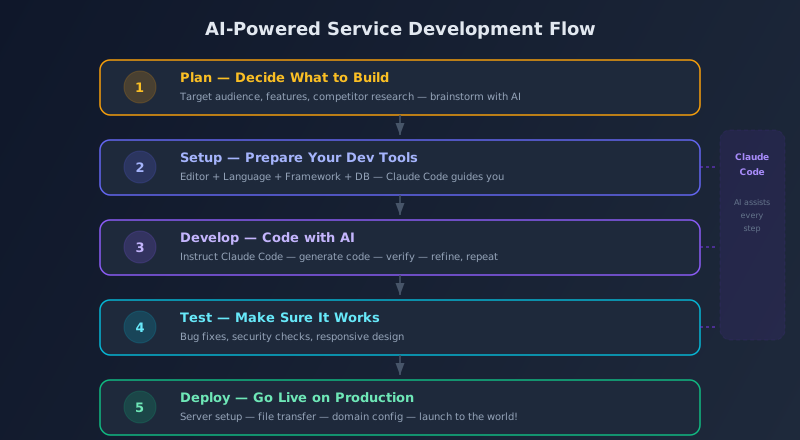
Now let's walk through the entire process of launching a service from scratch, step by step.
Step 1: Plan — Decide What to Build
First, decide what you're going to create. You don't need to think big right away.
- Great first projects: To-do app, bulletin board, blog, note-taking app
- Tip: Build something you personally want — it keeps you motivated
- Using AI: Ask ChatGPT or Claude: "I want to build something like this — what are the minimum features I need?"
Step 2: Setup — Prepare Your Dev Tools
Install the following tools. Just ask Claude Code "Help me set up [tool]" and it will walk you through the steps.
| Tool | Purpose | Notes |
|---|---|---|
| Text editor | Write code | VS Code (free) is the standard |
| Terminal | Run commands | Built into Mac; WSL recommended for Windows |
| Git | Version control | Track and revert changes |
| Language runtime | Run programs | PHP, Python, Node.js, etc. |
| Database | Store data | MySQL, SQLite, etc. |
| Claude Code | AI assistant | npm install -g @anthropic-ai/claude-code |
Step 3: Develop — Code with AI
Once your environment is ready, launch Claude Code and start building.
- Scaffold the project — "Create a new Laravel project"
- Design the database — "I need a [X] table and a [Y] table. Create the migrations"
- Build core features — "Create the list page, detail page, and create page"
- Style the UI — "Make it look modern with Tailwind CSS"
- Add more features — "Add login functionality" / "Add a search feature"
The trick is to give small, focused instructions instead of one massive request. "Build the entire to-do app" is worse than "First, just build the to-do list view" → "Now add the create feature" → "Now add delete..." — a step-by-step approach produces fewer errors.
Step 4: Test — Make Sure It Works
Run your service locally and check:
- Basic functionality: Does every page display correctly?
- Error handling: Does it crash on invalid input?
- Responsive design: Does it look good on mobile?
- Security: Basic protections against SQL injection, XSS, etc. (frameworks usually handle these automatically)
If you find bugs, just paste the error message into Claude Code — it will explain the cause and show you the fix.
Step 5: Deploy — Go Live
Time to publish. The process varies by server type.
Shared hosting:
- Sign up for a hosting plan
- Register and configure your domain
- Upload files via SSH or FTP
- Create the database and configure the connection
- Set up SSL (HTTPS)
- Verify everything works
PaaS (Vercel / Railway, etc.):
- Push your code to GitHub
- Connect your GitHub repo to the PaaS
- Set environment variables
- Deployment happens automatically
PaaS platforms are convenient, but free tiers have limitations. For serious use, shared hosting or VPS may offer better value.
10. Tips to Avoid Giving Up
Finally, here are common pitfalls beginners face and tips for staying on track.
Common Beginner Pitfalls
| Problem | Cause | Solution |
|---|---|---|
| Stuck during setup | OS and version differences | Tell Claude Code your OS and ask for steps |
| Can't read error messages | Unfamiliar technical jargon | Paste the error into AI — it explains in plain language |
| Don't know where to start | No big-picture understanding | Refer to the IT overview map in this article |
| Paralysis by perfection | Always feeling "it's not ready yet" | Ship an MVP (Minimum Viable Product) first |
| Going it alone | No one to consult | AI is your 24/7 sounding board |
The Most Important Thing
The most important thing in development is not "building something perfect" — it's "shipping something, period."
Your first service doesn't have to be perfect. The design can be ugly. The features can be sparse. "Something I built is live on the internet" — that experience is the single biggest motivator for your next step.
Shipping a 60% product beats endlessly polishing toward 100% and never launching. You can always improve later. After all, AI is here to help.
FAQ
Q. Can I really build a service without studying any programming at all?
Starting from absolute zero is tough, but it's true that you can get by with about one-tenth the knowledge that used to be required. The minimum you need is an understanding of the IT big picture covered in this article — how frontend, backend, databases, and servers relate. You don't need to memorize code, but being able to roughly understand "what this code does" will make working with AI much smoother.
Q. Is Claude Code free?
Using Claude Code requires an Anthropic API key or a Claude Pro plan ($20/month). With API usage, you pay per use — for individual development, expect roughly $5–$30/month. For free trial options, see How to Use AI for Free.
Q. How long does it take to launch a service?
For a simple web app (to-do app, bulletin board, etc.), leveraging AI can get you to launch in 1–2 weeks. That said, if you're new to environment setup, the first 1–3 days might be consumed by configuration. If you can dedicate 2–3 hours a day, two weeks is a realistic target.
Q. Is it safe to let AI handle security?
Basic security measures (SQL injection, XSS, CSRF protection, etc.) are handled automatically by frameworks like Laravel, so following the framework's conventions provides a solid baseline of safety. However, if your app handles authentication, payments, or personal data, don't take AI output at face value — we strongly recommend having a security-knowledgeable person review the code.
Q. Can I run Laravel on shared hosting?
Yes, you can. Any shared hosting that supports SSH and Composer can run Laravel. You'll need PHP 8.1 or later, but most modern hosting plans support this.
Q. Can I develop on Windows?
Absolutely. On Windows, we recommend installing WSL2 (Windows Subsystem for Linux). WSL2 runs a Linux environment on your Windows machine, dramatically improving compatibility with development tools. It also means you can follow Mac/Linux tutorials as-is. Just ask Claude Code "How do I set up WSL2?" and it will guide you through the process.
Q. What if I mess up and lose data?
During local development, the risk is essentially zero. With Git, every change is recorded, so you can always roll back to a previous state. In production, regular backups keep you safe. Even if you're at the "what's a git commit?" stage, Claude Code will teach you how to use it.
![15 Jobs Most Likely to Be Replaced by Generative AI — And How to Future-Proof Your Career [2026]](https://az-arte.com/images/articles/ai-job-loss-featured-en.svg)
![20 Best Generative AI Tools for Game Development: Art, Music, Coding & More [2026]](https://az-arte.com/images/articles/ai-gamedev-tools-featured-en.svg)