![How to Use AI for Free — ChatGPT, Claude, Gemini & More [2026 Guide]](https://az-arte.com/images/articles/free-ai-tools-2026-featured-en.svg)
Table of Contents
"AI costs money, right?" Many people still think so. In reality, as of 2026, most major AI services offer free plans — and the models available today outperform what was paid-only just a few years ago.
The real challenge is knowing which one to use. ChatGPT, Claude, Gemini, DeepSeek — you've heard the names, but few people understand exactly what each free tier offers and where its limits are.
This guide organizes the best free AI tools available as of April 2026 by purpose, and shows you the most effective way to combine them.
Note: This article reflects information as of April 2026. AI services frequently update their features and limits, so always check the official sites for the latest details.
1. The Free AI Landscape
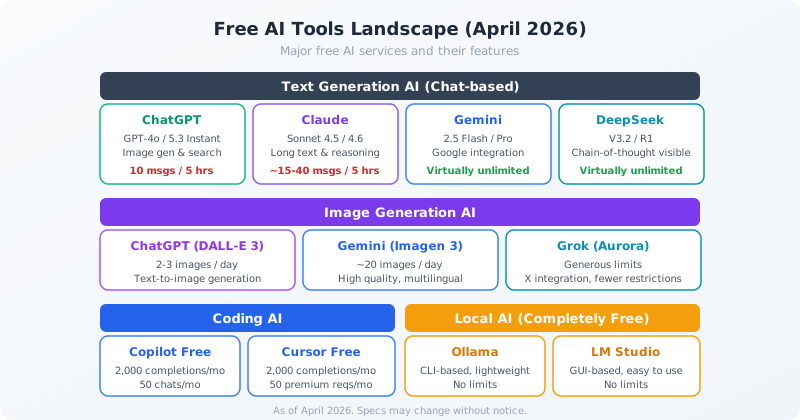
Free AI tools fall into four broad categories:
| Category | Key Services | Limits |
|---|---|---|
| Text Generation | ChatGPT, Claude, Gemini, DeepSeek, Grok, etc. | Usage caps (varies by service) |
| Image Generation | ChatGPT (DALL-E 3), Gemini (Imagen 3), Grok (Aurora) | Daily image limits |
| Coding Assistants | GitHub Copilot Free, Cursor Free | Monthly completion & chat caps |
| Local AI | Ollama, LM Studio | No limits (depends on your hardware) |
The key insight: you don't have to pick just one. Since they're all free, the smartest approach is to use several and leverage each one's strengths.
2. Text Generation AI (Chat-based)
These are the most widely used AI tools — great for answering questions, writing, summarizing, translating, and brainstorming.
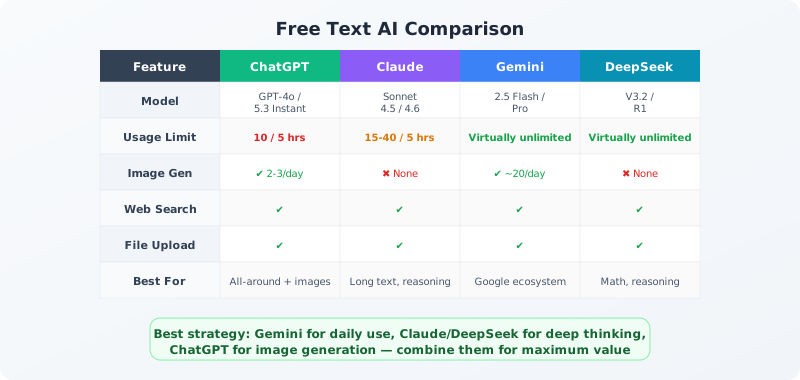
ChatGPT (OpenAI)
The most well-known AI chatbot. The free tier includes GPT-4o with web search, file uploads, and image generation (DALL-E 3).
- Models available: GPT-4o, GPT-5.3 Instant (advanced models have stricter limits)
- Limits: ~10 messages per 5 hours for advanced models. GPT-5.3 Instant has more generous limits
- Strengths: All-in-one: image generation, web search, and file analysis in a single platform
- Watch out: When you hit the limit, it automatically switches to a less capable model
Claude (Anthropic)
Excels at long-form text processing and logical reasoning. Also popular among developers for its high-quality code generation.
- Models available: Sonnet 4.5 / 4.6 (mid-to-high tier models available even on the free plan)
- Limits: ~15–40 messages per 5 hours (varies with message length)
- Strengths: Excellent at reading and writing long documents, logical analysis, and code generation
- Watch out: No image generation. Once you hit the limit, you must wait several hours
For details on choosing between Claude models, see "Opus vs. Sonnet vs. Haiku: Pricing and Performance Compared."
Gemini (Google)
Deeply integrated with Google's ecosystem. The free tier has the most generous limits of any major AI service — essentially unlimited for normal use.
- Models available: Gemini 2.5 Flash / 2.5 Pro
- Limits: Virtually unlimited (except for extreme continuous use)
- Strengths: Google Search, Gmail, and Google Docs integration. Image generation (Imagen 3). Very generous free tier
- Watch out: Requires a Google account. Creative writing can be somewhat weaker than competitors
DeepSeek
A Chinese AI service gaining attention for its strong reasoning capabilities. The R1 model is unique in showing its chain-of-thought process.
- Models available: DeepSeek V3.2 / R1
- Limits: Virtually unlimited
- Strengths: Strong at math and logical problems. Shows reasoning chains. Very generous limits
- Watch out: Data is sent to servers in China. Do not enter confidential information
Other Free Text AI Services
| Service | Key Feature | Best For |
|---|---|---|
| Grok (xAI) | X (formerly Twitter) integration. Strong on real-time info | Latest news summaries and analysis |
| Perplexity | Search-focused AI with cited sources | Research and fact-finding |
| Microsoft Copilot | Bing search integration, Office ties | Business document creation |
| Mistral (Le Chat) | European, strong multilingual support | Working in European languages |
| Meta AI | Meta's AI, powered by Llama | Casual conversation |
3. Image Generation AI
Several services let you generate images from text prompts for free.
Free Image Generation Services
| Service | Technology | Free Quota | Key Feature |
|---|---|---|---|
| ChatGPT | DALL-E 3 | 2–3 images/day | Accurate text rendering. Generates within conversation flow |
| Gemini | Imagen 3 | ~20 images/day | High quality with generous daily limits |
| Grok | Aurora | Generous limits | Fewer content restrictions (including people) |
| Stable Diffusion | Open source | Completely free (local) | Fully customizable. GPU recommended |
Prompting tip: The more specific your prompt, the better the results. Instead of "a cat picture," try "a calico cat napping on a windowsill, watercolor style, warm afternoon light" — specify composition, style, and atmosphere.
4. Coding AI Assistants
For programmers, AI coding assistants can dramatically boost productivity — and several excellent options are free.
GitHub Copilot Free
An AI code completion tool integrated into VS Code. The free tier is practical for everyday use.
- Completions: 2,000 code completions per month
- Chat: 50 AI chat messages per month (GPT-4o / Claude Sonnet)
- Languages: Supports virtually all major programming languages
Cursor Free
An AI-first code editor built on VS Code. Low switching cost for existing VS Code users.
- Completions: 2,000 code completions per month
- Premium requests: 50 per month (using high-performance models)
- Key feature: Understands your entire codebase for contextual suggestions
Other Free Coding Tools
- Claude Code: Code generation and review available on Claude's free plan (counts toward chat limits)
- Gemini Code Assist: Google Cloud-integrated coding assistant
- AI chatbot code generation: ChatGPT, Claude, Gemini, and DeepSeek can all generate code. Not as integrated as dedicated tools, but perfectly fine for simple tasks
5. Local AI (Completely Free, No Limits)
Every cloud service has usage limits. The way to eliminate those limits entirely is to run AI on your own computer.
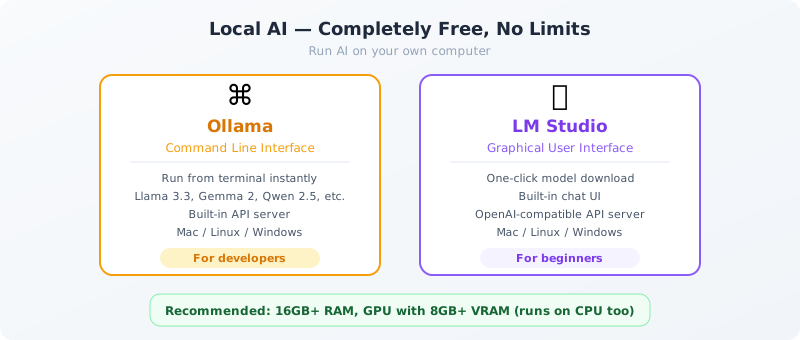
Ollama — CLI for Developers
A tool that runs AI models from the command line. Simple setup and lightweight operation.
# After install, just two commands to start
ollama pull llama3.3
ollama run llama3.3- Supports Llama 3.3, Gemma 2, Qwen 2.5, Mistral, Phi-4, and many more
- Built-in OpenAI-compatible API server
- Can be called from other apps and scripts
LM Studio — GUI for Beginners
A graphical interface for searching, downloading, and running models — all in one place. Perfect if you're not comfortable with the command line.
- One-click model download and execution
- Built-in chat UI similar to ChatGPT
- Also works as an OpenAI-compatible API server
Hardware Requirements
| Spec | Minimum | Recommended |
|---|---|---|
| RAM | 8 GB | 16 GB or more |
| GPU | Not required (CPU mode) | NVIDIA GPU with 8 GB+ VRAM |
| Storage | 10 GB free | 50 GB+ free (for multiple models) |
| Model Size | 7B parameters | 13B–70B parameters |
The advantage of local AI goes beyond "no limits." Your data never leaves your machine, making it safe for confidential information.
6. Free API Access
If you want to integrate AI into your own apps or scripts, free API tiers are available.
Google AI Studio
A platform for free API access to Gemini models.
- Free tier: ~1,500 requests per day (varies by model)
- Models: Gemini 2.5 Flash / 2.5 Pro
- Best for: Personal projects and prototyping
Other Free APIs
| Provider | Free Tier | Notes |
|---|---|---|
| OpenAI | Free credits on sign-up | One-time only. Pay-as-you-go after |
| Anthropic (Claude) | Free credits on sign-up | One-time only. Pay-as-you-go after |
| Groq | High-speed inference API (free tier) | Runs open models like Llama at high speed |
| Ollama (local) | Completely free | OpenAI-compatible API. Self-hosted |
For API pricing details, see "Opus vs. Sonnet vs. Haiku Pricing Compared."
7. Free vs. Paid Plans
Some people are fine with free plans; others should upgrade. Here's how to decide.
When Free Is Enough
- You're trying out AI or still learning
- A few messages per day is sufficient
- You can work around limits by switching between services
- You don't need the absolute best models available
When to Consider Paying
- You hit usage limits daily
- You need top-tier models (GPT-o3, Claude Opus, etc.) consistently
- You need reliable access for professional work
- You want to share access with a team
Paid Plan Pricing
| Service | Monthly | Key Benefits |
|---|---|---|
| ChatGPT Plus | $20 | Much higher GPT-4o limits, o3 access |
| Claude Pro | $20 | 5x Sonnet limits, Opus access |
| Gemini Advanced | $20 | Gemini Ultra, 2 TB Google One storage |
| Copilot Pro | $10 | Unlimited completions, premium models |
For the latest on each service's paid plans, check their official websites. Pricing and features are subject to change.
FAQ
Q. Is there any AI that's completely free with no costs at all?
Yes. Gemini, DeepSeek, and Grok only require account registration and offer virtually unlimited usage. For truly unlimited, offline AI, Ollama and LM Studio let you run models on your own computer with zero restrictions.
Q. Is it safe to enter personal information into free AI tools?
Generally, data entered into free plans may be used to train models. Avoid entering personal or confidential information. For sensitive data, use local AI (Ollama, LM Studio) or upgrade to a paid plan with data protection options.
Q. Which free AI is the best overall?
It depends on your needs. Gemini has the most generous limits for daily use. Claude excels at deep analysis and long documents. ChatGPT is best for all-in-one use including image generation. DeepSeek is strongest at math and reasoning. Using multiple services together is the most effective strategy.
Q. What should I do when I hit a usage limit?
Switch to another service. For example, when ChatGPT's limit is reached, use Claude. When Claude's limit is reached, switch to Gemini or DeepSeek. With accounts on multiple services, you can use AI throughout the day at no cost.
Q. I'm a beginner — can I use coding AI tools?
Absolutely. Beginners benefit the most from AI coding tools. You can ask ChatGPT or Claude how to write code, paste in error messages to get solutions, and accelerate your learning. If you use VS Code, installing GitHub Copilot Free is a great starting point.
Q. What if the information in this article becomes outdated?
AI service specs change every few months. For the latest information, check each service's official website or search with an AI like Perplexity for "[service name] free plan latest." We plan to update this article periodically as well.
![15 Jobs Most Likely to Be Replaced by Generative AI — And How to Future-Proof Your Career [2026]](https://az-arte.com/images/articles/ai-job-loss-featured-en.svg)
![Generative AI Knowledge Cutoff Dates Compared: ChatGPT, Claude, Gemini & More [2026]](https://az-arte.com/images/articles/ai-cutoff-featured-en.svg)