Table of Contents
Have you ever asked Claude Code or ChatGPT to "build a TODO app" and received something completely different from what you had in mind? Generative AI is powerful, but when your instructions are vague, AI fills in the blanks with its own assumptions.
This article covers 5 practical tips for writing better prompts, with concrete before-and-after examples that anyone -- even complete beginners -- can follow.
1. Why Your Prompt Determines the Result
Generative AI writes code based solely on your instructions (prompt). A human colleague might ask "did you mean this?", but AI generates the most plausible response based only on the information given -- so insufficient context leads to off-target results.
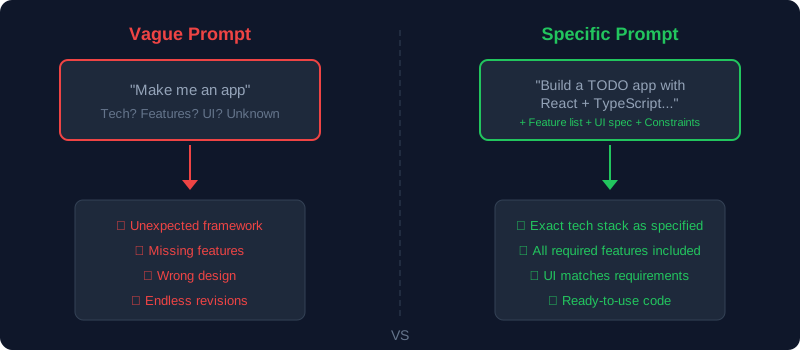
Problems Caused by Vague Instructions
- AI picks a different framework than what you wanted
- The UI (screen design) doesn't match your expectations
- Essential features are missing or unnecessary ones are added
- Error handling and validation are insufficient
The flip side: simply being specific in your prompt dramatically improves AI output quality. To learn more about how generative AI works, check out our article on What Is Generative AI?.
2. 5 Tips for Writing Effective AI Prompts
Master these five key points to significantly improve the quality of AI-generated code.
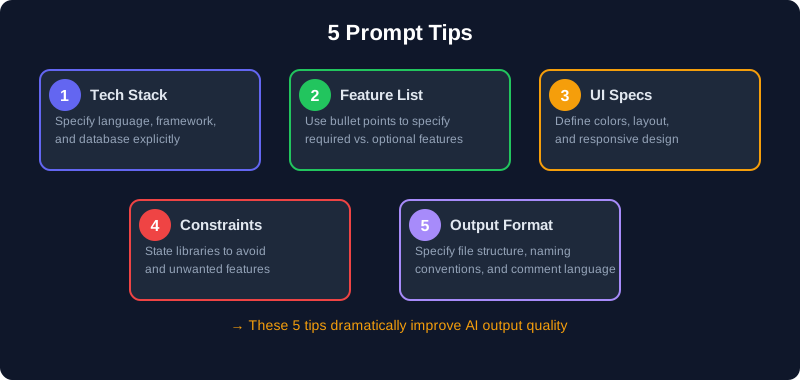
Tip 1: Specify the Tech Stack
Instead of "build a web app", specify the exact language, framework, and database you want.
❌ Bad:
"Build a TODO app"

✅ Good (for engineers):
"Build a TODO app using React + TypeScript.
Use useState for state management and
localStorage for data persistence."
💡 Don't Know the Technical Terms?
You don't need to know specific technologies. Just describe "where it should run" and "what should happen to the data" in plain language, and AI will choose the right tools for you.
✅ Good (for non-engineers):
"Build a TODO app that runs in a web browser.
Make sure the data isn't lost when I close the page.
I'll leave the technology choices to you,
but please keep it beginner-friendly."
Tip 2: List Features Clearly
Lay out required features as a bulleted list, marking each as required or optional. AI parses bullet points more accurately than long paragraphs.
✅ Good:
"Please implement the following features:
[Required]
- Add tasks (text input + add button)
- Toggle task completion
- Delete tasks
[Optional]
- Set due dates for tasks
- Filter completed tasks"
Tip 3: Describe the UI Concretely
"Make it look nice" tells the AI almost nothing. Provide specifics about colors, layout, and behavior.
✅ Good (for engineers):
"UI requirements:
- Use Tailwind CSS
- Dark mode (background: slate-900)
- Card-based layout with 8px border-radius
- Mobile-first responsive design
- Floating action button fixed to bottom-right"
✅ Good (for non-engineers):
"How it should look:
- Dark background theme
- Show each task as a card
- Make it easy to use on a phone
- Keep the add button always visible at the bottom-right
- Simple and clean, like Apple's Notes app"💡 Use Apps You Know as References
Saying "like Notion", "like Apple Notes", or "like Trello" helps AI quickly understand the look and feel you're going for.
Tip 4: State Constraints and What NOT to Include
Beyond what you want, telling AI what you don't want significantly improves accuracy.
✅ Good (for engineers):
"Constraints:
- Only external library allowed is Tailwind CSS
- Do not use state management libraries like Redux or Zustand
- No backend needed (frontend-only)
- Write comments in English"
✅ Good (for non-engineers):
"Constraints:
- No server or database setup should be required
- No login feature needed
- Keep it as simple as possible
- Add explanatory comments in the code"Tip 5: Specify the Output Format
Telling the AI how to structure its output makes the code immediately usable in real projects.
✅ Good (for engineers):
"Output format:
- Split into separate files per component
  (App.tsx, TodoList.tsx, TodoItem.tsx, AddTodo.tsx)
- Put type definitions in types.ts
- Add file path as a comment at the top of each file"
✅ Good (for non-engineers):
"Output format:
- Don't put everything in one giant file --
split it by feature
- At the top of each file, explain in plain English
what that file does
- Include step-by-step setup instructions
so I can copy-paste and run it"3. Bad Prompt vs Good Prompt (Real Examples)
Let's compare prompts using a "budget tracker app" as an example to see how prompt quality affects the output.
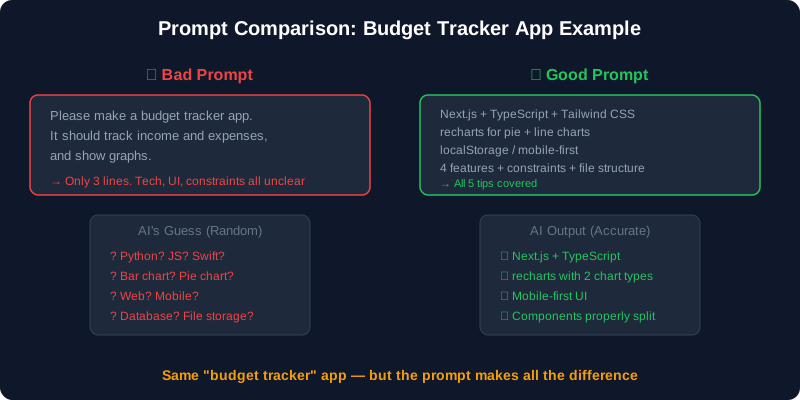
Bad Prompt
Build a budget tracker app.
It should track income and expenses
and show graphs.
With this instruction, AI has to guess:
- Language (Python? JavaScript? Swift?)
- Web or mobile?
- Chart type (bar? pie? line?)
- Data storage (database? local file?)
Good Prompt (For Engineers)
Build a budget tracker web app using
Next.js (App Router) + TypeScript.

[Tech Stack]
- Frontend: Next.js 14, TypeScript, Tailwind CSS
- Charts: recharts library
- Data storage: localStorage (no database needed)

[Features]
1. Record transactions (date, category, amount, note)
2. Pie chart by category (monthly)
3. Line chart showing monthly income/expense trends
4. List view with delete functionality

[UI Requirements]
- Mobile-first
- Bottom tab navigation (Input / List / Charts)
- Tailwind CSS default colors

[Constraints]
- No external APIs
- No authentication
- Split into separate component files

[Output Format]
- File path comment at the top of each file
- Code comments in English
Good Prompt (For Non-Engineers)
Even without programming knowledge, describing "what the app does", "how it looks", and "what you don't need" is enough to get great results.
Build a budget tracker app that works in a browser.
I'm a beginner, so please choose the best technologies.

[What I Want]
1. Record entries with date, category (food, transport,
   etc.), amount, and a note
2. See a pie chart showing spending by category
3. See a line chart showing if I'm spending more
   than last month
4. View all records in a list and delete mistakes

[How It Should Look]
- Easy to use on a phone
- Tab switching at the bottom (Input / List / Charts)
- Simple, clean colors

[What I Don't Need]
- Login feature
- Anything that requires server setup
  (should work entirely in the browser)

[Please Also]
- Provide beginner-friendly setup instructions
- Add explanatory comments in the code
4. Copy-Paste Prompt Templates
Just fill in these templates to create high-quality prompts. Copy and use them directly.
Build a [type of app].

[Tech Stack]
- Language: [e.g., TypeScript]
- Framework: [e.g., React / Next.js / Laravel]
- CSS: [e.g., Tailwind CSS]
- Data storage: [e.g., localStorage / SQLite / MySQL]

[Features] (mark as Required / Optional)
1. [Feature A] (Required)
2. [Feature B] (Required)
3. [Feature C] (Optional)

[UI Requirements]
- [Layout approach]
- [Color scheme / theme]
- [Responsive design: yes/no]

[Constraints]
- [Libraries to avoid / features not needed]

[Output Format]
- [File splitting approach]
- [Comment language]
Non-Engineer Template
Even without technical knowledge, filling in this template gives AI everything it needs.
Build a [type of app].
I'm a programming beginner, so please choose
the best technologies for me.

[What I Want] (mark as "Must have" / "Nice to have")
1. [What I want #1] (Must have)
2. [What I want #2] (Must have)
3. [What I want #3] (Nice to have)

[How It Should Look]
- [For phones? For computers?]
- [Reference app: "like Notion", "like Trello"]
- [Light theme? Dark mode?]

[What I Don't Need]
- [Login, payments, etc.]

[Please Also]
- Provide beginner-friendly setup instructions
- Add explanatory comments in the code
- Keep the overall structure as simple as possible
5. How to Improve Results Through Iteration
Getting perfect code in a single prompt is rare. Building up through back-and-forth conversation with AI is the most efficient approach.
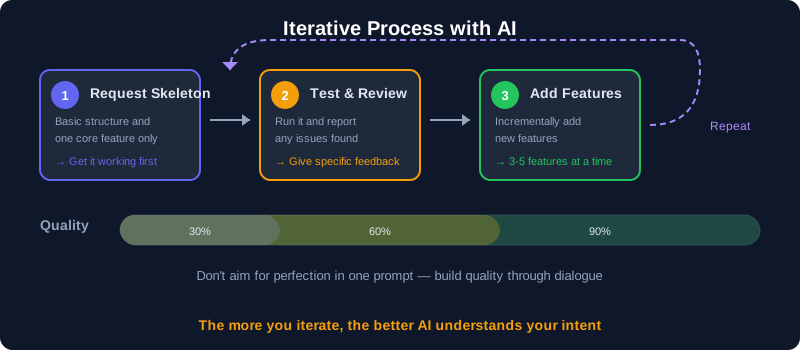
Step 1: Start with the Skeleton
Begin by asking for just the basic structure.
"First, set up the basic project structure
and implement only the task-add feature."
Step 2: Test and Give Specific Feedback
Run the generated code and report specific issues.
"The text input doesn't clear after clicking
the add button. Please clear the input after adding.
Also, empty strings can be added --
please add validation to prevent this."
Step 3: Add Features Incrementally
Once the basics work, add features step by step.
"Adding and deleting tasks now works correctly.
Next, please add:
1. Toggle completion (checkbox)
2. Filter to show/hide completed tasks
Please add to the existing code without
changing what already works."
For a broader look at building apps with AI, check out our article on whether complete beginners can build apps with AI.
6. Common Beginner Mistakes
Mistake 1: Asking for Everything at Once
Requesting 10+ features in a single prompt overwhelms the AI, resulting in half-baked implementations. Ask for 3-5 features at a time for best results.
Mistake 2: Using Vague Language
"Make it look nice" or "add some sample data" are the types of vague instructions AI struggles with most. Use specific numbers and concrete examples instead.
❌ "Add some sample data"
✅ "Add these 5 sample entries as initial data:
   - Groceries $15.00 (Food)
   - Bus fare $2.50 (Transport)
   - Lunch $12.00 (Food)
   - Book $18.99 (Education)
   - Electric bill $85.00 (Utilities)"
Mistake 3: Just Pasting the Error Message
Pasting only the error message without context can lead AI to an incorrect fix. Describe what you did and what happened.
❌ "TypeError: Cannot read properties of null"

✅ "When I click the delete button on a task,
I get this error:
TypeError: Cannot read properties of null
The error occurs on line 42 of TodoList.tsx.
Adding and displaying tasks works fine."
Mistake 4: Starting a New Chat Instead of Continuing
AI chat maintains context throughout the conversation. Starting a new chat loses all the design decisions made so far. Continue in the same chat for best efficiency.
7. Summary
Key Takeaways
- AI output quality is determined by how specific your prompt is
- 5 tips: specify your tech stack, feature list, UI specs, constraints, and output format
- Using templates makes it easy for anyone -- even non-engineers -- to write quality prompts
- Don't aim for perfection in one shot -- iterate through conversation
- "Make it look nice" is the enemy. Use specific numbers, examples, and conditions
FAQ
Can I build an app with just prompts and no programming knowledge?
For simple apps, yes -- you can build them with no coding experience using prompts alone. However, as you fix bugs and add features, understanding basic programming concepts (variables, functions, components) will make the process significantly smoother. We recommend starting by building apps through prompts while gradually learning to read code.
Are prompt-writing techniques the same for Claude Code and ChatGPT?
The fundamental approach is the same. However, Claude Code can read your entire project's files, so context-aware instructions like "match the existing code style" are particularly effective. Where ChatGPT would need you to paste the full codebase into chat, Claude Code can work with a simple "add this feature to the project."
Are longer prompts or shorter prompts better?
Longer prompts produce better results as long as they contain relevant information. However, extremely long prompts (over 10,000 characters) may cause AI to overlook important details. Filling in the template from this article (200-500 words) hits the practical sweet spot.
What if AI outputs code using an outdated version?
AI training data has a time cutoff, so it may not support the latest versions. Specifying versions like "use Next.js 14 App Router" or "use React 18 syntax" in your prompt helps. If it still produces old patterns, tell it: "This syntax is deprecated in Next.js 14. Please rewrite using the current approach."
![15 Jobs Most Likely to Be Replaced by Generative AI — And How to Future-Proof Your Career [2026]](https://az-arte.com/images/articles/ai-job-loss-featured-en.svg)
![20 Best Generative AI Tools for Game Development: Art, Music, Coding & More [2026]](https://az-arte.com/images/articles/ai-gamedev-tools-featured-en.svg)