Table of Contents
When you ask Claude Code or ChatGPT about setting up a development environment, there's a good chance they'll respond with "Let's use Docker." For experienced developers, this is natural advice. But for beginners, it raises immediate questions: "What even is Docker?" and "Do I really need this?"
Here's the bottom line: most beginners working on personal projects don't need Docker at the start. That said, AI has solid reasons for recommending it. This article will help you understand Docker's basics so you can decide whether it's right for you right now.
1. Why Does AI Recommend Docker?
AI tools suggest Docker for well-founded reasons.
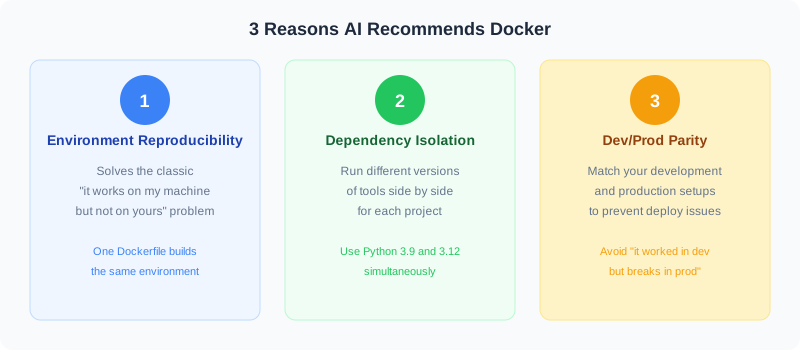
Reason 1: Environment Reproducibility
One of the most common problems in software development is "it works on my machine but not on yours." Differences in operating systems, installed software versions, and environment variables create countless discrepancies between development setups.
Docker solves this by bundling all environment information into a single configuration file (Dockerfile), ensuring anyone can reproduce the exact same environment on any machine. For AI, recommending a setup that "is guaranteed to work" is the safest possible advice.
Reason 2: Dependency Isolation
When working on multiple projects, you might need Python 3.9 for one project and Python 3.12 for another. Docker lets you create completely independent environments for each project, eliminating version conflicts entirely.
Reason 3: Dev/Prod Parity
When your development environment and production server run different operating systems or software versions, unexpected errors pop up at deployment time. Docker lets you use the exact same environment for both development and production, preventing the dreaded "it worked in dev but breaks in production" scenario.
AI's Limitation: Context-Blind Advice
However, AI has an important limitation. It tends to give the most "correct" general answer without fully considering whether you're a beginner, whether you're working solo or in a team, or the scale of your project. Docker is an industry standard in professional settings, so AI recommends it. But for a beginner's personal project, it's often overkill.
2. What Is Docker? (Beginner-Friendly Explanation)
In one sentence, Docker is a tool that packages up everything needed to run an application into a portable unit.
How It Differs from Virtual Machines
When you hear "packages up the entire environment," you might think of virtual machines (VMs). But Docker works differently. VMs emulate an entire OS, which means they take minutes to start up and consume gigabytes of disk space. Docker containers, on the other hand, share the host OS kernel, so they start in seconds and are much lighter on resources.
Understanding Through a Cooking Analogy
Here's Docker explained through a cooking metaphor:
- Dockerfile = A recipe (written instructions listing ingredients and steps)
- Image = A frozen meal (a ready-to-use package made from the recipe)
- Container = The actual cooked dish (the image "thawed" and running)
- Docker Hub = A supermarket (where you can grab images made by others)
Essential Commands to Know
If you decide to use Docker, these are the minimum commands you need to get started:
# Start a container from an image
docker run -p 8080:80 nginx

# List running containers
docker ps

# Stop a container
docker stop CONTAINER_ID

# Start multiple containers with docker-compose
docker compose up -d
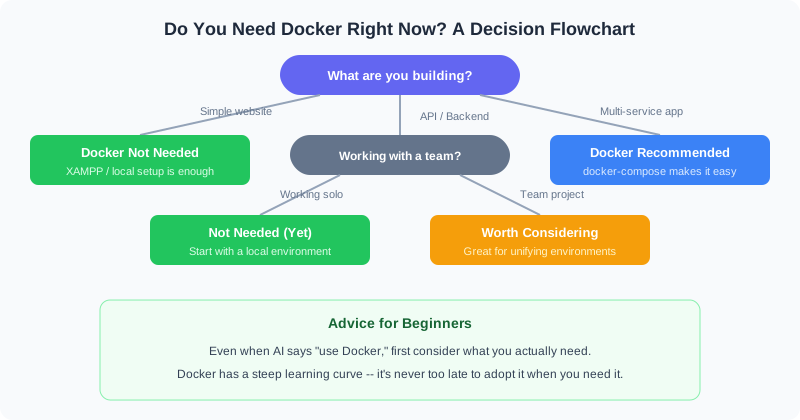
3. Do You Need Docker Right Now? A Decision Flowchart
When AI suggests Docker, use the following flowchart to decide.
Cases Where Docker Is Unnecessary
- Learning HTML and CSS: These run in the browser -- no Docker needed at all
- Learning Python basics: Just install Python directly
- Building a simple website: Tools like XAMPP and MAMP set up your environment with one click
- Frontend development (React, Vue, etc.): Install Node.js and you're ready to go
- Early stages of a personal project: Getting something working should be your priority
Cases Where Docker Is Worth Considering
- Team development: When everyone needs the same environment
- Combining multiple services: Web server + database + cache server, etc.
- Production runs on Linux but you develop on Windows or Mac
- Microservice architecture: When your app is split into many independent services
4. Getting Started Without Docker
If you've decided Docker is premature for your needs, every language and framework offers a Docker-free way to get started.
Setup by Language
| Language / Framework | Docker-Free Method | What You Need |
|---|---|---|
| HTML/CSS/JavaScript | Open directly in browser | Text editor only |
| Python | Install from python.org | Python + pip |
| Node.js (React, Vue, etc.) | Install from nodejs.org | Node.js + npm |
| PHP (Laravel, etc.) | XAMPP / MAMP / Laragon | PHP + Composer + MySQL |
| Ruby on Rails | rbenv + bundler | Ruby + SQLite |
| Java (Spring Boot) | Install JDK directly | JDK + Maven/Gradle |
How to Tell AI You Don't Want Docker
When AI suggests Docker, here's an effective way to redirect it:
# Example prompt for AI
"Please show me how to set up a local
environment without Docker.
I'm a beginner, so keep the setup
as simple as possible."
With clear instructions like this, AI will suggest alternatives to Docker. AI tends to default to "best practices," but when you specify your situation, it tailors its response accordingly. For more on using AI effectively, check out our article on What Is Generative AI?.
5. Essential Knowledge If You Do Use Docker
If you've decided Docker is what you need -- or your project requires it -- understanding these fundamentals will get you started.
Just 5 Concepts to Learn
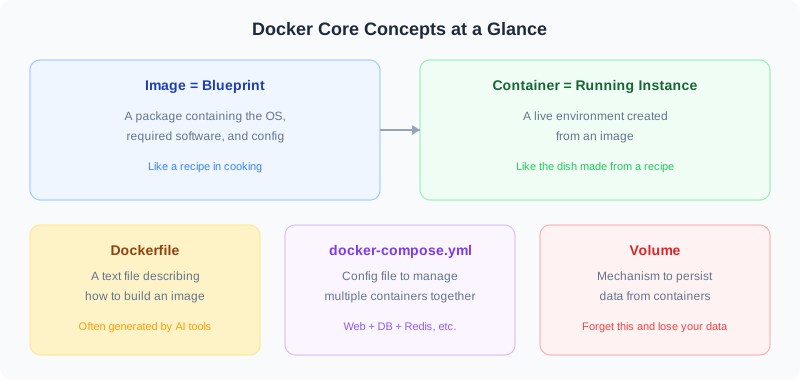
- Image: The "blueprint" for an environment. Official images are available on Docker Hub
- Container: A running environment created from an image. Containers are disposable
- Dockerfile: A text file that describes how to build an image
- docker-compose.yml: A config file for managing multiple containers together
- Volume: A mechanism to persist container data (forget this and your data disappears)
Installing Docker Desktop
On Windows and Mac, installing Docker Desktop is the easiest way to get started. It provides a GUI for management, so even beginners who aren't comfortable with the command line can visually monitor their containers.
Important Note
Docker Desktop on Windows requires WSL2 (Windows Subsystem for Linux 2). While it may be enabled automatically during installation, it can slow down your machine depending on your hardware specs. At least 8GB of RAM is recommended.
6. Common Pitfalls for Beginners
Here are the most common issues beginners run into when starting with Docker, along with how to fix them.
Pitfall 1: Port Conflicts
You might see an error saying "port 8080 is already in use." This happens when another application (XAMPP, another container, etc.) is already using the same port.
# Change the port number when starting
docker run -p 3000:80 nginx
# Now accessible on port 3000
Pitfall 2: Data Loss
Containers are disposable by default. When you delete a container, all data inside it is gone. For data you want to keep -- like database contents -- you need to use volumes to persist it.
# Use a volume to persist data
docker run -v mydata:/var/lib/mysql mysql
Pitfall 3: Disk Space Bloat
Docker images range from hundreds of megabytes to several gigabytes. When you use different images across multiple projects, your disk can fill up fast. Regularly clean up unused images.
# Remove all unused images and containers
docker system prune
Pitfall 4: WSL2 Memory Consumption (Windows)
On Windows, Docker Desktop uses WSL2, which can consume a significant amount of memory. If your PC has 8GB of RAM or less, other applications may slow down while Docker is running.
For a broader look at AI-powered development, see our article on whether complete beginners can build apps with AI.
7. Summary
Key Takeaways
- AI recommends Docker for "environment reproducibility," "dependency isolation," and "dev/prod parity"
- However, AI tends to give the "generally correct" answer without considering your skill level
- For beginners working on personal projects, Docker is usually unnecessary
- Docker-free alternatives exist for every language -- just tell AI "without Docker"
- If you do use it, learn these 5 concepts: image, container, Dockerfile, docker-compose, and volume
- It's perfectly fine to learn Docker only when you actually need it
Want to gauge your AI skill level? Try our AI skills assessment.
FAQ
AI keeps recommending Docker. Is it okay to say no?
Absolutely. AI provides what it considers the "generally optimal" approach, but that doesn't mean it fits your situation. Simply say "Show me how to do this without Docker" and it will suggest alternatives. During the learning phase, starting with a simpler setup lets you focus on writing code rather than wrestling with environment configuration.
When is the right time to learn Docker?
Consider learning Docker when: (1) you join a team project that requires everyone to use the same environment, (2) you need to combine multiple services (web server + database + cache, etc.), or (3) you need to handle deployment to production yourself. There's no rush to learn it during the personal learning project stage.
Is Docker Desktop free?
It's free for personal use and small businesses (fewer than 250 employees and less than $10 million in annual revenue). Larger companies need a paid plan (starting at $5/month). For learning purposes, the free tier is more than sufficient.
Are there alternatives to Docker?
Several alternatives exist depending on your goal. For dependency isolation, you can use Python virtual environments (venv) or Node.js version managers (nvm). For consistent team environments, Dev Containers (a VS Code extension) is a straightforward option. For cloud-based development, GitHub Codespaces and Gitpod provide unified environments without requiring any Docker knowledge.
![15 Jobs Most Likely to Be Replaced by Generative AI — And How to Future-Proof Your Career [2026]](https://az-arte.com/images/articles/ai-job-loss-featured-en.svg)
![Generative AI Knowledge Cutoff Dates Compared: ChatGPT, Claude, Gemini & More [2026]](https://az-arte.com/images/articles/ai-cutoff-featured-en.svg)