Table of Contents
"What can AI actually do for my business?" — Since the arrival of ChatGPT and Claude, this question has been on every professional's mind.
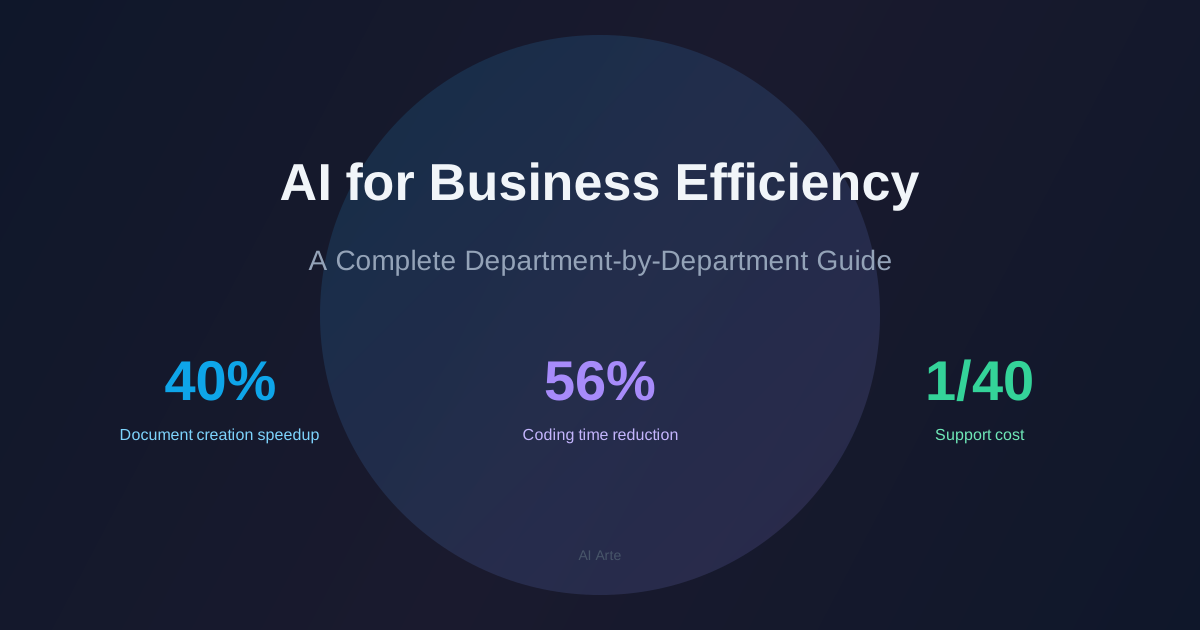
Here's the bottom line: document creation is 40% faster, coding is 56% faster, and customer support costs can drop to 1/40th of their previous level. AI is dramatically widening the productivity gap between those who know how to use it and those who don't.
This guide walks you through specific use cases for every major department — sales, finance, HR, development, and more — along with recommended tools, a step-by-step adoption plan, and the common mistakes that trip most companies up.
What Does "AI for Business Efficiency" Actually Mean?
AI-driven business efficiency means delegating repetitive, pattern-based tasks to AI so that humans can focus on higher-value, creative work.
According to McKinsey (2025), 88% of companies are already using AI in at least one business function, and 92% plan to increase their AI budgets within the next three years.
3 Types of Tasks Where AI Excels
- Pattern-based tasks: Email replies, meeting notes, report generation — anything with a repeatable structure
- High-volume information processing: Data analysis, document screening, market research
- Language-heavy tasks: Translation, summarization, proofreading, Q&A support
Conversely, strategic decision-making, relationship building, and creative ideation remain firmly in the human domain. Think of AI not as something that replaces your thinking, but as a partner that handles the busywork so you can think more.
Want to understand how AI works from the ground up? Check out "What Is Generative AI? How It Differs from Traditional AI."
Department-by-Department: What AI Can Do
Think AI is only for engineers? In reality, nearly every department has significant opportunities for AI-driven efficiency gains.
Sales & Marketing
Sales is one of the departments where AI impact is most immediately visible. McKinsey estimates that roughly 20% of current sales activities can be automated with existing AI tools.
| Task | How AI Helps | Impact |
|---|---|---|
| Proposals | AI drafts the first version, humans refine | 3 hours down to 1 hour (70% reduction) |
| Sales emails | Generate optimized copy based on past conversion data | 15% increase in close rate |
| Competitor analysis | AI auto-collects and summarizes competitor news and websites | Major reduction in research time |
| Social media posts | Auto-generate post copy and ad text | Content creation time cut in half |
Customer Support
Gartner predicts that 70% of customer interactions will be handled by AI technology. An AI chatbot costs roughly $0.50–0.70 per interaction, compared to a human agent at ~$19.50/hour — a massive cost difference.
| Task | How AI Helps | Impact |
|---|---|---|
| Inquiry handling | AI chatbot provides instant answers to common questions | 15% monthly reduction in ticket volume |
| FAQ management | Auto-generate and update FAQs from past interactions | Always up-to-date knowledge base |
| Escalation | AI classifies issues and routes to the right specialist | Consistent quality across all tickets |
Development & IT
A joint MIT Sloan/Microsoft study found that programmers using AI completion tools saw their coding time drop by 56%.
| Task | How AI Helps | Impact |
|---|---|---|
| Coding | Code completion and auto-generated functions | 56% reduction in development time |
| Code review | AI detects bugs and security vulnerabilities | Higher quality + faster reviews |
| Documentation | Auto-generate API docs from source code | Major reduction in documentation effort |
For a deep dive into AI coding tools, see "Claude Code vs Codex Comparison."
Finance & Accounting
| Task | How AI Helps | Impact |
|---|---|---|
| Invoice processing | AI-OCR reads invoices and feeds data into accounting software | Major reduction in manual data entry |
| Expense reporting | Snap a receipt, AI auto-categorizes and generates the report | Faster processing time |
| Financial reports | AI analyzes data and drafts report narratives | Report creation time cut in half |
Human Resources
McKinsey estimates that AI can reduce HR-related costs by 15–20%.
| Task | How AI Helps | Impact |
|---|---|---|
| Resume screening | Auto-filter applications against job requirements | 20+ hours saved per month |
| Interviews | AI transcribes and summarizes interview conversations | 80 hours saved per person per year |
| Employee training | AI chatbot answers onboarding and policy questions | Reduced burden on HR team |
General Administration
| Task | How AI Helps | Impact |
|---|---|---|
| Meeting minutes | Real-time transcription + automatic summarization | Note-taking effort reduced to near zero |
| Internal Q&A | AI searches company policies and manuals to answer questions | Higher self-service resolution rate |
| Contract review | AI checks clauses and highlights risk areas | Faster review turnaround |
Before/After — The Numbers Speak
Still skeptical? Here's a summary of key research findings on AI's real-world impact.
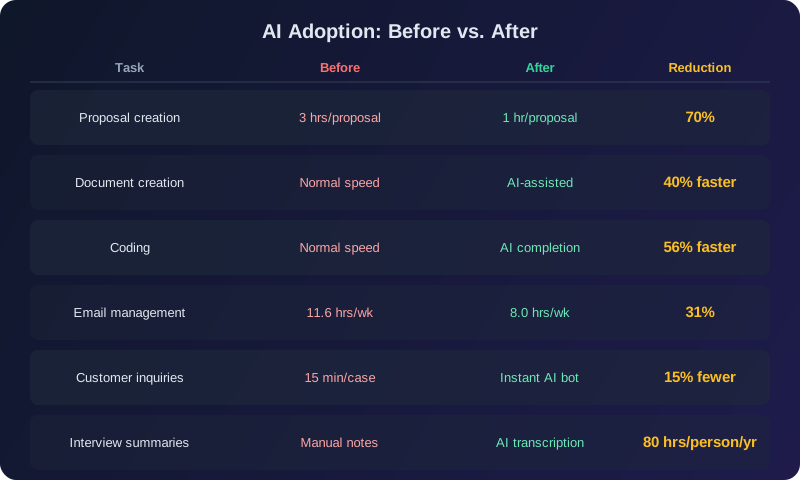
Research from Harvard Business Review (2025) found that after adopting AI tools, most employees redirected their saved time toward strategic work and professional development. In other words, AI isn't about doing less — it's about creating time for higher-value work.
AI Tools for Business Efficiency
Different tasks call for different tools. The golden rule: start with a free plan, experience the results firsthand, then upgrade to paid when you're ready.
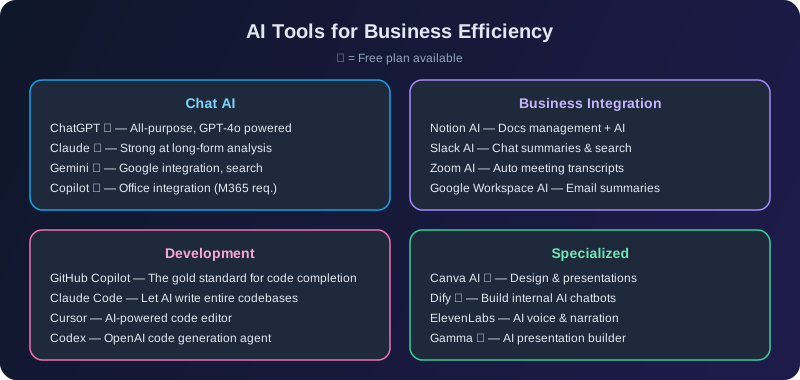
Chat AI
| Tool | Individual Plan | Team/Business | Best For |
|---|---|---|---|
| ChatGPT | Free–$20/mo | $25–30/user/mo | All-purpose: writing, brainstorming, research |
| Claude | Free–$20/mo | $20–25/user/mo | Long-form analysis. 3 distinct modes for different tasks |
| Gemini | Free–$20/mo | $24–36/user/mo | Google ecosystem: Gmail, Docs integration |
| Copilot | Free–$20/mo | $30/user/mo * | Microsoft 365 integration |
* Microsoft Copilot's business plan requires a separate M365 license ($12.50+/mo), bringing the effective cost to $42.50+/user/mo.
For a detailed pricing breakdown, see "Claude vs ChatGPT Pricing Comparison."
Business Integration Tools
| Tool | Pricing | Key Feature |
|---|---|---|
| Notion AI | From $20/user/mo | Document management + AI across multiple models |
| Slack AI | Included in plan | Channel summaries, AI-powered thread search |
| Zoom AI | Included in plan | Automatic meeting transcription and summaries |
Development & Code Tools
| Tool | Pricing | Key Feature |
|---|---|---|
| GitHub Copilot | Free–$19/user/mo | The gold standard for code completion. 56% coding time reduction |
| Claude Code | Usage-based | Let AI write and manage entire codebases |
| Cursor | Free–$20/mo | AI-native code editor |
4 Steps to AI Adoption
Not sure where to begin? The cardinal rule: don't try to roll out AI across the entire organization at once — start small.
Step 1: Map Your Workflows and Find the "Time Sinks"
Start by documenting each department's workflow and identifying tasks that are time-consuming and highly repetitive.
- "Invoice processing takes 50 hours per month"
- "Each proposal takes 3 hours to write"
- "We answer the same customer questions every single day"
These numbers become your baseline for measuring AI's impact later.
Step 2: One Task, One Tool — Test for 2–4 Weeks
Trying to adopt multiple tools at once is a recipe for confusion. Pick one task and one tool, then test for 2–4 weeks.
Good starting points:
- Heavy document creation — Try ChatGPT or Claude (free tier)
- Heavy coding workload — Try GitHub Copilot (free tier)
- High inquiry volume — Test an AI chatbot framework (like Dify)
Step 3: Measure Results and Share Internally
After the test period, compare against your Step 1 baseline.
- "Proposal creation went from 3 hours to 1 hour (70% reduction)"
- "Monthly overtime dropped by 20 hours"
- "Processing volume increased by 1.5x"
Hard numbers are your strongest tool for getting organizational buy-in. Don't say "AI is amazing" — say "we saved X hours and $Y per month."
Step 4: Scale Gradually Based on Success Stories
Once one department shows results, use that case study to expand to others. According to McKinsey, AI-leading companies redesign workflows at ~3x the rate of their peers. The key isn't "adding AI to existing processes" — it's "redesigning processes with AI in mind."
3 Common Failure Patterns
A striking finding from MIT (2025): 95% of AI projects fail to generate measurable returns. Understanding these failure patterns is essential to avoiding them.
Failure #1: Adopting AI for Its Own Sake
"Our competitors are using AI, so we should too." "It's trendy." — When adoption is driven by FOMO rather than a real business problem, you end up deploying tools without a clear use case. Always start with "What specific problem are we solving?"
Failure #2: Expecting Instant Results
If you expect dramatic improvements within three months, the project gets killed before it has a chance to deliver. BCG research shows that 74% of generative AI pilots fail to scale — and many of those failures are simply giving up too early.
Solution: Treat the first 1–2 months as a learning period. Plan to measure real impact starting in month 3.
Failure #3: Ignoring the People Factor
"AI will take my job" is the biggest barrier to adoption. If leadership mandates AI usage top-down without addressing employee concerns, adoption will stall or become superficial.
Solution: Show — with concrete examples — that AI handles tedious work so people can focus on meaningful work. Sharing testimonials from team members who've actually benefited is the most effective approach.
Real-World Case Studies & Lessons
Major Companies Leading the Way
Several major companies worldwide have already achieved large-scale efficiency gains through AI adoption.
| Company | Initiative | Impact |
|---|---|---|
| Panasonic Connect | Company-wide AI adoption program | 448,000 hours saved per year |
| Sony Group | AI integration across business processes | 50,000 hours saved per month |
| MUFG Bank | Generative AI deployed across 110 business processes | 220,000 labor hours reduced per month |
| Sumitomo Corporation | Microsoft 365 Copilot rolled out to all employees | Organization-wide productivity improvement |
The Adoption Gap — and How to Close It
Despite these success stories, many organizations still struggle to realize AI's full potential. BCG research indicates that 74% of generative AI pilots fail to scale, and an MIT study (2025) found that 95% of AI initiatives don't produce measurable returns.
The root cause? In most cases, it's not a technology problem — it's "not knowing what to use it for or how." The department-specific examples in this article are designed to close exactly that gap. Start with a familiar task, see the results, and build from there.
Summary
- AI can improve efficiency in virtually every department. Sales, customer support, development, finance, HR, administration — the opportunities are broad
- The impact is backed by data. 40% faster document creation, 56% faster coding, support costs reduced to 1/40th
- Start small. One task, one tool (free tier), 2–4 weeks of testing
- 95% of AI projects fail due to unclear objectives, unrealistic timelines, and ignoring the human factor
- Close the adoption gap. Use the case studies in this article as your starting point and free your team from time-consuming busywork
Want to build a more systematic understanding of AI? Check out the AI Fundamentals Course (free). Curious about where your AI knowledge stands? Take the AI Skills Assessment for a quick benchmark.
Frequently Asked Questions
Q. How much does AI adoption cost?
For individual use, you can start for free or spend ~$20/month. For team deployment, business plans from ChatGPT and Claude run $20–30/user/month. The recommended approach: validate the impact with a free plan first, then upgrade once you've confirmed the ROI.
Q. Is it safe from a security perspective?
Major AI services (ChatGPT, Claude, Gemini, etc.) offer business plans that don't use your input data for model training. For highly sensitive data, consider API-based access or on-premises deployment. Establishing internal usage guidelines is also essential.
Q. Will AI-driven efficiency lead to layoffs?
The goal of AI isn't to reduce headcount — it's to increase the value each person delivers. Harvard Business Review research confirms that companies seeing the best results are those where employees redirect their freed-up time toward strategic work and learning. The realistic goal is "achieving more with the same team."
Q. Does AI adoption make sense for small businesses?
Small businesses often benefit the most. Even without a dedicated AI team, using free tiers of ChatGPT or Claude to save 1–2 hours per person per day adds up to dozens of hours per month. The fact that you can start with virtually zero upfront investment makes AI adoption especially compelling for smaller organizations.
![15 Jobs Most Likely to Be Replaced by Generative AI — And How to Future-Proof Your Career [2026]](https://az-arte.com/images/articles/ai-job-loss-featured-en.svg)
![Generative AI Knowledge Cutoff Dates Compared: ChatGPT, Claude, Gemini & More [2026]](https://az-arte.com/images/articles/ai-cutoff-featured-en.svg)