What Is a Prompt? — How You Ask Changes Everything
When asking a friend for a favor, there's a big difference between "just make it nice" and "I need a two-page proposal by next Friday, budget under $5,000." The results you get are completely different.
The same applies to AI. A prompt is the instruction you send to AI. And the way you write your prompt dramatically changes the quality of AI's response.
This isn't just a feeling. A meta-analysis of over 1,500 prompt-related research papers found that adding specific conditions to prompts improved response accuracy by about 30% and reduced irrelevant information by 42%[1].
"Prompt engineering" might sound familiar. In 2025, 68% of companies incorporated prompt skills into company-wide standard training programs[2]. It's no longer a niche skill for engineers — it's become a fundamental skill for everyone who uses AI.
In this chapter, we'll walk through practical prompt-writing techniques with concrete examples that anyone can start using today.
The 5 Elements of a Good Prompt
Effective prompts share five key elements. Think of it like a recipe: "who's cooking" (role), "what's being made" (task), "who's it for" (context), "how to plate it" (format), and "dietary restrictions" (constraints).
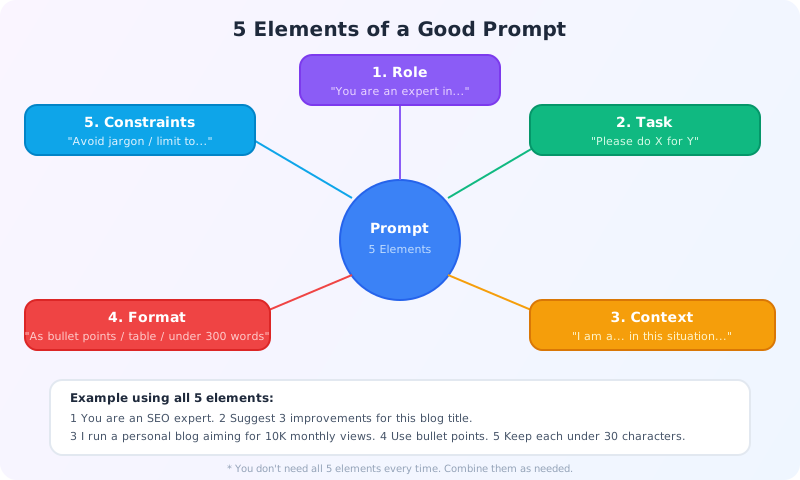
1. Role — Who should AI respond as?
Simply prefacing with "You are an expert in [field]" changes AI's tone and knowledge level.
Example: "You are a web marketer with 10 years of experience. Tell me how to grow a personal blog's traffic."
2. Task — What do you want done?
Instead of vague requests like "tell me" or "think about," use specific action verbs. "Summarize," "compare," "suggest 5 options" — the clearer the action, the more precise AI's response.
3. Context — Why are you asking?
Sharing your situation with AI dramatically improves the response direction. Just writing "I'm a college student with no programming experience" automatically adjusts the difficulty level of the answer.
4. Format — How should the answer look?
"In bullet points," "as a table," "in 300 words or less," "with headings" — without format specifications, AI tends to default to long paragraphs. Specify the format to match your use case.
5. Constraints — What rules should AI follow?
"Avoid technical jargon," "limit to the U.S. market," "always include drawbacks" — setting boundaries and conditions reduces the need for do-overs.
Tip: You don't need all 5 every time. When starting out, just focusing on Task + Context will already make a big difference. Add the other elements as you get more comfortable.
7 Practical Techniques You Can Use Today
A major 2024 study, "The Prompt Report," systematically cataloged 58 different prompt techniques[3]. But you don't need to learn all 58. About 7 are truly useful for everyday AI use. Here they are, organized by difficulty.
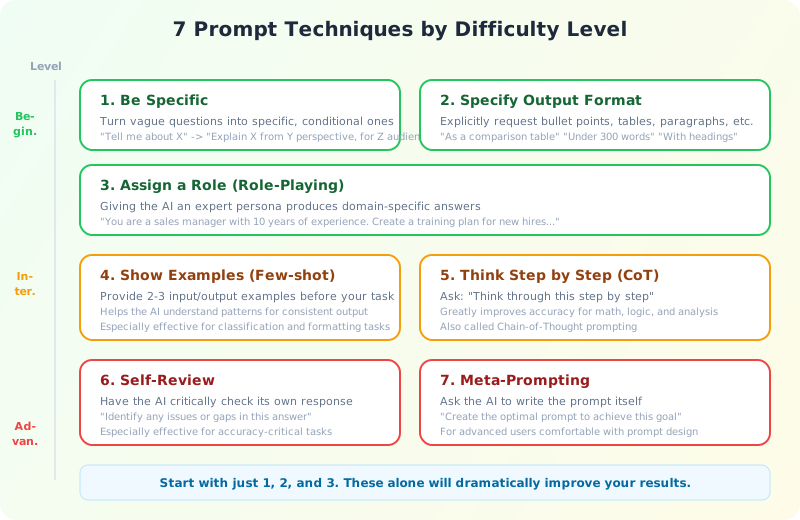
[Beginner] 1. Be Specific
The simplest technique with the biggest impact. Just add numbers, targets, and conditions to vague questions.
Vague: "How can I increase revenue?"
Specific: "Suggest 5 strategies to increase monthly revenue by 20% for a 10-person restaurant, ranked by cost. Current average ticket is $12 with about 3,000 monthly customers."
[Beginner] 2. Specify the Output Format
Research shows that specifying a format can change accuracy by up to 76 percentage points[1]. Just adding "in bullet points," "as a comparison table," or "in under 200 words" makes the output immediately usable.
[Beginner] 3. Assign a Role (Role-Playing)
Tell AI "You are a [role]" and the response becomes specialized for that domain.
"You are a sales manager with 10 years of experience. List the skills a new sales rep should develop in their first 3 months, in priority order."
The key is including years of experience and a specific position. "An expert" alone gives less depth than "a [role] with [X] years of experience."
[Intermediate] 4. Show Examples (Few-Shot)
Provide AI with 2-3 input/output examples before giving it the real task. This is especially powerful for classification, conversion, and structured tasks.
Classify the sentiment of product reviews in the following format:
Review: "This product is amazing!" → Sentiment: Positive
Review: "Very disappointing" → Sentiment: Negative
Review: "It works fine" → Sentiment: NeutralReview: "Shipping was fast but the item was scratched" → Sentiment:
Interestingly, research shows that few-shot effectiveness depends more on the "diversity" of examples than their "correctness." Showing a range of patterns matters more than providing perfect examples[4].
[Intermediate] 5. Think Step by Step (Chain-of-Thought)
Simply adding "think through this step by step" can improve accuracy by roughly 35% on reasoning tasks[1]. Particularly effective for math, logic, and complex analysis.
"Apples cost $1.50 each, oranges cost $0.80 each. If I buy 3 apples and 5 oranges and pay with a $10 bill, how much change do I get? Show your calculation step by step."
2025 note: For the latest "reasoning models" like ChatGPT o-series or Claude Extended Thinking, don't instruct them to "think step by step." These models automatically perform multi-step reasoning internally, and explicit instructions can actually reduce performance[5]. Use this technique with standard models like ChatGPT 4o or Claude Sonnet.
[Advanced] 6. Self-Review
Ask AI to critically check its own response. Effective when accuracy is essential.
(After receiving AI's response)
"Critically review this response for errors, gaps, or inconsistencies. Correct anything that's wrong."
However, AI can't always catch its own mistakes. Researchers have identified the "plausibility trap" — the more convincing AI output looks, the harder it is to verify[5]. For critical decisions, always include human review.
[Advanced] 7. Meta-Prompting — Have AI Write Your Prompts
Once you're comfortable with prompt writing, you can have AI create prompts for you.
"I'm a freelance web designer who wants to efficiently create client proposals. Create an optimal prompt for this purpose."
The key is not to use AI-generated prompts as-is, but to adapt them to your specific situation.
Before / After — Same Question, Vastly Different Results
Techniques are easier to appreciate with concrete examples, so let's look at some before/after comparisons.
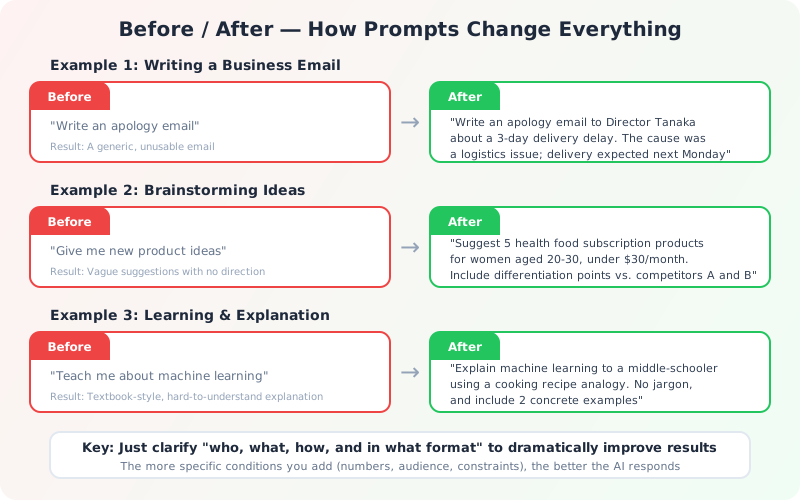
Example 1: Writing a Business Email
| Before | After |
|---|---|
| "Write an apology email" → Generic, unusable email |
"Write an apology email to our client's VP of Operations about a 3-day delivery delay. The cause was a logistics issue, and delivery is now expected by next Monday." → Email ready to send |
Example 2: Brainstorming Ideas
| Before | After |
|---|---|
| "Give me new product ideas" → No industry or context, vague suggestions |
"Suggest 5 health food subscription products targeting women aged 20-30, priced under $30/month. Include differentiation points vs competitors A and B." → Ideas ready for a business proposal |
Example 3: Learning & Research
| Before | After |
|---|---|
| "Explain machine learning" → Dense, textbook-style explanation |
"Explain how machine learning works using a cooking recipe analogy that a middle schooler could understand. No technical jargon, and include 2 concrete examples." → Friendly, immediately understandable explanation |
The common thread: make "who, what, how, and in what format" crystal clear. The more conditions you add, the more precisely AI responds.
Common Mistakes and How to Fix Them
Here are 5 traps new AI users often fall into, and how to escape them.
Mistake 1: Vague Instructions
"Make it better" or "write something nice" are as unhelpful to AI as they are to people. Specify what "better" means concretely. "More casual tone," "include 3 numbers," "under 300 words" — make your criteria explicit.
Mistake 2: Asking Everything at Once
"Explain marketing strategy, recommend tools, and show me how to budget" — AI will try to shallowly cover everything and do none well. One topic per question. Ask follow-up questions based on previous answers for deeper responses.
Mistake 3: Blindly Trusting AI Output
AI can be confidently wrong (hallucination). Be especially cautious with:
- Specific numbers and statistics — Ask for sources and verify
- Proper nouns — Always double-check names, company names, and legal references
- Current events — Models have knowledge cutoff dates
- Legal or tax information — Always verify with official sources
Simple fix: make a habit of asking "What's your source for this?" If AI can't provide a source, that's a red flag.
Mistake 4: Giving Up After One Exchange
"I tried AI but the answer was mediocre" → "AI is useless." This is an extremely wasteful pattern. As the next section explains in detail, 2-3 rounds of conversation with AI is the baseline.
Mistake 5: Delegating Everything to AI
AI excels at drafting, organizing information, and generating ideas. Humans excel at final judgment, reading context, and ethical considerations. Combining both is the most effective approach. "Let AI create the draft, then humans polish it" — this division of labor works best.
The Art of AI Conversation — Don't Stop at One Exchange
Even more important than prompt techniques is the mindset of "iterating on the conversation."
Research shows that iterative feedback improves output quality by 35%[1]. Instead of expecting perfection on the first try, look at AI's response, course-correct, and ask again. This cycle is what builds quality.

6 Types of Feedback
If you're not sure what feedback to give, here are 6 easy-to-use templates:
| Type | Example |
|---|---|
| Redirect | "Make it more casual" / "Too technical — simplify for beginners" |
| Deep dive | "Elaborate on option 3" / "Add specific implementation steps" |
| Add constraints | "Limit to options under $10K budget" / "Focus on the U.S. market only" |
| Change perspective | "Rethink this from the customer's viewpoint" / "Now give me the counterarguments" |
| Quality check | "Check this for errors or inconsistencies" |
| Reformat | "Turn this into an email" / "Reorganize this as a table" |
With 2-3 rounds of feedback, response quality improves dramatically. The trick is not expecting perfection from the start.
From Prompt Engineering to "Context Engineering"
Finally, let's touch on the latest trend in prompt science.
AI researcher Andrej Karpathy noted in June 2025 that "everyday short prompts are just a small part of industrial-scale AI applications," introducing the concept of context engineering[6].
This approach goes beyond just prompts (instructions) to designing all the information AI receives — reference materials, past conversations, tool outputs, and more. For example, loading company documents into AI before asking questions, or attaching previous meeting notes before requesting a summary.
That said, the fundamentals haven't changed. Start by practicing the 5 elements and 7 techniques covered in this chapter. That alone will transform the quality of AI's responses.
References
- Gupta, Aakash. "I Spent a Month Reading 1,500+ Research Papers on Prompt Engineering." Medium, 2025.
- "Is Prompt Engineering Dead?" Fast Company, May 2025.
- Schulhoff, Sander et al. "The Prompt Report: A Systematic Survey of Prompting Techniques." arXiv:2406.06608, 2024.
- Min, Sewon et al. "Rethinking the Role of Demonstrations: What Makes In-Context Learning Work?" arXiv:2202.12837, 2022.
- Lakera. "Prompt Engineering Guide 2026." lakera.ai, 2026.
- Karpathy, Andrej. "Context Engineering." X (Twitter), June 2025.
Related links:
- Prompt Engineering Guide — A comprehensive guide to prompt techniques
- Anthropic Prompt Engineering Docs — Prompt design guide for Claude
In the next chapter, we'll explore how to apply these prompt techniques in real-world scenarios — practical AI applications for work, learning, and creative projects.