The AI Boom Explained — Why Is Everyone Talking About AI Now?
It's nearly impossible to go a day without hearing the word "AI." It's all over the news, social media, and everyday conversation. But AI as a technology has been around since the 1950s. So why is everyone suddenly so excited about it?
The answer is simple: AI has finally become something ordinary people can use.
The turning point was November 2022, when OpenAI released ChatGPT. Before that, AI was a complex tool used by programmers and researchers. But ChatGPT changed everything — you just open a browser, type a question, and get an answer in seconds. Ask it to "make a packing list for my business trip next week" and you'll have one in moments. This accessibility changed the world.
The Numbers Behind AI's Explosive Growth
Let's look at some concrete numbers to understand how widespread AI has become (as of March 2026):
- AI tools have over 378 million users worldwide (2025, SimilarWeb)
- 88% of companies use AI in some part of their operations (McKinsey 2025 survey)
- 38% of knowledge workers use AI daily (up sharply from 11% in 2024)
- The AI market has reached an estimated $300-540 billion, growing at over 30% annually
Just three years ago, most people had barely heard of AI. Now they're using it to draft work emails and write report outlines. This is a shift as significant as the smartphone revolution.
What Makes This AI Boom Different?
This is actually the third AI boom in history. Previous waves of AI hype hit technological walls and fizzled out.
So what's different this time? Two major breakthroughs.
First, AI can now have conversations. Earlier AI required experts to operate through commands and code. Today's AI responds to plain, everyday language. No manuals or programming required.
Second, AI can now create things. Text, images, code, music, video — AI can generate entirely new content. This is known as "Generative AI," and it's the driving force behind this boom.
The Three Types of AI — Generative, Predictive, and Recognition
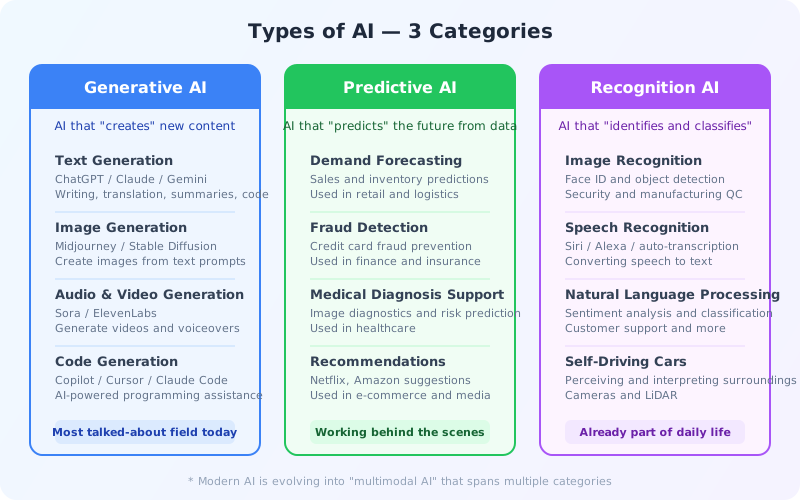
The word "AI" covers a lot of ground. You don't need to memorize everything, but understanding three broad categories makes the whole landscape much clearer.
Generative AI — AI That Creates New Things
This is the category getting the most attention right now. Generative AI can produce new content including text, images, audio, video, and code.
Some everyday examples:
- Ask ChatGPT to "create an outline for my presentation next week" and it'll generate the entire slide structure for you
- Tell Midjourney "a cat sitting on a beach at sunset" and it generates that image in seconds
- Use GitHub Copilot and describe what you want in plain English to get working code
Just a few years ago, these were considered "uniquely human tasks." The fact that AI can now handle them is the essence of today's AI boom.
Predictive AI — AI That Forecasts the Future from Data
Behind the scenes in business, predictive AI has actually been working for much longer than generative AI. It finds patterns in historical data and predicts "what will happen next."
For example, Amazon's "Recommended for you" feature uses predictive AI analyzing your purchase history. Credit card companies use predictive AI to detect fraudulent transactions in real time. Even weather forecasts have gotten more accurate thanks to AI.
It's not as flashy as generative AI, but it's the unsung hero that powers much of our daily lives.
Recognition AI — AI That Identifies and Classifies
Unlocking your phone with face recognition. Searching "cats" in Google Photos and getting only cat pictures. Talking to Siri or Alexa and having them understand you. These are all examples of recognition AI at work.
It works so seamlessly that you might not even realize AI is involved. But sophisticated AI technology is running behind the scenes.
Side note: The boundaries between these categories are increasingly blurring. For instance, ChatGPT can generate text (generative AI), understand images (recognition AI), and predict the next question from conversation context (predictive AI). AI that combines multiple capabilities like this is called "multimodal AI." We'll explore this further in Chapter 6.
Inside ChatGPT — An LLM Is a "Supercharged Autocomplete"
When you use ChatGPT, Claude, or Gemini, it looks like the AI is "thinking" about its responses. But the actual mechanism is surprisingly simple.
In a nutshell, it's a massively powerful version of your phone's autocomplete.

It's Just Predicting the Next Word
When you type "Good mor" on your phone, it suggests "Good morning." It's simply predicting what word is most likely to come next based on past patterns.
The core technology behind ChatGPT — LLM (Large Language Model) — does essentially the same thing. But the scale is on a completely different level.
- Phone autocomplete → Predicts from your typing history (data size: a few MB)
- LLM → Predicts from the entire internet's text (data size: several TB or more)
Your phone only looks at the last few characters, but an LLM considers the entire conversation context to generate the "best next word" one token at a time. This ability to "understand context" is what makes LLMs appear intelligent.
How Did AI Get So "Smart"?
An LLM becomes capable through three major steps.
Step 1: Reading massive amounts of text (Pre-training)
The model ingests enormous volumes of internet text — websites, books, research papers, news articles — to learn patterns of language. It stores statistical tendencies like "this word tends to follow that word" across hundreds of billions of parameters (adjustment values). This process takes months using thousands of GPUs (high-performance computing chips).
Step 2: Learning how to converse (Fine-tuning)
Just reading vast amounts of text doesn't make the AI conversational — it's more like a language-obsessed savant. Using high-quality conversation examples prepared by humans, it learns patterns like "when asked a question, respond like this."
Step 3: Getting human feedback (RLHF)
Finally, human evaluators rate responses — "this answer is good," "that one is harmful" — refining the AI's output quality. This process is what makes AI respond politely and avoid harmful content.
Important: It's "Predicting," Not "Knowing"
This is a crucial point. AI isn't "answering" questions — it's generating plausible-sounding continuations.
For example, when you ask "What is the capital of France?" and it responds "Paris," it doesn't actually "know" that Paris is the capital. It has learned from massive amounts of text that "Paris" statistically follows "capital of France."
This mechanism allows AI to generate fluent text. But it also means AI can confidently produce incorrect information. This is called "hallucination," and we'll explain it in more detail later.
What AI Can and Can't Do — Avoiding Overconfidence and Underestimation
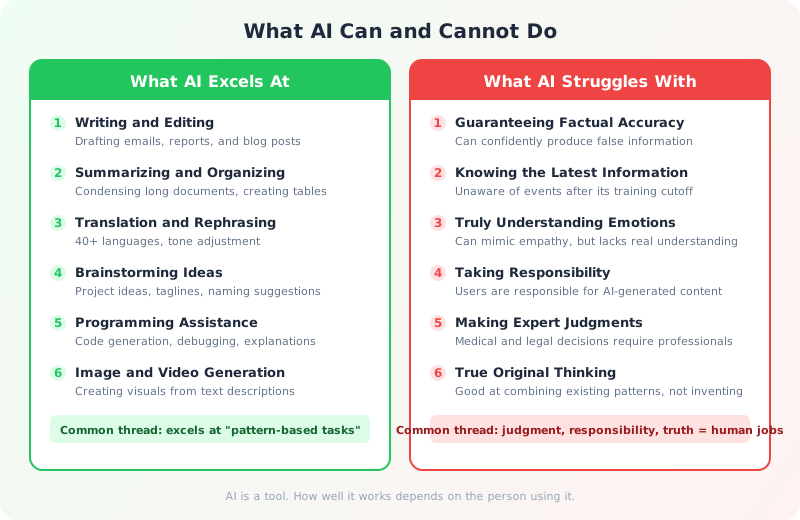
People tend to view AI in extremes — either as a "magical tool that can do anything" or as "just a machine, nothing special." The reality is somewhere in between: AI has clear strengths and clear weaknesses.
What AI Is Good At
Writing and editing text is where today's AI truly shines. Drafting emails, writing reports, summarizing long documents, proofreading — AI performs as well as or better than a human assistant for all kinds of "working with words."
For example, someone who used to spend 30 minutes writing a professional email can now ask AI to "write a polite business email about this topic" and get a draft in one minute. They just review it and make minor tweaks. It's not unusual to cut work time by 90% or more.
Beyond that, brainstorming ideas, writing Excel formulas or code, and translating documents into other languages have already become everyday habits for many professionals.
What AI Struggles With — Understand This to Avoid Trouble
The biggest weakness is that AI can't guarantee factual accuracy. AI generates text that's statistically "plausible," but it doesn't verify whether the content is actually correct.
Benchmark research shows that even the best models have a ~0.7% hallucination rate on basic tasks (Suprmind 2026 survey). "0.7% sounds low," you might think — but in legal contexts, over 75% of responses contain errors, and in medical contexts, over 23% do (Stanford RegLab). Reliability varies dramatically by domain.
MIT research has also revealed that AI tends to use more confident language precisely when it's wrong. Just because it says "definitely" or "certainly" doesn't mean it's correct.
Another critical point: never let AI make final decisions for you. Whether it's medical or legal judgments, or important business decisions — AI is a powerful assistant, but the ultimate responsibility lies with the human using it.
Practical Tips for Using AI Effectively
The key is to use AI for what it's good at, and always have humans check its weak spots.
- AI drafts, humans finalize — Have AI create email and document drafts, then review the content before sending
- AI generates ideas, humans decide — Get AI to suggest multiple options, then choose which one to go with yourself
- AI starts the research, you verify — Use AI's output as a starting point, then confirm important facts from official sources
Try It Yourself — 3 Free AI Tools to Start Today
We've covered how AI works and its strengths and weaknesses. But there's no substitute for hands-on experience. The best way to learn is to try it yourself.
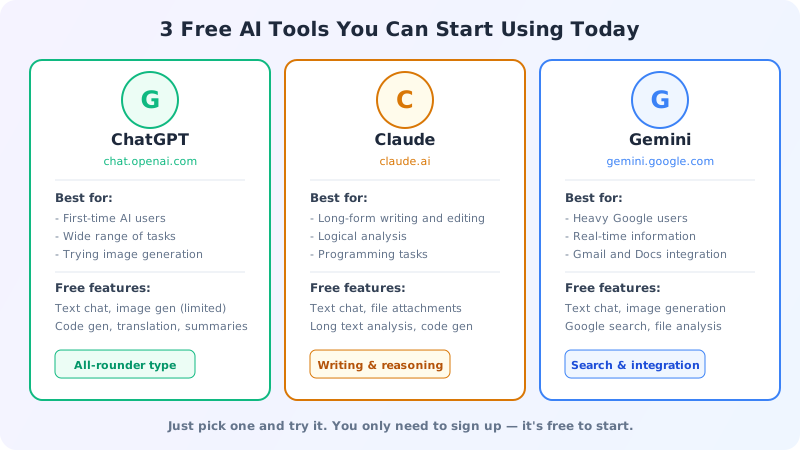
The good news: all major AI tools are free to try. No credit card required. With just an email address or Google account, you can be chatting with AI in five minutes.
ChatGPT — Start Here
Developed by OpenAI, ChatGPT is the tool that sparked the AI revolution. If you're unsure where to begin, start here.
How to get started: Visit chat.openai.com → Sign up with your email or Google account → Start using it immediately.
Things to try first:
- "Create a packing list for a 3-day trip to New York next week"
- "Rewrite this email in a more professional tone" (paste your draft)
- "Explain inflation in terms a 10-year-old could understand"
Claude — Great for Long Writing and Analysis
Developed by Anthropic, Claude excels at creating and analyzing long documents and programming support. It's known for thoughtful, logical responses.
How to get started: Visit claude.ai → Sign up with your email → Available on Web, iOS, and Android.
Things to try first:
- Upload a PDF or Word document and ask "Summarize the key points of this document in 5 bullets"
- "Point out the weaknesses in this proposal and suggest improvements"
- "Write an Excel macro to aggregate sales data by department"
Gemini — Deep Google Integration
Google's AI offering, Gemini integrates seamlessly with Google Search, Gmail, and Google Docs. It also handles real-time information well.
How to get started: Visit gemini.google.com → Sign in with your Google account → Start using it right away.
Things to try first:
- "What's the weather like in my city today, and what should I wear?" (fetches real-time data)
- Upload a photo and ask "Describe what's in this picture"
- "Plan a family trip for next month. Budget $2,000, two kids"
Which One Should You Choose?
Honestly, if you're just starting out, any of them will do. All three are free to try, so there's no reason not to experiment with each one. As you use them more, you'll naturally develop a feel for which tool suits which type of task.
For a detailed comparison of each tool's features and strengths, see Chapter 2: Choosing AI Tools.
Essential Things to Know Before Using AI
Before you start using AI, there are three things you absolutely need to understand. These are important points that can cause real problems if ignored.
1. Hallucination — AI Can Confidently Make Things Up
We touched on this earlier, but let's dive a bit deeper.
Hallucination refers to the phenomenon where AI generates false information as if it were completely factual. The term comes from the English word for seeing things that aren't there — as if the AI is "hallucinating."
For example, if you ask AI to "explain the contents of a paper by [author name]," it may fabricate a title, author, and abstract for a paper that doesn't exist. The response will be grammatically perfect and written with full confidence, making it very convincing to anyone who doesn't know better.
It's estimated that AI hallucinations cost businesses $67.4 billion per year globally (AllAboutAI 2024 survey).
The fix is simple: Don't take AI's output at face value. Always verify important facts through another source (official websites, trusted publications, etc.). This alone can drastically reduce hallucination-related problems.
2. Privacy — What Happens to Your Input?
What you type into an AI chat may be used as training data for the model, depending on the service. This means entering confidential information or personal data could lead to it being used in unexpected ways.
Research shows that approximately 8.5% of prompts entered into AI contain sensitive data. Of those, 46% involve customer information and 27% contain employee personal data.
Ground rules:
- Don't enter company confidential information (revenue data, unreleased product info, etc.)
- Don't enter other people's personal information (names, addresses, phone numbers, etc.)
- Never enter passwords or credit card numbers
- If using AI for work, check your company's AI usage policy
Many tools offer privacy settings where you can opt out of having your chat data used for training. Check these settings for peace of mind.
3. Copyright — Who Owns What AI Creates?
Copyright for AI-generated text and images is still being debated worldwide. Laws vary by country, and clear rules haven't been established yet.
What we know so far:
- If you publish AI-generated text as-is and it closely resembles someone else's copyrighted work, it could create legal issues
- In the U.S., courts have ruled that "works created solely by AI are not eligible for copyright protection"
- Numerous lawsuits are underway over copyrighted materials used in AI training data without permission
Practical advice: Rather than using AI output as-is, customize and add your own touches. Especially for professional use, either disclose that AI was involved or substantially rework the content before publishing.
We'll explore AI risks and ethical considerations in much greater depth in Chapter 5.
If you've read this far, you already have a solid understanding of how AI works and how to approach it. In the next chapter, Chapter 2: Choosing AI Tools, we'll compare the major AI tools and help you find the right one for your needs.
References
- McKinsey "The State of AI" (2025 Survey) — 88% enterprise AI adoption rate
- Suprmind "AI Hallucination Rates & Benchmarks" (2026) — Comparative hallucination rate data
- AllAboutAI "AI Hallucination Report" (2024) — $67.4 billion in annual losses from hallucinations
- MedhaCloud "67 AI Adoption Statistics for 2026" — AI adoption statistics
- Netguru "AI Adoption Statistics in 2026" — 38% of knowledge workers use AI daily