What Can AI Do? — 4 Categories of Use Cases
"I get that AI is useful, but what exactly can I use it for?" — this is the first question most people have after trying AI.
According to McKinsey's survey (2024), the share of people using AI at work has reached 72% globally, up sharply from 55% the prior year[1]. It's no longer about "whether to use AI" but "how to use it."
AI use cases fall into four main categories. In this chapter, we'll explore practical examples you can try today, complete with prompt templates.
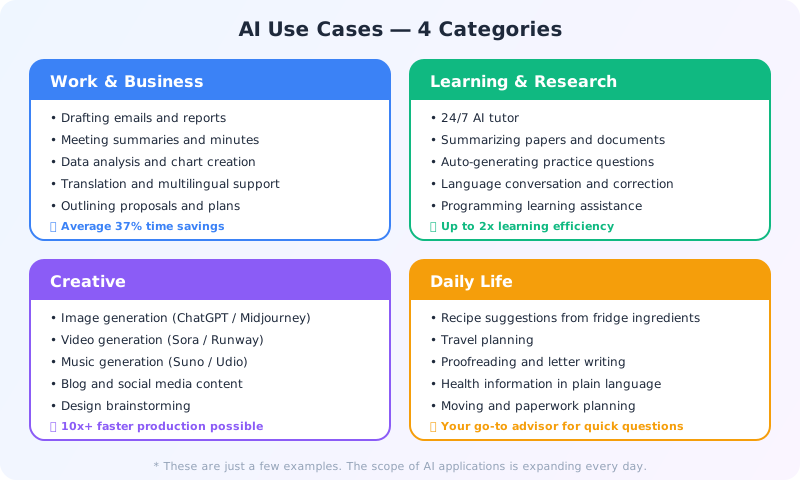
AI at Work — Email, Documents & Data Analysis
AI is most powerful at work for tasks that are time-consuming for humans but don't require much creativity. Research from Harvard Business School found that consultants using AI completed tasks 25.1% faster with 40% higher quality[2].

Email & Business Writing
This is where AI delivers the most immediate results. Just provide the purpose and recipient details, and you'll get a properly toned email.
Prompt example:
"Write a reply to the following email. Keep it polite but concise, and propose an online meeting next Tuesday at 2 PM.
[paste the email]"
Reports, proposals, apology emails, thank-you notes — the less familiar you are with a type of document, the more AI helps. Instead of writing from scratch, have AI draft it and then refine it yourself. This alone can cut email writing time in half or more.
Data Analysis & Summarization
You can upload CSV or Excel files to ChatGPT or Claude and ask for trend analysis and chart creation.
Prompt example:
"From the attached sales data, create: 1) A monthly trend chart 2) Year-over-year comparison 3) Top 5 product analysis. Keep it concise enough for one executive meeting slide."
Summarizing a 100-page report in 3 sentences, categorizing survey free-text responses, comparing competitor websites — processing large amounts of information quickly is AI's greatest strength.
Meeting Minutes
Transcribe meeting recordings with Whisper (OpenAI's speech recognition), then have ChatGPT or Claude create structured minutes. This two-step process eliminates the usual 30 minutes of post-meeting work.
Prompt example:
"Organize the following meeting notes into: 1) Decisions made 2) Action items (with assignee and deadline) 3) Agenda for next meeting.
[paste notes]"
Translation & Multilingual Support
AI translation has evolved dramatically beyond Google Translate. The key advantage of chat AI translation is the ability to specify nuance.
Prompt example:
"Translate the following email to French. The recipient is a first-time overseas client, so use a business-formal tone. Keep technical terms in English."
AI for Learning — Your 24/7 Tutor and Language Partner
AI works like a "tutor that's available 24/7 and never gets annoyed no matter how many times you ask." A randomized controlled trial from Harvard in 2025 found that students using AI tutoring achieved learning outcomes more than twice as high as traditional instruction[3].
Personalized Instruction
With textbooks and YouTube, finding content at the right level is difficult. With AI, you can adjust in real time — "make it simpler" or "give more examples."
Prompt example:
"I'm a programming beginner. Teach me Python for-loops in this order: 1) Basic syntax 2) Three practical use cases 3) Common errors and how to fix them. Always explain technical terms in plain language."
The key is stating your level upfront. "I'm a beginner," "I've taken high school chemistry," or "I've used this professionally for 3 years" — just sharing context adjusts the explanation depth appropriately.
Research Starting Point
When exploring a new field, AI is excellent as an "entry point" for information. Getting a systematic overview, understanding key debates, and finding keywords for deeper research — all possible in minutes.
Prompt example:
"About quantum computing: 1) Overview of how it works (at a middle school level) 2) Current practical applications 3) Outlook for the next 5 years 4) Five keywords for deeper research."
However, always fact-check AI's information. Numbers and proper nouns especially need primary source verification. AI is a "starting point" for research, not the final authority. Search-integrated AIs like Perplexity and Gemini provide source links with their answers, making verification easier.
Language Learning Partner
AI is particularly powerful for language learning. It partially solves the problem of "not having native speakers to practice with."
| Method | Prompt Example |
|---|---|
| Conversation practice | "Let's practice conversational Spanish. Scenario: ordering at a restaurant." |
| Grammar help | "Explain the difference between 'ser' and 'estar' in Spanish with examples." |
| Writing correction | "Correct the following French text. Make it sound natural and explain why you made each change." |
| Reading support | "Pick out the 5 most difficult expressions from this German article and explain them in English." |
AI for Creative Work — Image, Video & Music Generation
Creative AI exploded between 2024 and 2025. Tasks that once required professional designers or creators can now be accomplished with text input alone.
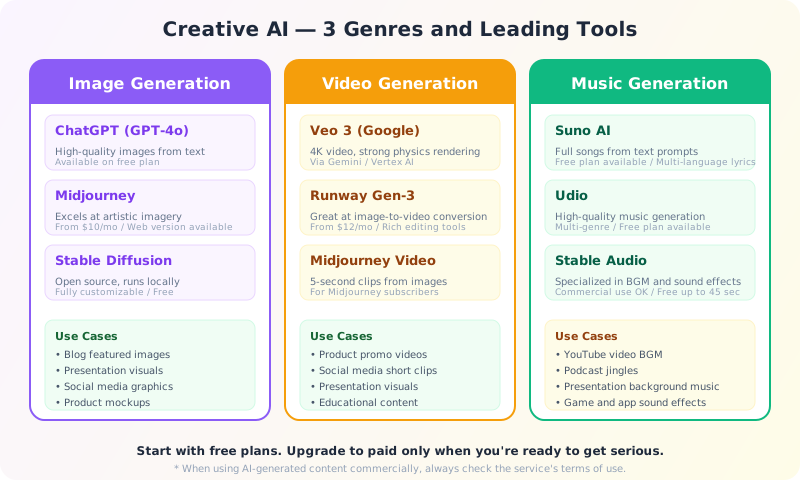
Image Generation — "Drawing with Words"
ChatGPT's image generation (GPT-4o) is available even on free plans, making it the most accessible creative AI. Blog header images, presentation visuals, social media graphics — the practical applications are abundant.
Prompt example:
"Create a blog header image that blends technology and nature. Use a green-to-blue gradient, minimalist design, 16:9 landscape ratio."
For more artistic images, try Midjourney. For full customization on your own PC, try Stable Diffusion.
Video Generation — Creating Footage from Text
Google's Veo 3, Runway Gen-3, Midjourney Video, and more — tools for generating video from text or images are rapidly emerging. This is the fastest-evolving genre, with frequent tool changes (OpenAI's Sora was announced to shut down in 2026). The output quality is already usable for short-form videos and promotional content.
Music Generation — From Background Music to Full Songs
Suno AI can generate complete songs with vocals from instructions like "a relaxing jazz BGM" or "an upbeat pop song with English lyrics." Practical uses include YouTube video background music, podcast jingles, and presentation intro music.
Written Creative Content
Blog outlines, catchphrase generation, social media post drafts — AI is a powerful assistant for written creative work too.
Prompt example:
"I want to write a blog post on 'remote work productivity tips.' Give me: 1) Five SEO-friendly title options 2) An outline (heading structure) for the most search-friendly title."
Copyright warning: When using AI-generated images, video, or music commercially, always check each service's terms of use. Also, asking AI to create content "in the style of [specific artist/brand]" can create copyright and trademark issues. More details in Chapter 5: AI Risks and Ethics.
AI in Daily Life — Cooking, Travel & More
Beyond work and learning, AI is a helpful partner for everyday situations too.
Cooking — Recipe Suggestions from What's in Your Fridge
"I have chicken thighs, potatoes, onions, and canned tomatoes in my fridge. Suggest 3 dinner recipes I can make in 30 minutes. Kid-friendly flavors (5-year-old)."
Just listing ingredients gets you recipes — a real lifesaver for the daily "what's for dinner?" decision. You can also specify allergy accommodations and nutritional requirements.
Travel Planning — Personalized Itineraries
"I'm planning a 3-day trip to Barcelona. Budget: $1,500 per person, couple in our 30s. We love architecture and local food. Create a day-by-day itinerary with transportation and estimated times."
You get a plan perfectly tailored to your conditions faster than browsing guidebooks or travel sites. Follow-up questions like "rain plan alternatives" or "hidden gems" are easy to explore.
Life Admin — Moving, Paperwork & Checklists
"I'm relocating from New York to San Francisco next month. Create a comprehensive checklist of everything I need to do before and after the move — address changes, utilities, government paperwork, etc."
Your "Quick Question" Advisor
Health info, understanding contracts, insurance comparisons, social etiquette — AI is convenient for those "not quite worth calling a professional, but I want to double-check" moments.
| Situation | Prompt Example |
|---|---|
| Health info | "My blood test shows LDL cholesterol at 150. What does this mean and what lifestyle changes should I consider?" |
| Contracts | "Review this lease agreement for any clauses that could be disadvantageous when moving out. Explain in plain terms." |
| Social etiquette | "I've been invited to a colleague's wedding. What's the appropriate gift amount, and can you draft a brief toast?" |
| Paperwork | "I want to claim medical expense deductions on my taxes. List the required documents and steps as a checklist." |
Important note: For medical, legal, and tax-related AI responses, always treat them as reference information only. Final decisions should always involve a qualified professional. Think of AI as "getting a knowledgeable friend's opinion" — helpful but not authoritative.
3 Tips for Successful AI Adoption
We've covered many use cases, but truly "mastering" AI is less about technique and more about mindset.
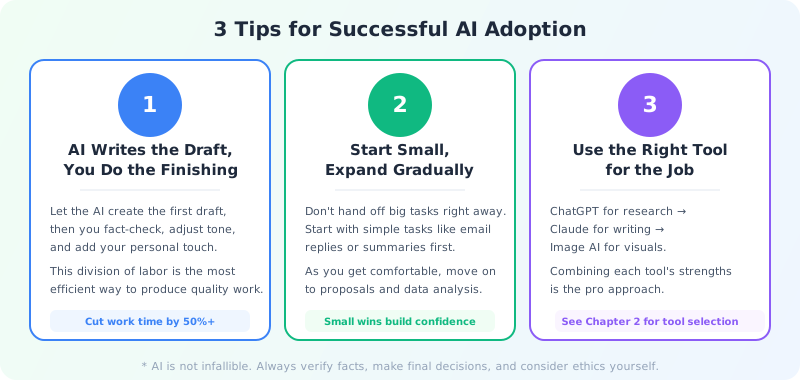
Tip 1: AI Drafts, You Finalize
Don't use AI output as your final product. Treat it as a draft. Let AI handle the 0-to-60% and you take it from 60-to-100%. This division of labor is the key to balancing quality and speed.
Specifically:
- Fact-check — Verify all numbers and proper nouns
- Tone adjustment — Rewrite in your own voice
- Context gaps — Add insider knowledge and situational nuance that AI doesn't have
Tip 2: Start Small, Expand Gradually
Instead of jumping in with "write an entire proposal," start with email replies and text summaries — small, quick tasks. As you build confidence through successes, you'll naturally start thinking "I wonder if AI could do this too?"
Recommended progression:
- Start with email reply drafts (highest immediate impact)
- Move to summarizing long texts (condensing reports or articles to 3 sentences)
- Then try data analysis and proposal outlines
Tip 3: Use the Right Tool for the Job
As we covered in Chapter 2, each AI tool has its strengths. Don't stick with just one — use the right tool for each purpose like a pro.
| Purpose | Recommended Tool |
|---|---|
| Long-form analysis & writing | Claude (excels with long context) |
| Tasks involving image generation | ChatGPT (GPT-4o includes image generation) |
| Current information research | Perplexity / Gemini (web search integration) |
| Coding assistance | Claude Code / Copilot / Cursor |
| Video background music | Suno AI (text-to-music generation) |
Try it today: Pick one prompt example from this chapter and try it right now. Our recommendation: drafting an email reply. Paste an actual email you received and have AI draft a response. The "wow, that was fast" moment is your first step into AI adoption.
References
- McKinsey & Company. "The state of AI: How organizations are rewiring to capture value." McKinsey Global Survey, 2024.
- Dell'Acqua, Fabrizio et al. "Navigating the Jagged Technological Frontier: Field Experimental Evidence of the Effects of AI on Knowledge Worker Productivity and Quality." Harvard Business School Working Paper, 2023.
- "AI tutoring outperforms active learning in a randomized controlled trial." Nature Scientific Reports, June 2025.
Related links:
- Sora (OpenAI) — Text-to-video AI
- Suno AI — Text-to-music AI
In the next chapter, we'll dive into the risks and ethical considerations everyone should know — hallucination, copyright, and privacy.