The AI Tools Landscape — 4 Categories to Know
When you decide to try AI tools, the first obstacle is often "there are too many options — how do I choose?"
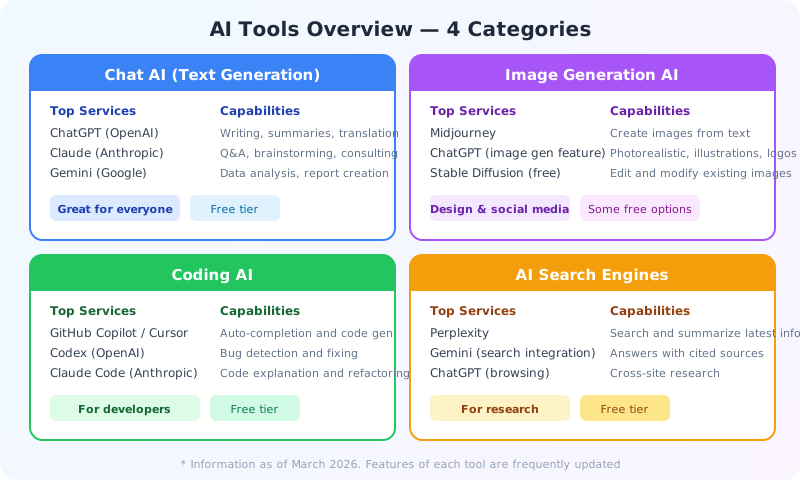
Don't worry. As of March 2026, the major AI tools fall into four categories. You don't need to learn them all. Just figuring out which category matches what you want to do makes choosing much easier.
Chat AI (Text Generation)
ChatGPT, Claude, Gemini, and more. Writing, summarizing, translating, data analysis, brainstorming — this is the most versatile category. If you're new to AI, start here. Every service has a free plan, so you can try without spending a cent. Five minutes with a chat AI will quickly answer the question "What can AI actually do?"
Image Generation AI
ChatGPT's image generation feature, Midjourney, Stable Diffusion, and others. Just type a description like "I want an image of this" and it generates everything from photo-realistic images to illustrations and logos. Great for social media posts and presentation visuals.
Coding AI
GitHub Copilot, Cursor, Codex (OpenAI), Claude Code, and more. While these are developer-oriented tools, they're gaining attention for enabling "even non-programmers to build apps." From code auto-completion to AI agents that autonomously build applications, the support is comprehensive.
AI Search Engines
Perplexity, Gemini (with search integration), ChatGPT (with browsing), and more. Unlike traditional search engines, these tools research across multiple websites and deliver summarized answers with citations. They dramatically improve research efficiency.
According to Fortune Business Insights, the global AI market is expected to reach approximately $514.5 billion in 2026. However, the tools that regular users interact with daily are concentrated in these four categories. Even if the options seem overwhelming, just pick one tool from the category that matches your goal.
ChatGPT vs Claude vs Gemini — Three AI Chatbots, Three Personalities
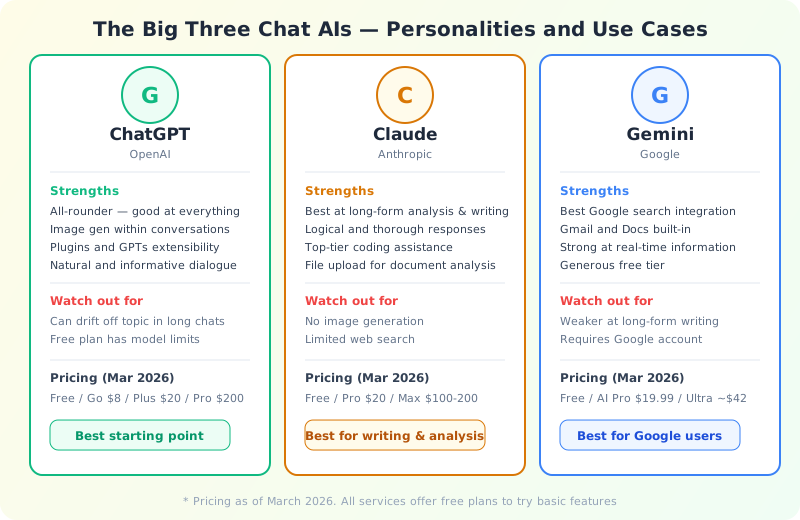
Among chat AIs, ChatGPT, Claude, and Gemini have the largest user bases. You might think "aren't they all the same?" — but they actually have distinct personalities. Think of them as three talented colleagues, each with different strengths.
ChatGPT — The All-Rounder
Developed by OpenAI, ChatGPT is the tool that sparked the generative AI boom. Since its November 2022 launch, it has been the most widely used chat AI, with over 750 million weekly active users in 2025, commanding roughly 68% market share in the chat AI space (Similarweb, January 2026).
ChatGPT is best for:
- First-time AI users — It handles almost any question and provides a reassuring breadth of knowledge
- Image generation — Being able to ask "create an image like this" mid-conversation is a unique ChatGPT strength
- Versatile use — GPTs and plugins let you extend its functionality
Pricing includes a free plan, Go ($8/month), Plus ($20/month), and Pro ($200/month) as of March 2026. The free plan covers basic conversations and limited image generation, making it the best starting point.
Claude — The Master of Thought and Writing
Developed by Anthropic, Claude is an AI assistant built on the design philosophy of being "helpful, harmless, and honest." It specializes in long-form text processing and logical reasoning.
Claude is best for:
- Long-form writing and analysis — For reports, research papers, and proposals, Claude delivers consistently high quality
- Logical analysis — It excels at organizing complex problems and providing well-structured comparisons
- Programming — Consistently ranks at the top of coding benchmarks, plus offers Claude Code for developers
- Document analysis — Upload PDFs or text files to have them analyzed in depth
Pricing includes a free plan, Pro ($20/month), and Max ($100/$200/month). The free plan has usage limits but is enough to experience Claude's writing quality. If you need AI for long-form writing or deep analysis, give Claude a try.
Gemini — The Google Integration King
Developed by Google, Gemini's greatest strength is its integration with the Google ecosystem. Being able to use AI within Gmail, Google Docs, and Sheets is a significant advantage the others don't offer.
Gemini is best for:
- Finding the latest information — Its Google Search integration is unmatched for real-time data
- Google users — Once you experience AI inside Gmail and Docs, you won't want to go back
- Video content analysis — It can even summarize YouTube video content
Pricing includes a free plan, AI Pro ($19.99/month), and Ultra (3 months for $124.99, ~$42/month). The free tier is relatively generous, and a Google account is all you need to get started.
So Which One Should You Choose?
Honestly, "try all of them and use whichever you like best" is the optimal strategy. They're all free to try, so why not? But if you want a quick starting point:
- If you can only pick one → ChatGPT (the most resources and community support available)
- If writing and analysis matter most → Claude (unmatched long-form consistency)
- If you're a Google power user → Gemini (seamlessly enhances your existing Google workflow)
The 2026 approach isn't about "picking just one" — it's about using multiple tools for different purposes. Writing with Claude, searching with Gemini — this kind of workflow is becoming increasingly common.
How Far Can Free Plans Take You?
"Free plans probably hit limits right away, right?" — this is a common concern. While paid plans do offer more, 2026's free plans are surprisingly capable.
What You Can Do on Free Plans
| Feature | ChatGPT Free | Claude Free | Gemini Free |
|---|---|---|---|
| Text Chat | Yes (usage limits) | Yes (usage limits) | Yes (usage limits) |
| Image Generation | Yes (limited) | No | Yes (limited) |
| File Attachments | Yes | Yes | Yes |
| Web Search | Yes | Limited | Yes |
| Available Model | Mostly GPT-4o mini | Sonnet (mid-tier) | Mostly Gemini Flash |
| Usage Estimate | Dozens/day | Dozens/day | Dozens/day |
For everyday tasks like drafting emails, polishing text, and quick research, free plans are more than enough.
5 Things You Can Do with Just a Free Plan
Here are real examples of tasks that any free plan can handle:
- Drafting business emails — Type "Write an apology email to a client about a project delay. Cause: system outage. Expected resolution: next Friday" and get a polished draft instantly
- Meeting notes summary — Paste your bullet points and ask "Turn this into structured meeting minutes. Clearly mark decisions and action items"
- Email translation and reply — Paste a foreign-language email and ask "Translate this and draft a reply with this message"
- Presentation outline — Share your topic and ask "Create a slide outline for a 10-minute presentation with key points for each slide"
- Excel formula help — Ask "What formula will automatically extract the day of the week from a date in Column A?"
All of these work perfectly fine on any service's free plan. Just offloading the "slightly tedious" daily tasks to AI can save significant time.
When to Consider Upgrading to Paid
Here's when it might be time for a paid plan:
- You keep hitting "limit reached" messages — Heavy work use will outgrow free limits
- You want the best models — GPT-4o/o3 for ChatGPT, Opus for Claude, Ultra for Gemini — top-tier models offer noticeably better accuracy and creativity
- You need serious image generation — When free limits aren't enough
- You need to process long documents — Paid plans offer larger context windows (how much AI can read at once)
- Team use — Business plans include team management and security features
Pricing Comparison — How Much Per Month?
| Service | Free | Entry Paid | Standard | Premium |
|---|---|---|---|---|
| ChatGPT | Yes | Go $8/mo | Plus $20/mo | Pro $200/mo |
| Claude | Yes | Pro $20/mo | Max $100/mo | Max $200/mo |
| Gemini | Yes | AI Pro $19.99/mo | — | Ultra ~$42/mo |
* Prices as of March 2026.
The key is to upgrade only when you personally feel it's worth it. There's no rush at all. Use a free plan for a week or two, get a sense of how you use it, and then decide. ChatGPT's Go plan ($8/month) is a great middle ground for those who need more than free but find $20 too steep.
Try Image Generation AI
As we covered in Chapter 1, image generation AI is one of the fastest-evolving fields of 2025-2026. Type "a small cafe with a red roof on a rainy day" and watch the scene come to life — it's genuinely exciting to try.
ChatGPT's Image Generation Is Best for Beginners
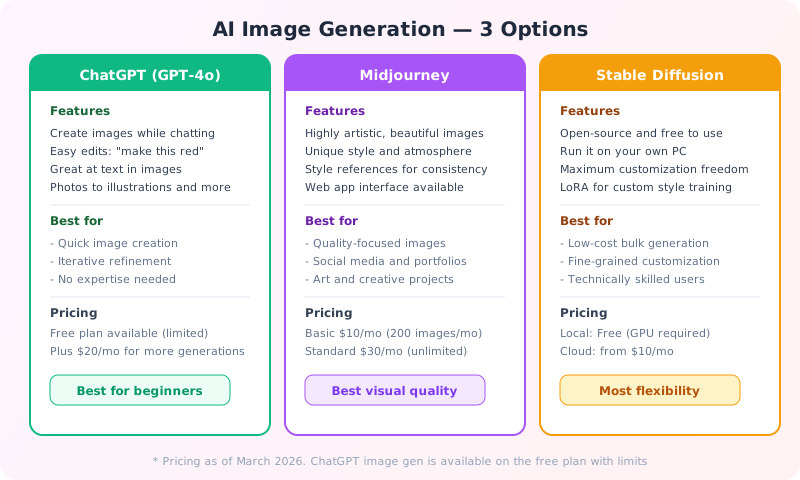
If you're trying image generation AI for the first time, ChatGPT's image generation feature is the top recommendation. The reason is simple: you can "create images while having a conversation."
For example:
- "Create a watercolor illustration of a Parisian cafe" → Image generated
- "Make the colors warmer" → Modified image appears
- "Add a cat on the terrace" → Further modification
This iterative, conversational process is far more intuitive than specialized tools. After ChatGPT's image generation received a major upgrade in March 2025 (GPT-4o native image generation), the quality has reached a level that professional creatives acknowledge.
For Top Quality: Midjourney
Midjourney stands out for its "artistic quality." It's known for its distinctive visual style and beautiful output, and is popular even among professional designers and illustrators. Starting at $10/month, you can use it via a web app. The "style reference" feature lets you generate multiple images with a consistent style based on an existing image.
However, it doesn't support the "conversational refinement" approach that ChatGPT offers. Writing effective prompts requires some skill, and instructions are primarily in English.
For Maximum Freedom: Stable Diffusion
Stable Diffusion is an open-source image generation model — install it on your own computer and generate unlimited images for free. You can even train custom styles using LoRA technology. However, you'll need a decent GPU (graphics card) and some technical knowledge.
Tools like ComfyUI and Forge UI have recently made it much more accessible than before. It's ideal for those who want to "generate lots of images without spending money" or "want fine-grained customization."
Things to Watch Out For
Image generation AI is evolving rapidly, but there are important caveats:
- Copyright — Copyright treatment of generated images varies by country and service. Check each service's terms of use for commercial applications
- Fake image risks — Generating images resembling real people raises ethical concerns. Each service has restrictions in place
- Training data concerns — There's criticism about models being trained on existing artists' work without permission
We'll cover these issues in detail in Chapter 5: AI Risks and Ethics.
The World of Coding AI
"Programming? That's not for me" — wait, don't skip this section. The evolution of coding AI is relevant to every professional, not just programmers.
Why? Because coding AI is making it possible for "people with zero programming experience to build apps." McKinsey's research (2024) reports that development teams using coding AI saw productivity gains of up to 55%.
GitHub Copilot — Your Coding Companion
The most widely used coding AI, provided by GitHub and Microsoft. It runs inside code editors like VS Code, suggesting "what code you should write next" as you type.
For example, just writing a function name prompts it to suggest the entire implementation, or writing a comment generates the corresponding code. Pricing: free plan (limited), $10/month for individuals, $19/month for business (as of March 2026).
Cursor — An AI-First Editor
Cursor is a code editor built from the ground up for "collaborating with AI." Based on VS Code, AI conversation sits at the editor's core. Just say "find the bug in this file" or "add this feature" in plain language, and it proposes and applies changes across multiple files at once.
Pricing: free plan (limited), Pro $20/month, Business $40/month. It's rapidly gaining popularity among developers and was highlighted as a notable tool in the 2025 Stack Overflow Developer Survey.
Codex — An Autonomous Coding Agent in the Cloud
Released by OpenAI in May 2025, Codex is a cloud-based coding agent. Give it a task, and it autonomously writes code, runs tests, and submits pull requests — all in a sandboxed cloud environment. As of March 2026, it has over 2 million weekly active users (per OpenAI).
It's included in ChatGPT Plus ($20/month) at no extra cost. It's especially powerful for "background work" and "routine code generation." The CLI tool is also open source.
Claude Code — An AI Engineer in Your Terminal
Anthropic's developer CLI tool lets you ask Claude to code directly from your terminal. It autonomously reads and writes files, manages Git, and runs tests. On SWE-bench (a coding ability benchmark), it scored 80.9%, placing it among the top performers.
While Codex works asynchronously in the cloud, Claude Code works locally in real-time, allowing interactive collaboration. In fact, this very website (AI Arte) was built using Claude Code. Available with Claude Pro ($20/month).
You Don't Need to Be a Programmer to Benefit
Coding AI is a specialist tool, but chat AIs (ChatGPT, Claude, Gemini) also offer powerful coding support. Even without programming knowledge, you can:
- Create Excel macros — Ask "Write a macro to aggregate monthly sales by department" and get copy-paste ready code
- Build web pages — "Create HTML and CSS for a simple personal portfolio page" and get a publish-ready page
- Process data — "Write a Python script to extract only California entries from this CSV data"
- Automate tasks — "Create a script that backs up files in a folder every day at a set time"
In other words, coding AI isn't just for programmers — it's valuable for anyone who wants to automate small tasks to work more efficiently. Learning the prompt techniques in Chapter 3 will help you use these tools even more effectively.
If you're interested in serious programming, check out the AI agent discussion in Chapter 6. Coding AI is currently the fastest-evolving area in the field.
Find Your Tool — A Purpose-Based Flowchart
Feeling overwhelmed by all the options? Here's a simple flowchart to help you find the right tool for your needs.

Recommended Starting Point
Honestly, ChatGPT is the safest first choice. It's a Swiss Army knife that covers chat, image generation, search, and coding assistance all in one service.
From there, if you want better writing quality, try Claude. If you want Google integration, try Gemini. If you want cited research, try Perplexity. Gradually expanding your toolkit this way is the most stress-free approach.
Don't Forget AI Search Engines
One often-overlooked category worth mentioning: AI search engines, led by Perplexity, can dramatically change how you do research.
Traditional Google searches require you to open results one by one and compile information yourself. AI search engines analyze information across multiple sites and generate cited answers. Just ask "What's the latest on [topic]?" and it'll research across academic papers to news articles and give you a comprehensive response.
Perplexity is very usable even on its free plan, so give it a try. It'll change how you research.
Summary — "Just Start" Matters More Than Picking the Perfect Tool
In this chapter, we've covered four categories of AI tools. To recap:
- Chat AI (ChatGPT / Claude / Gemini) — Versatile all-rounders. Start here
- Image Generation AI (ChatGPT / Midjourney / Stable Diffusion) — For visual content creation
- Coding AI (Copilot / Cursor / Codex / Claude Code) — For development efficiency
- AI Search Engines (Perplexity / Gemini) — For dramatically better research
The important thing is not to overthink which tool to start with. Every tool takes just minutes to set up, and if it's not the right fit, you simply switch. Rather than searching for the perfect choice, just try one — that's the fastest path to getting value from AI.
In the next chapter, we'll learn about "prompt engineering" — the skill that dramatically affects the quality of AI output. No matter which tool you choose, how you use it makes all the difference.
References
- Similarweb / First Page Sage "AI Chatbot Market Share 2026" (January 2026)
- Fortune Business Insights "Artificial Intelligence Market Size" (2026, $514.5B market)
- McKinsey Global Institute "The State of AI: How organizations are rewiring to capture value" (2024)
- Panto "AI Coding Assistant Statistics" (2025, 84% of developers use AI coding tools)
- Official websites: ChatGPT / Claude / Gemini / Perplexity