![What Is llms.txt? A Complete Guide to Format, Required Info, and Dynamic Generation [LLMO]](https://az-arte.com/images/articles/llms-txt-guide-featured-en.svg)
Table of Contents
- 1. What Is llms.txt?
- 2. Why You Need It -- How It Differs from robots.txt
- 3. Format Specification -- What to Write and How
- 4. What Information to Include -- Required, Recommended, and Optional
- 5. llms.txt vs llms-full.txt
- 6. Static File vs Dynamic Generation -- Which Should You Choose?
- 7. Implementation -- Code Examples by Framework
- 8. Post-Setup Verification and Testing
- 9. Real-World llms.txt Examples
- FAQ
The age of AI search is here. ChatGPT web search, Perplexity, Google AI Overviews -- as more users get information through AI, making sure AI understands your site correctly has become critically important.
That's where llms.txt comes in. If robots.txt is a file that tells search engine crawlers like Googlebot "you can/can't crawl this page," llms.txt is a file that introduces your site to AI crawlers like GPTBot and ClaudeBot -- "here's what our site is about."
This article covers everything: the llms.txt format specification, what information to include, the criteria for choosing between static and dynamic generation, and implementation code for major frameworks.
1. What Is llms.txt?
llms.txt is a plain text file (in Markdown format) placed in the root directory of your website, designed to communicate your site's overview, structure, and content catalog to LLMs (Large Language Models).
Basic Information
| Item | Details |
|---|---|
| File Name | llms.txt |
| Location | Domain root (https://example.com/llms.txt) |
| Format | Markdown (plain text) |
| Encoding | UTF-8 |
| Proposed By | llmstxt.org (Jeremy Howard et al.) |
| Standardization | De facto standard (not a formal RFC or specification) |
| Bots That Read It | GPTBot, ClaudeBot, PerplexityBot, Google-Extended, etc. |
In One Sentence
robots.txt = "Keep out" / llms.txt = "Here's what our site is about"
While robots.txt is an access control file (allow/deny), llms.txt is a content description file (self-introduction). The two don't conflict -- they're actually meant to be used together.
2. Why You Need It -- How It Differs from robots.txt
You might think, "Can't AI understand my site from sitemaps and meta tags?" That's true to an extent, but llms.txt offers distinct advantages.
Comparing robots.txt / sitemap.xml / llms.txt
| File | Purpose | Target | Content |
|---|---|---|---|
| robots.txt | Allow/deny crawling | All crawlers | Allow/Disallow rules |
| sitemap.xml | Provide page list | Search engines | URLs, update dates, priority |
| llms.txt | Describe site content | LLM crawlers | Overview, structure, content summaries |
Three Reasons You Need llms.txt
Reason 1: LLMs Can't Efficiently Crawl an Entire Site
While Googlebot crawls billions of pages to build a massive index, LLM crawlers don't cover sites as comprehensively. By placing an llms.txt file, you can efficiently tell AI, "Here's the most important content on this site."
Reason 2: It Increases Your Chances of Being Cited in AI Answers
When ChatGPT or Perplexity generates answers from web searches, explicitly stating your site's expertise and content through llms.txt makes it more likely to be recognized as a trustworthy source. This is part of LLMO (Large Language Model Optimization).
For a detailed explanation of LLMO, see "What Is LLMO?"
Reason 3: It Conveys Meta Information That sitemap.xml Can't
sitemap.xml is just a list of URLs. With llms.txt, you can also communicate:
- Your site's theme and areas of expertise
- Summaries and categories for each piece of content
- Your site's update frequency and scale
- Whether you offer multilingual support
- Contact information
3. Format Specification -- What to Write and How
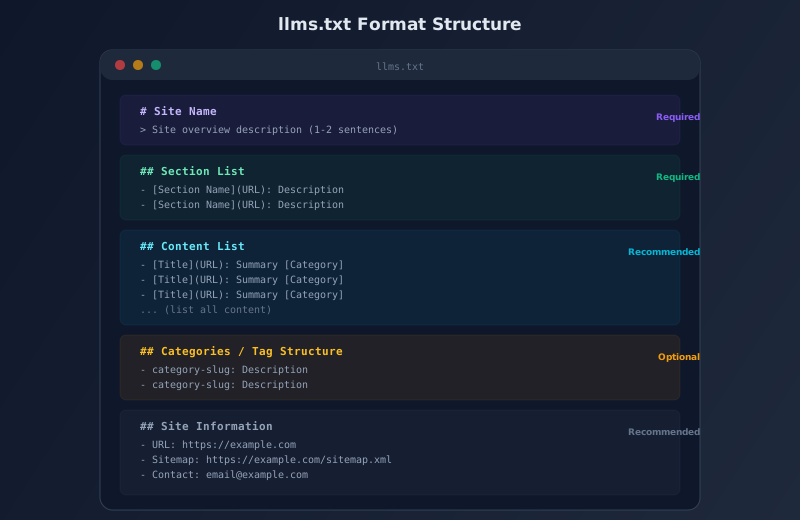
llms.txt is written in Markdown format. Here's the format based on the llmstxt.org specification.
Basic Structure
# Site Name

> A brief description of the site. 1-3 sentences covering the site's theme, audience, and value proposition.

## Section Name 1

- [Page Title](URL): Brief summary of the page

## Section Name 2

- [Page Title](URL): Brief summary of the page
- [Page Title](URL): Brief summary of the page
Format Rules
| Element | Markdown Syntax | Purpose |
|---|---|---|
| H1 Heading | # Site Name | The site's official name. Only one per file |
| Blockquote | > Overview text | Site description. Placed right after H1 |
| H2 Heading | ## Section Name | Content grouping |
| List Link | - [Title](URL): Description | Individual content information |
Practical Example
# My Tech Blog

> My Tech Blog is a software engineering blog covering web development, cloud infrastructure, and AI tools. Updated weekly with practical tutorials and comparisons.

## Main Sections

- [Articles](https://example.com/articles): 50+ in-depth technical articles
- [Tutorials](https://example.com/tutorials): Step-by-step coding tutorials

## Popular Articles

- [React vs Vue in 2026](https://example.com/articles/react-vs-vue): A detailed comparison of React and Vue.js for modern web development, covering performance, ecosystem, and learning curve.
- [Docker for Beginners](https://example.com/articles/docker-beginners): Complete guide to Docker containers for developers who have never used containerization.

## Site Information

- URL: https://example.com
- Sitemap: https://example.com/sitemap.xml
- Languages: en, ja
- Contact: admin@example.com
Important Notes
- Write in English by default. The llms.txt specification and examples are all in English, making it the best practice. For multilingual sites, write in English and specify supported languages with
Languages: ja, en, es, .... However, for single-language sites (e.g., a site entirely in French, entirely in Russian, etc.), writing in the site\'s language is perfectly acceptable. Major LLMs (GPT, Claude, Gemini, etc.) process most languages with high accuracy, and users of such sites will query in the same language, ensuring consistent responses - Always use UTF-8 encoding. Other encodings like Shift-JIS may cause character corruption
- Avoid special characters like em dashes. Since llms.txt is displayed as plain text, characters like em dashes may not render correctly in some environments. Use hyphens (-) or double hyphens (--) instead
- Use absolute URLs (complete URLs starting with https://)
- Only one H1 per file. Use H2 for section divisions
4. What Information to Include -- Required, Recommended, and Optional
Many people get stuck deciding what to write, so here's a breakdown by priority.
Required Information (Without These, llms.txt Serves No Purpose)
| Information | Where to Write It | Example |
|---|---|---|
| Site Name | H1 heading | # AI Arte |
| Site Overview | Blockquote | > AI learning platform... |
| Main Sections | H2 + link list | - [Articles](URL): Description |
Recommended Information (Improves AI Understanding)
| Information | Why It Matters |
|---|---|
| Full Content List | Lets AI grasp the full scope of your site |
| One-Line Summary per Content | Gives AI a preview of each page's content |
| Category/Tag Structure | Shows the site's information architecture |
| Site URL | Declares the canonical URL |
| Sitemap URL | Points to the detailed URL list |
| Supported Languages | Important for multilingual sites |
| Contact Info | Establishes the site operator's identity |
Optional Information (Nice to Have, but Not Essential)
- Tech Stack: What the site is built with (frameworks, etc.)
- Update Frequency: How often new content is added
- Total Content Count: Number of articles, etc.
- License/Citation Policy: Whether AI is allowed to cite your content
- API Information: If programmatic access is available
Information You Should NOT Include
- Sensitive Information: Admin panel URLs, internal API endpoints, etc.
- Personal Information: Unnecessarily detailed personal data (addresses, phone numbers, etc.)
- Credentials: API keys, passwords, etc.
5. llms.txt vs llms-full.txt
The llmstxt.org specification also defines llms-full.txt in addition to llms.txt.
| File | Content | Size Estimate | Purpose |
|---|---|---|---|
| llms.txt | Site overview, structure, link list | 1-50KB | A "table of contents" for the entire site |
| llms-full.txt | Full text of all content | 100KB - several MB | Providing full content text to AI |
When You Need llms-full.txt
- Technical Documentation: API references and library docs where providing the full text to AI improves answer accuracy
- Knowledge Bases: FAQ collections and glossaries -- content that's frequently cited in fragments
When You Don't Need llms-full.txt
- Blogs and Media Sites: With many articles, combining everything into one file would be too large. The summaries in llms.txt are sufficient
- E-commerce Sites: Product information is better served through structured data (JSON-LD, etc.)
- Corporate Sites: With few pages, llms.txt alone covers everything
For most blogs and media sites, llms.txt alone is enough. Think of llms-full.txt as something designed for technical documentation.
6. Static File vs Dynamic Generation -- Which Should You Choose?
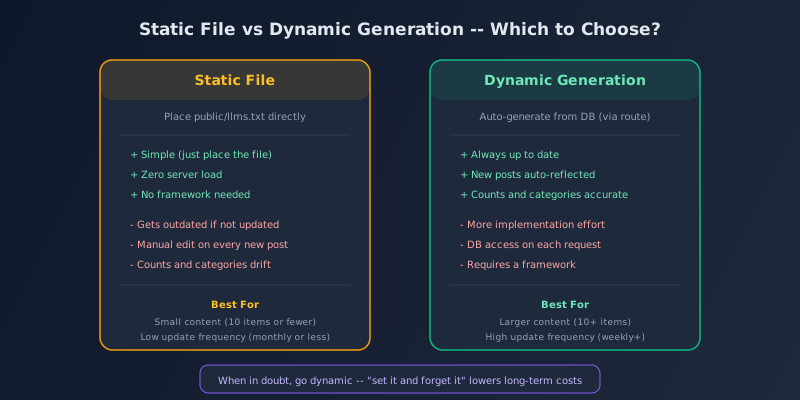
There are two main approaches to maintaining llms.txt.
Approach 1: Static File
Place a text file directly at public/llms.txt (or an equivalent path).
Pros:
- Simplest implementation (just drop the file in)
- Zero server load
- Works without any framework
Cons:
- Every time you add or update content, you need to manually update the file
- Forgetting to update means stale information is served to AI
- Content counts and categories can drift from reality
Approach 2: Dynamic Generation
The application intercepts requests to /llms.txt, fetches the latest data from the database, and dynamically generates the text.
Pros:
- Always reflects the latest information
- Adding an article automatically updates llms.txt
- Content counts and category names are always accurate
Cons:
- Requires more implementation effort (route definition + controller)
- Each request triggers a database query (mitigated with caching)
- Requires a framework
Decision Criteria
| Condition | Recommendation |
|---|---|
| 10 or fewer content items, rarely updated | Static file is fine |
| 10+ content items or updated monthly or more | Dynamic generation recommended |
| Using WordPress / Laravel / Django, etc. | Dynamic generation is easy to implement |
| Static site (Hugo, Jekyll, Astro, etc.) | Auto-generation at build time is ideal |
| Solo operation, want minimal maintenance | Dynamic generation (set it up once and forget it) |
Bottom line: when in doubt, go dynamic. The initial implementation cost is higher, but since you can "set it and forget it," long-term maintenance costs are lower. The worst-case scenario is using a static file and forgetting to update it, leaving AI with outdated information.
7. Implementation -- Code Examples by Framework
Let's look at how to implement dynamic llms.txt generation in major frameworks.
Laravel (PHP)
Route Definition (routes/web.php):
use App\Http\Controllers\LlmsTxtController;

Route::get('/llms.txt', [LlmsTxtController::class, 'index']);
Controller (app/Http/Controllers/LlmsTxtController.php):
class LlmsTxtController extends Controller
{
    public function index()
    {
        $articles = Article::published()
            ->with(['translations' => fn($q) => $q->where('locale', 'en')])
            ->orderBy('published_at')
            ->get();

        $lines = [];
        $lines[] = '# My Site Name';
        $lines[] = '';
        $lines[] = '> Site description here.';
        $lines[] = '';
        $lines[] = '## All Articles (' . $articles->count() . ')';
        $lines[] = '';

        foreach ($articles as $article) {
            $t = $article->translations->first();
            if (!$t) continue;
            $url = 'https://example.com/en/articles/' . $article->slug;
            $lines[] = '- [' . $t->title . '](' . $url . '): ' . $t->meta_description;
        }

        $content = implode("\n", $lines);
        return response($content, 200)
            ->header('Content-Type', 'text/plain; charset=utf-8');
    }
}
The key point is to explicitly set Content-Type: text/plain; charset=utf-8. Without it, the response might be interpreted as HTML.
Django (Python)
# urls.py
from django.urls import path
from . import views

urlpatterns = [
    path('llms.txt', views.llms_txt, name='llms_txt'),
]

# views.py
from django.http import HttpResponse
from .models import Article

def llms_txt(request):
    articles = Article.objects.filter(
        status='published'
    ).order_by('published_at')

    lines = ['# My Site', '', '> Description.', '', '## Articles', '']
    for a in articles:
        lines.append(f'- [{a.title}](https://example.com/articles/{a.slug}): {a.meta_description}')

    content = '\n'.join(lines)
    return HttpResponse(content, content_type='text/plain; charset=utf-8')
Next.js (TypeScript)
// app/llms.txt/route.ts (App Router)
import { NextResponse } from 'next/server'

export async function GET() {
  // Fetch data from DB or CMS
  const posts = await getAllPosts()

  const lines = [
    '# My Site',
    '',
    '> Description.',
    '',
    '## Articles',
    '',
    ...posts.map(p =>
      `- [${p.title}](https://example.com/posts/${p.slug}): ${p.description}`
    ),
  ]

  return new NextResponse(lines.join('\n'), {
    headers: { 'Content-Type': 'text/plain; charset=utf-8' },
  })
}
WordPress (PHP)
Add to functions.php or as a plugin:
// functions.php
add_action('init', function() {
    add_rewrite_rule('^llms\.txt$', 'index.php?llms_txt=1', 'top');
});

add_filter('query_vars', function($vars) {
    $vars[] = 'llms_txt';
    return $vars;
});

add_action('template_redirect', function() {
    if (!get_query_var('llms_txt')) return;

    header('Content-Type: text/plain; charset=utf-8');
    $posts = get_posts(['numberposts' => -1, 'post_status' => 'publish']);

    echo "# " . get_bloginfo('name') . "\n\n";
    echo "> " . get_bloginfo('description') . "\n\n";
    echo "## Articles (" . count($posts) . ")\n\n";

    foreach ($posts as $post) {
        $url = get_permalink($post);
        $desc = get_the_excerpt($post);
        echo "- [{$post->post_title}]({$url}): {$desc}\n";
    }
    exit;
});
For WordPress, don't forget to re-save your permalink settings (flush rewrite rules) after adding the code.
Static Site Generators (Hugo / Astro, etc.)
Write a script to auto-generate it at build time.
# build-llms-txt.sh (example for Hugo)
#!/bin/bash
echo "# My Site" > public/llms.txt
echo "" >> public/llms.txt
echo "> Site description." >> public/llms.txt
echo "" >> public/llms.txt
echo "## Articles" >> public/llms.txt
echo "" >> public/llms.txt

for file in content/posts/*.md; do
  title=$(grep '^title:' "$file" | sed 's/title: //')
  slug=$(basename "$file" .md)
  desc=$(grep '^description:' "$file" | sed 's/description: //')
  echo "- [${title}](https://example.com/posts/${slug}): ${desc}" >> public/llms.txt
done
Run this before builds in your CI pipeline (GitHub Actions, etc.) and it will auto-update with every deployment.
8. Post-Setup Verification and Testing
After setting up llms.txt, verify the following.
Basic Checklist
| Check Item | How to Verify |
|---|---|
| Accessible via URL | curl https://yoursite.com/llms.txt |
| Correct Content-Type | Use curl -I to confirm text/plain; charset=utf-8 |
| No character encoding issues | Open it directly in a browser and check for correct display |
| Links are valid | Confirm all listed URLs are actually accessible |
| HTTP status is 200 | curl -o /dev/null -w "%{http_code}" |
| Not blocked by robots.txt | Ensure robots.txt doesn't contain Disallow: /llms.txt |
Additional Checks for Dynamic Generation
- Check llms.txt after adding a new article: Is the new article reflected?
- Content count is correct: Does "All Articles (27)" match the actual number of published articles?
- Unpublished articles are excluded: Confirm that drafts and scheduled posts don't appear
Validation Tools
As of April 2026, there is no official llms.txt validator. However, you can verify it through these methods:
- Have ChatGPT or Claude read it: Ask "Read https://yoursite.com/llms.txt and tell me about this site"
- Markdown previewer: Paste the llms.txt content into a Markdown previewer to check that the structure renders correctly
- SEO audit tools: Some SEO audit tools have begun supporting llms.txt presence checks
9. Real-World llms.txt Examples
Let's look at trends among sites that have adopted llms.txt.
Types of Sites Leading Adoption
| Site Type | Adoption Rate | Reason |
|---|---|---|
| AI-Related Services and Tools | High | The AI industry itself is highly LLMO-conscious |
| Technical Documentation | High | Strong demand for AI to accurately understand their content |
| Tech Blogs | Moderate | High sensitivity to technical trends |
| Corporate Sites | Low | Awareness is still limited |
| E-commerce Sites | Low | Structured data (JSON-LD) is the priority |
What Makes a Good llms.txt
- Clear, concise overview -- the site's area of expertise is immediately apparent
- All content listed with summaries -- AI can grasp the full picture
- Category structure is explicit -- the information architecture is clear
- Dynamically generated -- always reflects the latest state
What Makes a Bad llms.txt
- Only site name and contact info -- too little information to help AI understand anything meaningful
- Full content text copied in -- llms.txt is a "table of contents," not a "full text." Full text belongs in llms-full.txt
- Left outdated -- claiming "10 articles" when there are actually 50 undermines credibility
- Contains sensitive information -- admin panel URLs or API keys exposed
FAQ
Q. Will my site not appear in AI search results without llms.txt?
No. AI can still crawl your site and include it in search results without llms.txt. It's simply a "helper file that aids AI understanding." However, having it allows AI to more accurately grasp your site's structure and content, which is thought to increase the likelihood of being cited in AI-powered search. Think of it like sitemap.xml for SEO -- not strictly required, but better to have.
Q. Does llms.txt matter if I'm blocking AI crawlers in robots.txt?
If you're blocking bots like User-agent: GPTBot with Disallow in robots.txt, those bots won't crawl your site. However, llms.txt operates independently of robots.txt rules. AI might still access llms.txt through other means (such as a user directly pasting the URL). If you're intentionally blocking AI crawlers, not placing an llms.txt file is the consistent approach.
Q. What language should llms.txt be written in?
For multilingual sites, English. For single-language sites, the site\'s language is also fine. The specification and examples are predominantly in English, making it the most logical choice for multilingual sites as a neutral language. However, if a site\'s content is entirely in one language, writing llms.txt in that language is acceptable. Major LLMs process most languages with high accuracy, and users will query in the same language as the site, resulting in consistent responses.
Q. Is there a file size limit for llms.txt?
There's no explicit limit in the specification. However, keeping it under 50KB is recommended in practice. Even sites with hundreds of articles can fit within 50KB when each entry consists of a title plus a one-line summary. If you want to include full text, create a separate llms-full.txt file.
Q. How often should I update it?
With dynamic generation, you don't need to worry -- the latest information is returned with every request. For static files, updating whenever you add or modify content is ideal. At minimum, review and update monthly. If stale information is likely to linger, switching to dynamic generation is recommended.
Q. Does it affect SEO?
llms.txt does not directly affect traditional SEO (Google search rankings). Google uses Googlebot to crawl HTML and does not factor llms.txt into search rankings. However, it may influence citation likelihood in AI-powered search -- such as Google's AI Overviews, ChatGPT, and Perplexity. Consider it an LLMO strategy, separate from traditional SEO.
Q. Are there WordPress plugins for this?
As of April 2026, several WordPress plugins for auto-generating llms.txt have emerged. However, quality varies, so if you use a plugin, always review the generated output. You can also implement it yourself by adding a few dozen lines of code to functions.php -- no plugin required.

![Generative AI Knowledge Cutoff Dates Compared: ChatGPT, Claude, Gemini & More [2026]](https://az-arte.com/images/articles/ai-cutoff-featured-en.svg)