Table of Contents
One of the first things people notice when they start using Claude Code is how fast it burns through tokens. Have you ever thought, "I only edited one file -- how am I already at the limit?"
This article explains why Claude Code uses so many tokens, covers 10 practical saving techniques, and breaks down what happens when you hit the limit and how extra costs work.
1. Why Claude Code Consumes So Many Tokens
Unlike regular chat, Claude Code is an agentic system. A single instruction from the user triggers multiple internal API calls to complete the task.
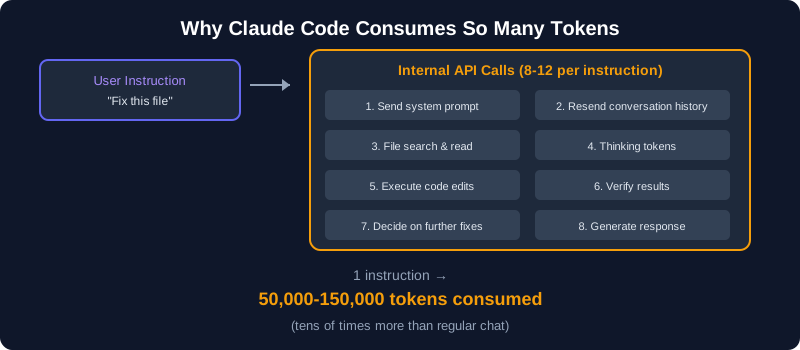
Specific Reasons for High Token Usage
- System prompt + conversation history included every turn: Each message resends the entire conversation history, so the longer the conversation, the faster token usage accelerates
- File contents are loaded into context: When editing code, the target file's content is pulled into context. Larger files consume more tokens
- Tool calls chain together: A single instruction can trigger file search, read, edit, and verify steps internally (according to Anthropic, a single command can generate 8-12 API calls)
- Thinking tokens count as output: Claude Code's internal "thinking" process also consumes tokens
For more on the differences between Claude's modes, see our article on the differences between Claude Chat, Cowork, and Code.
2. Usage Limits and Pricing by Plan
Anthropic does not publicly disclose specific token limits, but here is a breakdown of each plan's pricing and positioning.
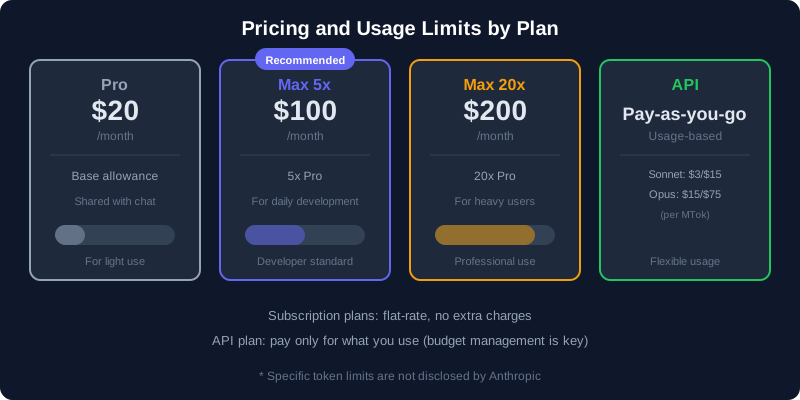
| Plan | Monthly Price | Usage Limit | Key Features |
|---|---|---|---|
| Pro | $20 | Base allowance (5-hour rolling window) | Shared quota with regular Claude chat |
| Max 5x | $100 | 5x Pro | For regular Claude Code users |
| Max 20x | $200 | 20x Pro | For heavy users and professional work |
| API (Pay-as-you-go) | Usage-based | Rate limits apply | Sonnet: $3/$15, Opus: $15/$75 (per MTok) |
Note: Pro and Max plans share the same token quota
Claude Code and regular Claude chat share the same token allowance. Heavy Claude Code usage will also restrict your regular chat access.
For a detailed pricing comparison, see our article on Claude vs ChatGPT pricing comparison.
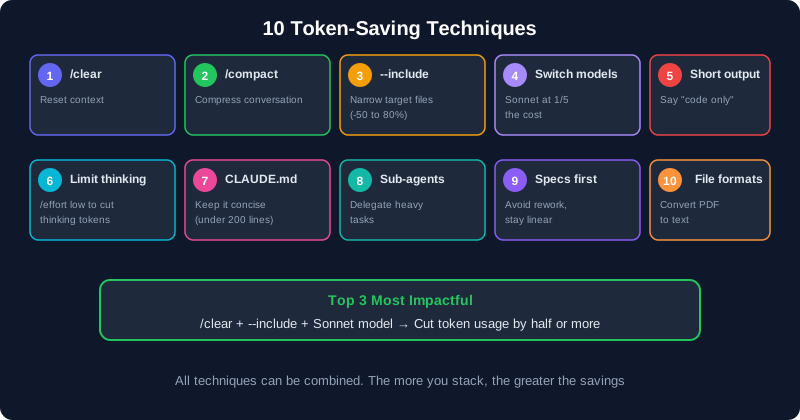
3. 10 Token-Saving Techniques
By applying the following techniques, you can significantly reduce your token consumption.
Tip 1: Reset Context Frequently with /clear
When switching to a different task, run /clear to reset the conversation. Leftover conversation history means unnecessary tokens are resent with every message.
# After finishing work on authentication
/clear

# Start the next task
"Add a payment feature"
Tip 2: Compress Conversations with /compact
You can compress a long conversation mid-session. Add custom instructions to keep only what matters.
# Basic compression
/compact

# Compression with custom instructions
/compact Keep only the code changes and API specs
Tip 3: Narrow Context with --include
Use the --include option when launching Claude Code to limit which files are loaded. According to Anthropic's official documentation, this alone can reduce input tokens by 50-80%.
# Target specific directories instead of the whole project
claude --include "src/components/**/*.tsx"

# Specify multiple patterns
claude --include "src/api/**" --include "src/types/**"
Tip 4: Switch Models Based on the Task
You don't need Opus (the top-tier model) for every task. Sonnet costs roughly one-fifth as much for both input and output, and handles everyday coding tasks well.
# Use Sonnet for everyday coding
/model sonnet

# Use Opus for design decisions or complex refactoring
/model opus
Tip 5: Request Shorter Output
Longer AI responses mean more output tokens. Instructions like "code only" or "answer in one line" cut down unnecessary output.
❌ "Fix this function"
→ AI generates a long explanation + code + notes (lots of output tokens)

✅ "Fix this function. No explanation, just the code"
→ Code only (significantly fewer output tokens)
Tip 6: Limit Thinking Tokens
Claude Code consumes tokens for its internal "thinking" process. For simple tasks, limiting thinking can reduce costs.
# Lower effort for simple tasks
/effort low
Tip 7: Keep CLAUDE.md Concise
CLAUDE.md (the project configuration file) is loaded with every single message. Stuffing it with unnecessary information increases token usage on every turn.
CLAUDE.md Best Practices
Only include project rules, commands, and key conventions. Move long explanations and documentation to separate files. Aim for under 200 lines.
Tip 8: Leverage Sub-Agents
Delegate tasks that produce heavy output -- like running tests or analyzing logs -- to sub-agents. Their detailed output stays out of the main context, saving tokens.
Tip 9: Provide Specs Upfront to Avoid Rework
A back-and-forth like "build it, then fix it, then change it" wastes tokens. Providing clear specs from the start prevents rework and keeps token usage linear.
❌ Conversation pattern (exponential token growth):
"Build a login feature" → "Add validation"
→ "Actually, switch to email auth" → "Change the UI too"

✅ Specs-first pattern (linear token growth):
"Build a login feature with these specs:
- Email + password authentication
- Email validation (format check + duplicate check)
- Password requirements: 8+ characters, alphanumeric
- Login form UI: centered, card-style layout"
For more on writing effective prompts, see our article on prompt tips for AI app development.
Tip 10: Watch Your File Formats
PDFs and Excel files consume large amounts of tokens due to text extraction and image conversion. When possible, convert them to plain text or CSV before passing them to Claude Code.
4. What Happens When You Hit the Limit?
What happens when you reach the token limit depends on your plan.
Subscription Plans (Pro / Max)
- Usage is managed on a 5-hour rolling window. When you hit the limit, you are temporarily unable to use Claude Code
- You are not permanently blocked -- your allowance recovers over time
- No extra charges apply (it is a flat-rate subscription)
- However, if you hit the limit frequently, consider upgrading to a higher plan
API Plan (Pay-as-You-Go)
- When you hit the rate limit (per-minute or per-day caps), a 429 error is returned
- There is no hard usage cap, but Anthropic-set rate limits still apply
- You are billed for exactly what you use, so budget management is essential to avoid runaway costs
API Usage Warning
When using Claude Code via the API, Anthropic has published data showing the average developer cost is about $6 per day (90% of users stay under $12/day). However, costs can rise significantly on large projects, so be sure to set up usage monitoring.
5. How Pay-As-You-Go API Pricing Works
If you are on the API plan, here are the per-token prices (as of April 2026).
| Model | Input Tokens | Output Tokens | Prompt Cache |
|---|---|---|---|
| Claude Sonnet 4.6 | $3 / MTok | $15 / MTok | 10% of input cost |
| Claude Opus 4.6 | $15 / MTok | $75 / MTok | 10% of input cost |
* MTok = 1 million tokens
What Is Prompt Caching?
Anthropic offers a prompt caching feature that reduces input token costs to 10% when the same context (system prompt and recent conversation) is reused.
However, the cache expires after approximately 5 minutes. If you pause work for longer than that, the cache is invalidated and the full context is re-billed on the next message.
Making the Most of Caching
Run /compact before taking a break. This shrinks the context, so when the cache expires, the impact on your next message is minimized.
6. Summary
Key Takeaways
- Claude Code triggers multiple API calls per instruction, consuming far more tokens than regular chat
- The three fundamentals of saving tokens are /clear, /compact, and --include
- For everyday coding, Sonnet (roughly 1/5 the cost of Opus) is more than sufficient
- Subscription plans are flat-rate with no extra charges. When you hit the limit, usage is temporarily paused and recovers on a rolling window
- API usage is pay-as-you-go. Use prompt caching and set up usage monitoring
FAQ
Is the Pro plan realistic for Claude Code?
It works for light tasks, but you will hit the limit frequently during serious development. If you use Claude Code regularly, Max 5x ($100/month) is the minimum recommendation. The Pro plan's quota is shared with regular chat, so Claude Code alone can exhaust it quickly.
Is there a way to check my token usage?
Use the /cost command in Claude Code to see your current session's token usage and estimated cost. For API users, you can check detailed usage on Anthropic's dashboard (console.anthropic.com).
If I hit the limit, will upgrading my plan take effect immediately?
Yes, plan upgrades take effect immediately. You can switch from Pro to Max 5x, or from Max 5x to Max 20x at any time, and the new limit applies right away.
How does pricing work for teams and enterprises?
The Team plan comes in two tiers: Standard ($25/seat/month) and Premium ($100/seat/month, includes Claude Code). The Enterprise plan requires an annual contract with per-seat licensing plus API usage charges, starting at a minimum of 50 seats. For large-scale deployments, we recommend contacting Anthropic directly for a custom quote.
![15 Jobs Most Likely to Be Replaced by Generative AI — And How to Future-Proof Your Career [2026]](https://az-arte.com/images/articles/ai-job-loss-featured-en.svg)
![Generative AI Knowledge Cutoff Dates Compared: ChatGPT, Claude, Gemini & More [2026]](https://az-arte.com/images/articles/ai-cutoff-featured-en.svg)