Table of Contents
- 1. What Is "Bypass" in the First Place?
- 2. The Real Reason: The 2-Layer Permission System
- 3. Layer 1: Tool Permission UI (Bypass-Controllable)
- 4. Layer 2: AI Safety Judgment (Not Bypass-Controllable)
- 5. Operation Patterns Where Claude Asks on Its Own
- 6. Why Two Layers? The Design Philosophy
- 7. Practical Ways to Reduce Confirmation Prompts
- 8. Summary
- FAQ
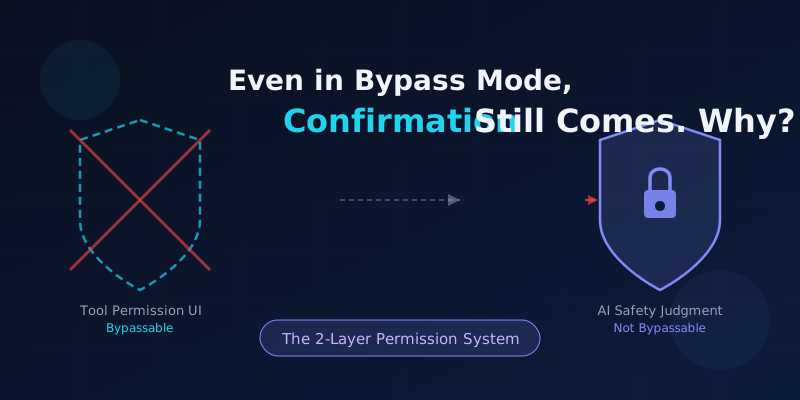
You've set the --dangerously-skip-permissions flag in Claude Code, yet Claude still sends a message in the chat asking "Is it okay to run this operation?" Sound familiar?
The instinct is to think "the bypass isn't working" — but that's not what's happening. Claude Code's permission system has two independent layers, and bypass mode only controls one of them.
This article covers everything from "what bypass actually is" to the difference between both permission layers, the types of operations where Claude asks on its own, and practical ways to reduce confirmation prompts when automating.
1. What Is "Bypass" in the First Place?
In software, "bypass" means skipping the normal confirmation or approval flow to proceed directly. Think of a shopping site's "buy now" button that skips the review screen — that's a bypass of the confirmation flow.
In Claude Code's default mode, a confirmation dialog appears before any file edit or shell command is executed.
# Default mode: confirmation before every action
$ claude
> Please fix index.js
[Claude] May I edit this file? [y/n]
The permission bypass mode skips (bypasses) this confirmation flow.
# Bypass mode: no confirmation dialogs
$ claude --dangerously-skip-permissions
# or
$ claude --permission-mode bypass
Note that the flag includes the word dangerously. Anthropic positions this mode as intended for containers or isolated environments only — it's not recommended for everyday local development. For a full breakdown of bypass mode risks, see Claude Code Bypass Permission Mode: Risks and Safe Usage.
2. The Real Reason: The 2-Layer Permission System
The answer to "why does confirmation appear even with bypass enabled" is that Claude Code's permission system is built on two independent layers.
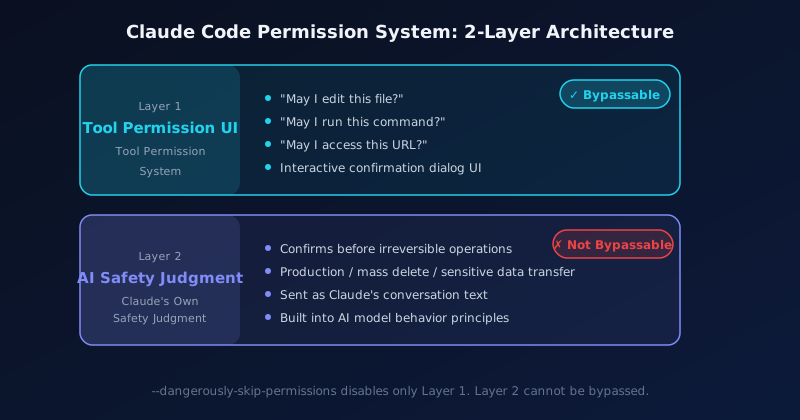
Confusing these two layers is the root cause of the "bypass isn't working" misconception. Let's look at each in detail.
3. Layer 1: Tool Permission UI (Bypass-Controllable)
The first layer is the confirmation dialog shown before tool execution — the interactive UI that appears when Claude Code is about to edit a file or run a shell command.
| Tool | Example Confirmation Dialog |
|---|---|
| File edit | "May I modify index.js?" |
| Bash execution | "May I run npm install?" |
| Web access | "May I access https://...?" |
This is exactly the layer that bypass mode disables. With --dangerously-skip-permissions, none of these dialogs appear and Claude can execute tools freely. In this sense, bypass mode is working correctly.
Note: There Are 5 Permission Modes
Claude Code has five permission modes: default, acceptEdits, plan, auto, and bypassPermissions. Bypass (bypassPermissions) is the least restrictive. For details on each mode, see the bypass mode explainer.
4. Layer 2: AI Safety Judgment (Not Bypass-Controllable)
The second layer is Claude's autonomous safety judgment. This is completely separate from the tool confirmation UI.
When Claude determines that an operation might have significant consequences, it sends a confirmation message in the chat as plain text. This is not a tool execution mechanism — it's Claude's conversational behavior as an AI.
--dangerously-skip-permissions skips the Layer 1 UI dialogs, but it has no effect on this Layer 2 AI judgment — because Layer 2 is a behavioral principle built into Claude's model itself.
Common Misconception
"I set bypass mode but Claude stopped → bypass isn't working"
→ More accurately: "Layer 1 UI is disabled, but Layer 2 AI judgment is requesting confirmation." Bypass is working fine.
5. Operation Patterns Where Claude Asks on Its Own
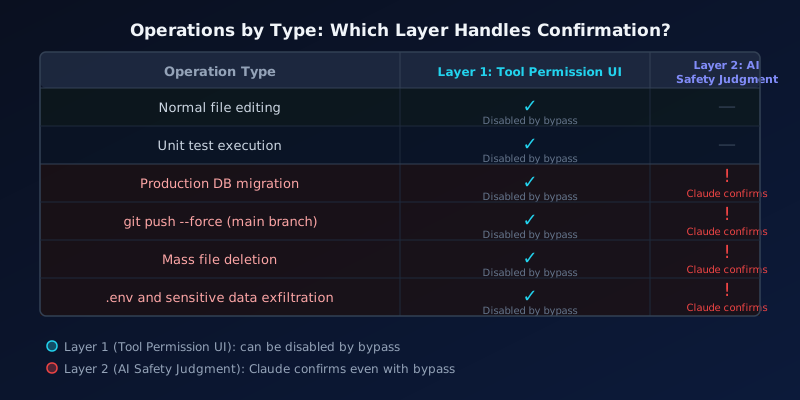
Claude's internal criteria for "I should confirm this" fall into three main categories.
① Irreversibility
Operations that can't be undone make Claude cautious. Permanent file deletion, git push --force, and DROP TABLE are prime examples. Because mistakes are hard to recover from, Claude pauses and asks.
② Blast Radius
Actions that affect production environments, large numbers of files, or other users trigger more frequent checks. Changing one local file rarely prompts a question; modifying a production DB schema almost always does.
③ Security Risk
Operations that send .env files, auth tokens, or API keys externally are flagged as high security risk by Claude, which will ask before proceeding.
These judgments are baked into Claude's AI model and cannot be fully switched off via config. For more on how AI agents are designed to operate safely, see What Is an AI Agent?.
6. Why Two Layers? The Design Philosophy
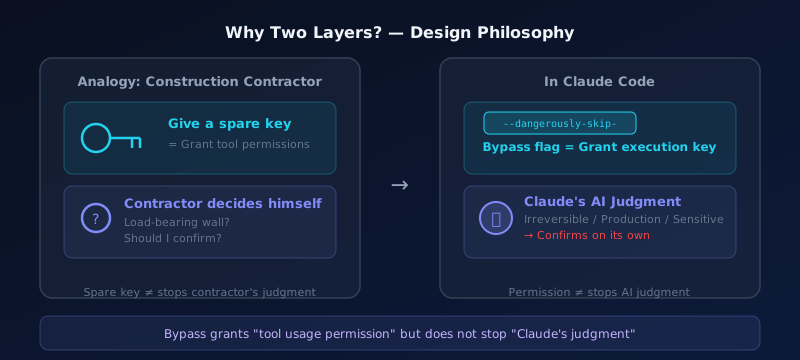
Here's an analogy that makes the two-layer design intuitive.
Imagine you hire a contractor to renovate a room and give them a spare key, saying "you can do whatever you need to." That's equivalent to granting tool permissions.
But when the contractor is about to knock down a wall and asks "Is this a load-bearing wall? Are you sure you want me to remove it?" — they're asking based on their own professional judgment, not because they lost the key.
Giving them a key does not stop the contractor from thinking. Their professional judgment and safety awareness operate independently of the key.
Claude works the same way. Bypass mode gives Claude "the key to use tools," but it does not stop Claude's AI judgment. In fact, Claude pausing before high-risk operations is an intentional safety feature, not a malfunction.
7. Practical Ways to Reduce Confirmation Prompts
In CI/CD pipelines and other automation scenarios, you may need Claude to complete tasks without stopping. Here are the most effective approaches.
Approach 1: Use CLAUDE.md to Provide Context
Create a CLAUDE.md file at your project root explaining the environment and constraints. When Claude understands "this is a safe, isolated environment," confirmation frequency drops significantly.
# About This Environment

This repository runs inside a CI/CD pipeline test environment.
- Runtime: fully isolated Docker container
- Production impact: none
- All changes are rollback-safe

Please proceed without asking for extra confirmation.
Approach 2: Give Small, Specific Instructions
Vague instructions increase Claude's uncertainty and trigger more confirmations.
| Instruction Type | Example | Confirmation Rate |
|---|---|---|
| Vague | "Clean up this project" | High |
| Specific | "Delete all .log files inside /tmp/" | Low |
| Vague | "Deploy it" | High |
| Specific | "Run npm run deploy:staging on the staging environment" | Low |
Approach 3: Try Auto Mode First
Before reaching for full bypass mode, try auto mode. It runs a safety classifier in the background while auto-approving most operations. If the only reason you're using bypass is "I'm tired of confirmation prompts," auto mode may be enough.
Important Caveat
No configuration can reduce Claude's safety judgment to absolute zero. This is intentional — not a bug or limitation. For high-risk operations, Claude asking for confirmation is correct behavior. Accept it as part of the design.
8. Summary
| Item | Detail |
|---|---|
| What bypass is | Skipping the pre-tool confirmation dialogs (Layer 1) |
| What bypass disables | Tool Permission UI ("May I run this command?") |
| What bypass does NOT disable | Claude's AI safety judgment (confirmation sent as chat text) |
| Claude's confirmation criteria | Irreversibility, blast radius, security risk |
| How to reduce confirmations | CLAUDE.md context / specific instructions / auto mode |
| Why two layers | Tool permission and AI judgment are fundamentally separate concepts |
When Claude asks for confirmation even in bypass mode, it's not that bypass has stopped working — two independent systems are simply doing their jobs. Understanding this distinction helps you predict Claude Code's behavior accurately and use it more efficiently.
To understand the differences across Claude products, see Claude.ai vs Claude Code: What's the Difference?.
FAQ
Can I get zero confirmations with bypass mode?
You can disable the tool execution UI dialogs (Layer 1), but you cannot completely eliminate Layer 2 AI safety judgment confirmations. This is an intentional safety feature. However, carefully documenting your environment in CLAUDE.md and giving specific instructions can significantly reduce how often Claude asks.
Is Claude asking for confirmation a bug?
No. Bypass mode skips the tool permission UI, not Claude's AI judgment. Claude pausing before irreversible operations, production environments, or sensitive data is intentional safety behavior — not a malfunction. It's not "bypass not working," it's "two systems running independently."
How do I stop Claude from pausing in CI/CD pipelines?
Three things work well: ① Explicitly state in CLAUDE.md or the system prompt that "this is a fully isolated CI/CD environment and all operations run safely," ② give small, specific task instructions (vague instructions trigger more confirmations), ③ combine bypass mode with Docker container isolation. Note that some pausing may still occur even with all three in place.
Can I visually tell apart a tool dialog and Claude's confirmation?
Yes. Layer 1 tool permission dialogs appear in the Claude Code terminal as interactive UI like "Allow bash command? [y/n]". Layer 2 AI judgment confirmations appear as regular conversation text from Claude (e.g., "This will modify the production DB — is that okay?"). The display format is completely different, so they're easy to distinguish once you're familiar.
![Generative AI Knowledge Cutoff Dates Compared: ChatGPT, Claude, Gemini & More [2026]](https://az-arte.com/images/articles/ai-cutoff-featured-en.svg)
![Claude vs ChatGPT Pricing Comparison [2026]: Free Plans, Subscriptions & API Costs Explained](https://az-arte.com/images/articles/claude-vs-chatgpt-pricing.svg)