Table of Contents
- 1. Release Overview --- When, What, Pricing, Where to Use It
- 2. New Features at a Glance
- 3. High-Resolution Image Support --- A Claude First
- 4. Effort Levels --- The New xhigh
- 5. Task Budgets (Beta)
- 6. Impact of the New Tokenizer
- 7. Behavioral Changes --- What Shifted From 4.6
- 8. Breaking Changes
- 9. Benchmarks
- 10. Comparison Table --- Opus 4.6 / 4.5 / 4.1
- 11. When to Use It
- 12. New in Claude Code --- /ultrareview and Max Plan Upgrades
- FAQ
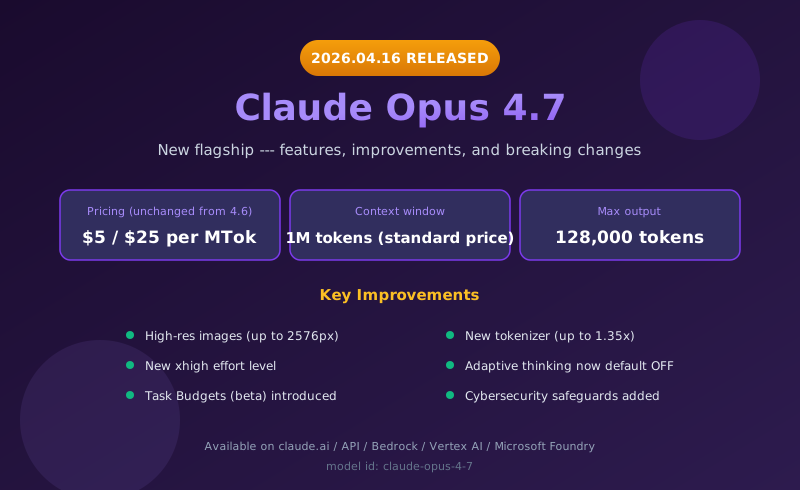
On April 16, 2026, Anthropic officially released its flagship model, Claude Opus 4.7. The model ID is claude-opus-4-7, and input/output pricing stays at $5 / $25 per MTok --- the same as 4.6. But under the hood, this release is packed with changes that substantially rewrite the experience of using a frontier model: high-resolution image support, a new xhigh effort level, task budgets (beta), and a new tokenizer.
At the same time, there are breaking changes --- the extended thinking API is gone, sampling parameters like temperature/top_p/top_k are no longer accepted, and prefill has been removed --- so existing code needs to be migrated.
This article walks through what's new in 4.7, what changed compared to 4.6, and when you should actually use it, all from an engineering perspective.

1. Release Overview --- When, What, Pricing, Where to Use It
| Item | Details |
|---|---|
| Release date | April 16, 2026 |
| Model ID | claude-opus-4-7 |
| Pricing (input) | $5 / 1M tokens (same as 4.6) |
| Pricing (output) | $25 / 1M tokens (same as 4.6) |
| Context window | 1,000,000 tokens (standard API pricing, no long-context surcharge) |
| Max output | 128,000 tokens |
| Available on | claude.ai, Anthropic API, AWS Bedrock, Google Vertex AI, Microsoft Foundry |
The standout fact here is that "a 1M context window is now standard pricing" with no price increase. Previous models often charged extra for long-context (200K+) usage; 4.7 runs on the regular rate even at the full 1M tokens.
Opus 4.7 is immediately available to paid claude.ai users on the web and mobile apps, and you can switch to it via the API just by changing the model ID. It's also live on AWS Bedrock, Google Vertex AI, and Microsoft Foundry simultaneously, so multi-cloud enterprise environments can use it without changes.
2. New Features at a Glance
Here's the headline list of what's been added or changed in Opus 4.7.
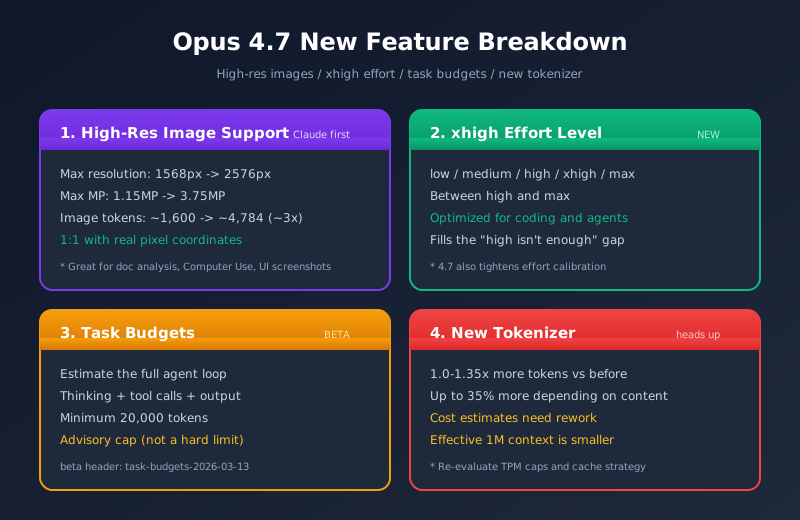
- High-resolution image support (a Claude first) --- up to 2576px / 3.75 megapixels (about 3x the previous 1568px / 1.15MP)
- Better low-level perception --- improved pointing, measurement, counting, and bounding-box detection
- New xhigh effort level --- between high and max, optimized for coding and agent use cases
- Task budgets (beta) --- a new feature for pre-estimating total tokens across an agent loop
- New tokenizer --- uses 1.0-1.35x more tokens than before (up to 35% more, depending on content)
- Adaptive thinking --- now off by default (explicit opt-in required)
- Stronger filesystem-based memory --- improved cross-session scratchpad and note-taking
- Knowledge work (.docx / .pptx) improvements --- better tracked-changes editing, slide layout, and chart/diagram parsing
- Claude Code integration --- new
/ultrareviewslash command, default effort raised to xhigh on the Max plan, and Auto mode extended to Max users - Real-time cybersecurity safeguards --- new refusal behavior for high-risk topics
- Behavioral shifts --- more literal instruction-following, more direct tone, fewer tool calls
In particular, high-resolution image support and the xhigh effort level deliver real, practical value for document analysis, computer use, and coding agents. Let's go through these in order.
3. High-Resolution Image Support --- A Claude First
Opus 4.7 is the first Claude-series model to handle high-resolution images natively.
Resolution Changes
| Metric | Opus 4.6 and earlier | Opus 4.7 |
|---|---|---|
| Max resolution (long edge) | 1568px | 2576px |
| Max megapixels | 1.15 MP | 3.75 MP |
| Image tokens per full-res image | ~1,600 tokens | ~4,784 tokens (~3x) |
| Coordinate scale | Pixel coordinates of the downsampled image | 1:1 with real pixels (no conversion needed) |
What This Enables
- Document analysis --- fine print, table borders, and chart axis ticks on A4 scans become clearly readable
- Computer Use --- you can pass full-HD or higher screenshots directly
- UI screenshot understanding --- 4K or high-DPI captures parse without downsampling
- 1:1 coordinate mapping --- when you ask the model to return click coordinates, you no longer need scale-conversion logic, which makes the implementation simpler
One catch: a single full-resolution image consumes about 4,784 tokens. Agents that exchange large numbers of screenshots can see image tokens spike fast and hit the wallet. If lower resolution is enough, resizing in advance is a worthwhile call.
4. Effort Levels --- The New xhigh
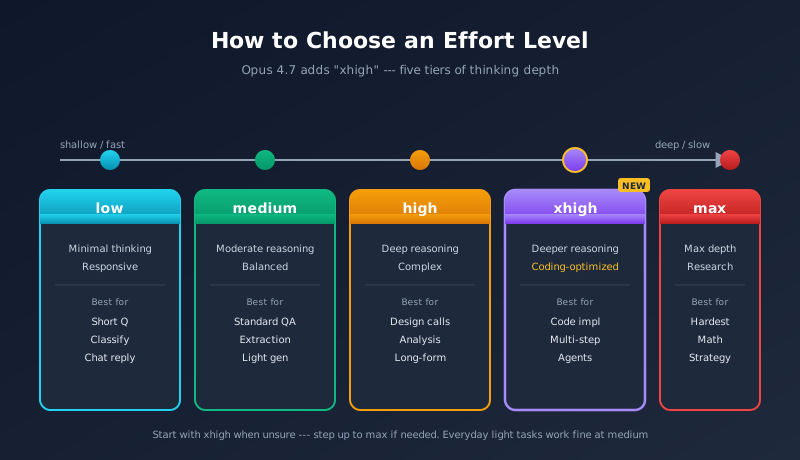
The "effort level" that controls Claude's extended thinking depth has gained a new tier: xhigh.
The Five Tiers
| Level | Characteristics | Typical Use Case |
|---|---|---|
| low | Minimal thinking, prioritizes responsiveness | Short questions, classification, simple summaries, chat replies |
| medium | Moderate reasoning | Standard Q&A, info extraction, light generation |
| high | Deep reasoning | Design decisions, complex analysis, long-form generation |
| xhigh (NEW) | Between high and max, optimized for coding/agents | Code implementation, multi-step agents, refactoring |
| max | Maximum thinking depth | The hardest reasoning problems, research-level analysis |
Through 4.6, there was a gap of "high isn't enough but max is overkill" that often felt off for coding and agent work. xhigh is added precisely to fill that gap; Anthropic notes it's optimal for coding and agent use cases.
Tips for Picking an Effort Level
4.7 also tightens effort calibration, especially at low and medium where the model "stays inside the scope you give it" more strictly. So if a task that worked at medium on 4.6 now feels under-served, consider bumping it up to high or xhigh.
5. Task Budgets (Beta)
Opus 4.7 introduces a new beta feature called Task Budgets. It lets you give the model a coarse upfront estimate of how many tokens an entire agent loop is allowed to consume.
How Task Budgets Work
- Beta header:
task-budgets-2026-03-13 - Minimum value: 20,000 tokens
- Scope: covers the entire agent loop --- thinking + tool calls + output
- Behavior: an advisory cap (a guideline), not a hard limit --- it does not force-stop on overrun
Why It's Needed
The traditional max_tokens only controls the output of a single response. But in real agent runs, thinking tokens, tool-call round trips, and multi-step output all interleave, and "how many tokens will this whole task burn?" became hard to predict.
Once you specify a task budget, the model uses it as a target when planning, and tries to work at an appropriate depth and pace. Think of it as a way to express, on a cost basis, things like "don't go too deep, finish quickly" or, conversely, "take your time and think this through."
Because it's advisory, if you need to guarantee a hard stop on overrun, you'll need to maintain a counter on the application side as well.
6. Impact of the New Tokenizer
Opus 4.7 ships with a new tokenizer that consumes 1.0-1.35x as many tokens for the same string compared to earlier models. Depending on content, the increase can be up to 35%.
Impact on Cost and Context Budget
- The same prompt may cost more --- price stays put, but if token count goes up, total spend goes up
- Effective information density inside 1M context drops --- 1M tokens is still 1M tokens, but the same document now eats more of them
- Estimates and alerts need recalibration --- if you've built budgets and rate limits assuming the old token counts, recompute
Practical Steps
When migrating an existing Claude app to 4.7, re-evaluate the following.
- Monthly cost forecast --- assume up to 35% more on the same traffic
- Context-window utilization --- past logs that were "just under 1M" deserve a closer look
- Rate limits and tokens-per-minute caps --- recheck your headroom against your org's TPM limit
- Cache strategy --- prompt-cache hit rates may shift
The migration playbook from 4.6 to 4.7 is covered in detail in the migration guide article below.
7. Behavioral Changes --- What Shifted From 4.6
Opus 4.7 doesn't just add features --- the response style itself has shifted from 4.6.
Major Behavior Shifts
- More faithful to instructions --- especially at low/medium effort, the model carries out instructions as given without piling on extras
- More direct tone --- fewer validation phrases ("great question!"), less excessive politeness, fewer emojis
- Response length adapts to the task --- short for simple questions, long for complex ones --- the one-size-fits-all verbosity is gone
- Fewer tool calls by default --- if reasoning suffices, it reasons; it avoids unnecessary tool use
- Fewer subagent spawns --- it leans on its own thinking rather than fanning out
- Stricter effort calibration --- low/medium hold scope tightly and avoid expansive interpretation
Impact on Existing Prompts
Prompts you wrote for 4.6 that assumed "it'll politely add context" or agents that assumed "it'll use lots of tools to verify" may behave differently on 4.7.
- If you want extra context, say so explicitly: "explain reasons and alternatives too"
- If you want more tool use, be specific: "always use WebSearch to verify the facts"
- If you want longer output, ask for it: "at least 500 words"
The overall direction is "the model doesn't do extra stuff," which is a more predictable behavior --- if you write explicit instructions, it follows them.
Cybersecurity Safeguards and Safety
Opus 4.7 also introduces real-time cybersecurity safeguards, which means even legitimate security work --- penetration testing, vulnerability research, red-teaming --- can now be refused depending on context. If you use Claude for security in production, consider applying to Anthropic's Cyber Verification Program.
On the safety side, Anthropic highlights the following improvements:
- Improved honesty --- the model is more willing to say "I don't know" and avoid weakly-grounded assertions
- Better prompt-injection resistance --- stronger defenses against malicious third-party injected instructions
- Mythos Preview is currently the best alignment --- Opus 4.7 is more broadly capable, but Mythos Preview leads on alignment accuracy
One trade-off Anthropic publicly notes: harm-reduction advice on controlled substances has become somewhat verbose. Pharma and healthcare chatbot operators should add output filtering to be safe.
8. Breaking Changes
Opus 4.7 includes several breaking changes versus 4.6. If you wrote code against 4.6, you may hit 400 errors out of the box.
Removed Parameters and Features
| Feature | Behavior in 4.6 | Behavior in 4.7 |
|---|---|---|
| Extended thinking | Enable extended thinking with thinking: {type: "enabled", budget_tokens: N} | Same payload returns a 400 error. Move to adaptive thinking |
| Adaptive thinking | Default ON | Default OFF. Opt in explicitly with thinking: {type: "adaptive"} |
| Thinking content display | Returned by default | Omitted by default. Specify display: "summarized" to see it |
| temperature | Adjustable from 0.0 to 1.0 | Any non-default value returns a 400 error |
| top_p / top_k | Sampling control | Any non-default value returns a 400 error |
| Assistant prefill | Insert an assistant message at the head of the messages array to seed the response | 400 error (carried over from 4.6) |
What You Need to Fix
- Code using extended thinking: change
thinking.typeto"adaptive", and add adisplayfield if needed - Code that tunes temperature, etc.: remove these parameters. If you need determinism, address it via prompting
- Code using assistant prefill: fold the prefill content into the user message, or replace it with output-format instructions
- UIs that display thinking: be aware that thinking content won't return unless you specify
display: "summarized"
For full migration steps, see the migration guide article.
9. Benchmarks
Detailed numerical scores were disclosed only selectively at launch, but Anthropic reports major improvements in coding, agent processing, and vision tasks.
Areas With Reported Improvements
Official Benchmarks
The headline numbers Anthropic disclosed at launch:
| Benchmark | Opus 4.6 | Opus 4.7 | Domain |
|---|---|---|---|
| CursorBench | 58% | 70% | Coding |
| CursorBench (visual accuracy) | 54.5% | 98.5% | UI screenshot understanding |
| Rakuten-SWE-Bench | baseline | 3x more tasks solved | Real-world code changes |
| CyberGym | 73.8 | --- (not disclosed) | Security |
| Finance Agent | --- | state-of-the-art | Financial agents |
| GDPval-AA | --- | top-tier | Economically valuable knowledge work |
Third-Party and User Reports
- 93-task coding benchmark: about 13% improvement over Opus 4.6
- OfficeQA Pro (document reasoning): about 21% fewer errors
- Factory Droids (real production tasks): 10-15% better success rate
A Note on Field Evaluation
The above are from official and partner-reported benchmarks. That said, your own measurements on your own workloads are the most trustworthy metric. The new tokenizer changes the token count for the same text, so you should benchmark cost and latency before any switch.
Things to look at when evaluating:
- Send the same input to 4.6 and 4.7 and compare output quality, time, and token consumption
- For coding tasks, evaluate objectively on "did it work the first time?" and "do the tests pass?"
- For agent tasks, look at both "task completion rate" and "tool call count" (4.7 reduces tool calls --- if completion rate is up, that's a pure win)
- For vision, compare on real high-resolution use cases (UI screenshots, document scans)
How It Sits Next to Mythos Preview
In the launch announcement, Anthropic notes that an unreleased model called "Mythos Preview" is currently the highest in alignment accuracy and the lowest in misbehavior rate. Opus 4.7 is more broadly capable than Mythos Preview, but its cyber capabilities don't reach the same level (the strategy is to test cyber-safety on the more capable model first, then roll out gradually). The flagship generally available to users today is Opus 4.7.
10. Comparison Table --- Opus 4.6 / 4.5 / 4.1
| Item | Opus 4.1 | Opus 4.5 | Opus 4.6 | Opus 4.7 |
|---|---|---|---|---|
| Pricing (input) | $15 | $5 | $5 | $5 |
| Pricing (output) | $75 | $25 | $25 | $25 |
| Max context | 200K | 200K | 1M | 1M |
| Max output | 32K | 64K | 128K | 128K |
| Max image resolution | 1568px | 1568px | 1568px | 2576px |
| Effort levels | low/medium/high | low/medium/high/max | low/medium/high/max | low/medium/high/xhigh/max |
| Extended thinking | Yes | Yes | Adaptive thinking | Adaptive thinking (default OFF) |
| Task budgets | None | None | None | Yes (beta) |
| temperature etc. | Available | Available | Available | Removed |
| Prefill | Available | Available | Removed | Removed |
| Tokenizer | Previous | Previous | Previous | New (1.0-1.35x) |
Numbers reflect official information as of April 16, 2026. The headline for 4.6 -> 4.7 is capability gains at flat pricing.
11. When to Use It
Opus 4.7 is the flagship, but using Opus for everything isn't always the best move.
When Opus 4.7 Is Optimal
- Complex coding tasks --- large refactors, design decisions, multi-file changes
- Long-running agent loops --- multi-step automation, in combination with task budgets
- Vision tasks involving high-resolution images --- Computer Use, UI screenshot analysis, document OCR
- 1M-token long-context processing --- understanding large codebases, analyzing long documents
- The hardest reasoning --- math, research-grade analysis, strategic planning
When to Consider Sonnet
- Routine Q&A, classification, info extraction
- Bulk processing where you need a "pretty smart" answer at lower cost
- Real-time UX where you want to keep latency down
When to Consider Haiku
- Cheap-and-massive simple classification, translation, filtering
- IoT, edge, anywhere response speed is the absolute priority
In practice, the most cost-effective architecture is often Opus 4.7 for user-facing work (code generation, complex reasoning, the brain of an agent) combined with Sonnet or Haiku for behind-the-scenes bulk work (log classification, data extraction, first-pass filtering).
12. New in Claude Code --- /ultrareview
Claude Code (Anthropic's official CLI) was also updated in step with the Opus 4.7 release, adding a new slash command: /ultrareview.
What /ultrareview Does
- Reviews changed code at a depth equivalent to xhigh effort
- Goes deeper than a normal code review --- reusability, error handling, concurrency pitfalls, security risks, all in scope
- Surfaces "design decisions that aren't great," not just implementation mistakes
If /review is "PR-review-grade," then /ultrareview is more like a senior-engineer-grade design review. It's a fit for the moments around major feature additions or final pre-release checks.
Note that /ultrareview uses xhigh-grade thinking, so it consumes more time and tokens than a normal review. The recommended pattern is /review for everyday lightweight PR checks, and /ultrareview for milestone checks.
Default Effort Bumped on the Max Plan
Claude Code Max plan users now get default effort raised to xhigh when using Opus 4.7. Routine tasks that previously ran at high-equivalent effort now automatically run with deeper reasoning. You get higher-quality results within your token quota, but consumption goes up too --- worth monitoring.
Auto Mode Extended to Max Users
Auto mode, previously limited to certain plans, is now available to Claude Code Max users. It automatically switches between Opus, Sonnet, and Haiku based on the type of task, balancing cost optimization and speed.
FAQ
Q. Can I switch an app running on Opus 4.6 directly to 4.7?
For most apps, changing the model ID is enough. You'll need to make changes if any of the following apply: (1) you use thinking: {type: "enabled"} for extended thinking, (2) you set temperature/top_p/top_k to non-default values, (3) you use assistant prefill, or (4) you display thinking content in your UI. These will cause 400 errors or behavior changes. See the migration guide for full details.
Q. Will the new tokenizer really raise my costs?
Because the same text consumes 1.0-1.35x as many tokens, you can see up to ~35% more cost in the worst case. That said, 4.7 also makes fewer tool calls by default and gives more concise responses, so the net change varies by app. For high-traffic apps, run 4.6 and 4.7 in parallel and measure monthly cost on real traffic before flipping production over.
Q. How should I split work between xhigh and max?
Anthropic describes xhigh as optimal for coding and agent use cases. max is for "the hardest reasoning." For implementation tasks, refactoring, adding tests, multi-step agent planning, xhigh hits the sweet spot. For mathematically hard problems, research-grade analysis, or strategic planning, reach for max. The safe pattern is to start with xhigh and step up to max only if it's not enough.
Q. Why isn't task budget a hard cap?
Agent loops have unpredictable token consumption due to tool-call round trips. If the budget were a hard cap, you'd frequently see tasks killed just before completion. Anthropic deliberately designed it as advisory (a guideline). The model is aware of the budget when planning and adjusts accordingly, but it may go slightly over if needed. If you require hard stops, implement a separate counter on the application side.
Q. Is high-resolution image support enabled automatically?
Yes --- just specifying the 4.7 model ID is enough; submitted images are processed at up to 2576px without any special opt-in. That said, a single full-resolution image consumes around 4,784 tokens, so agents that handle many images can see costs spike. If you don't actually need high resolution, consider downsampling first.
Q. Without temperature, can I still get deterministic output?
4.7 returns a 400 error for non-default values of temperature/top_p/top_k. To get effective stability, specify the output format strictly in the prompt (e.g., "return JSON in exactly the following schema"). Combining this with structured output specifications like response_format increases stability further.
Q. Why is thinking content hidden by default?
4.7 omits thinking content by default. To show it, specify display: "summarized". This reflects a stance change toward "the thinking is part of the model's internal processing, and the final response is the main user-facing artifact." If you want to keep showing "the model is thinking" in your UI, set summarized explicitly.
Q. How is /ultrareview different from /review in Claude Code?
/review is normal PR-review level --- it flags code quality, bugs, and style. /ultrareview goes at xhigh-grade depth --- design issues, concurrency pitfalls, security risks, reusability, error-handling soundness. It costs more time and tokens, but it's very effective for the final check before an important merge. Recommended pattern: /review for daily checks, /ultrareview for milestones.
Q. How much did benchmarks improve?
From Anthropic's official numbers and partner reports: CursorBench: 58% -> 70% (coding), CursorBench visual accuracy: 54.5% -> 98.5% (UI screenshot understanding), Rakuten-SWE-Bench: 3x more production tasks solved. Third-party reports also show ~13% improvement on a 93-task coding benchmark, ~21% fewer errors on OfficeQA Pro, and 10-15% better success rate on Factory Droids. Finance Agent and GDPval-AA are rated state-of-the-art / top-tier.
Q. What's Mythos Preview? Is it stronger than Opus 4.7?
Mythos Preview is an unreleased internal Anthropic model. The official announcement says "Mythos Preview is currently the highest in alignment accuracy and the lowest in misbehavior rate," but it's a staged release with deliberately constrained cyber capabilities. For broad general capability, Opus 4.7 is currently the strongest generally available model. Mythos may exceed 4.7 on parts of the capability benchmark, but availability is limited --- the strategy is to roll out gradually starting from areas where safety is well established.
Q. I'm being refused on legitimate security work (pentesting, etc.). What now?
4.7 introduces real-time cybersecurity safeguards, so even legitimate work like penetration testing, vulnerability research, and red-teaming can be refused depending on context. To continue with security use cases in production, apply to Anthropic's Cyber Verification Program for access. Once approved, you can run with looser settings.
Q. Where can I find detailed 4.7 benchmark scores?
Detailed scores are disclosed selectively at launch, with Anthropic indicating major improvements in coding, agent processing, and vision. For industry-standard benchmarks like SWE-bench, the proper play is to wait for the Anthropic blog, the model card, and third-party evaluations to roll out. That said, since your own workload is the most reliable measure, A/B comparisons before production deployment are strongly recommended.
This article reflects official information as of April 16, 2026. Specifications, pricing, and availability can change --- check Anthropic's official documentation for the latest information before going to production. For specific migration steps, see the migration guide article.
![Generative AI Knowledge Cutoff Dates Compared: ChatGPT, Claude, Gemini & More [2026]](https://az-arte.com/images/articles/ai-cutoff-featured-en.svg)
![Claude vs ChatGPT Pricing Comparison [2026]: Free Plans, Subscriptions & API Costs Explained](https://az-arte.com/images/articles/claude-vs-chatgpt-pricing.svg)